IPhone sharing option default to WhatsApp business

when I want to share something from Safari or Social channels via WhatsApp the iPhone defaults to WhatsApp Business but I would like to change it to “regular” WhatsApp. How can I do that?

iPhone 11 Pro, iOS 15

Posted on Jan 25, 2022 12:23 PM

Reply
Question marked as Top-ranking reply

Posted on Feb 3, 2022 5:48 PM

Hello lucia139,


Thanks for getting back to us with those additional details. We understand that you're having a question about customizing the sharing option on WhatsApp on your iPhone, so let's continue working on this together.


While the following support article explains how to customize the sharing option on iMove App, you can follow the same steps with other apps:


Customize sharing options in iMovie on iPhone


For example, if you would like to share photo in the Photos App on your iPhone, check this out:


  • Open the photo you'd like to share.
  • Tap the sharing button at the bottom.
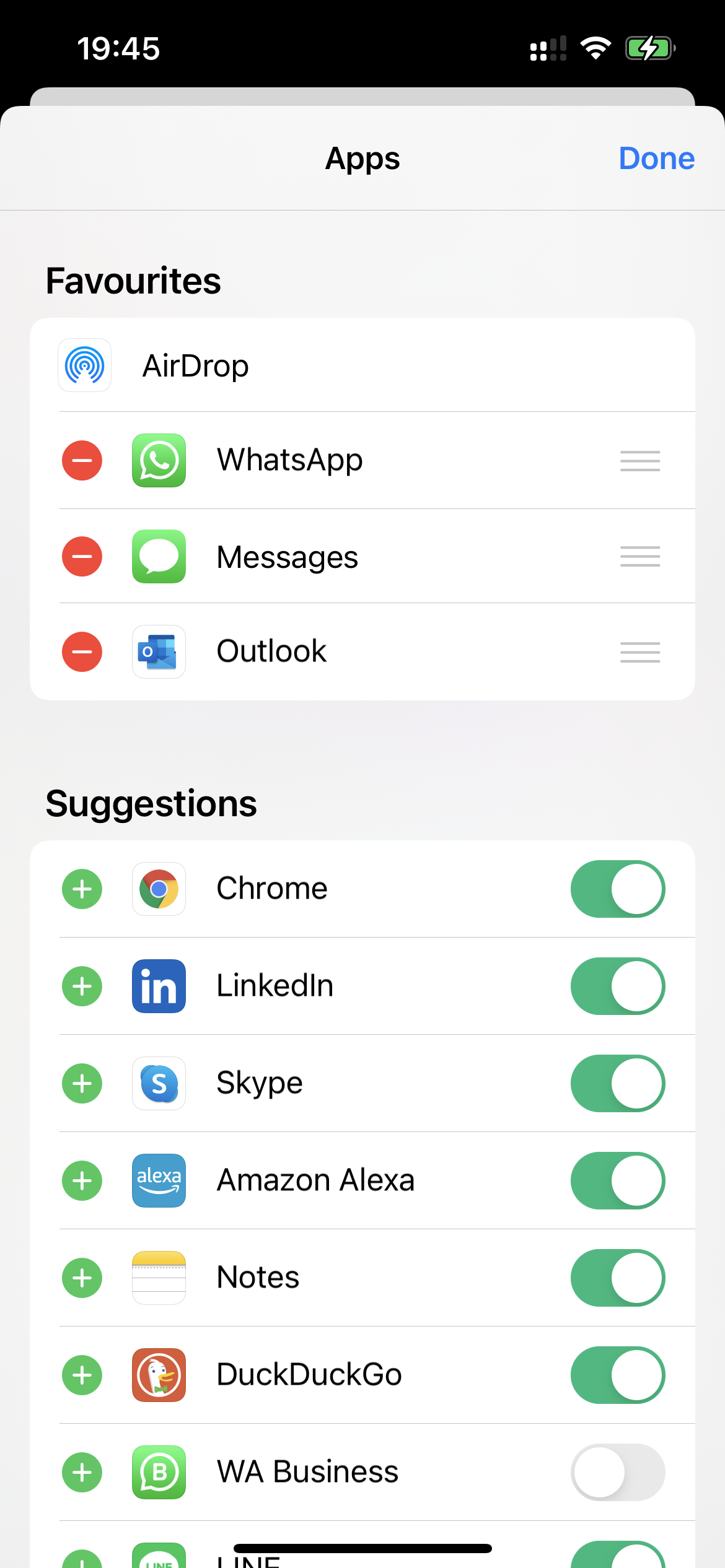
  • In the second row where you see different apps, scroll until you see the three dots "More".
  • Tap "More", then hit "Edit" on the top right corner.
  • Tap the button next to "WhatsApp" to turn it on.
  • If you would like to remove "WhatsApp Business" from the sharing button option, tab the button next to it to turn it off.


Let us know if you have any questions. Cheers!


5 replies
Question marked as Top-ranking reply

Feb 3, 2022 5:48 PM in response to lucia139

Hello lucia139,


Thanks for getting back to us with those additional details. We understand that you're having a question about customizing the sharing option on WhatsApp on your iPhone, so let's continue working on this together.


While the following support article explains how to customize the sharing option on iMove App, you can follow the same steps with other apps:


Customize sharing options in iMovie on iPhone


For example, if you would like to share photo in the Photos App on your iPhone, check this out:


  • Open the photo you'd like to share.
  • Tap the sharing button at the bottom.
  • In the second row where you see different apps, scroll until you see the three dots "More".
  • Tap "More", then hit "Edit" on the top right corner.
  • Tap the button next to "WhatsApp" to turn it on.
  • If you would like to remove "WhatsApp Business" from the sharing button option, tab the button next to it to turn it off.


Let us know if you have any questions. Cheers!


Mar 28, 2022 10:50 AM in response to Eric--F

I have exactly the same problem where sharing from any source (Photos, Twitter, YouTube etc) defaults to share via WA Business instead of WA.

I have followed the instructions given but this does not work. Even with WA Business removed (greyed out) it still comes up by default.

I think it may be a bug because I can get it to work if I hit the three dots, Edit (no need actually to do anything as WA Business is already greyed out) and then share via WA. But then next time, event though WA Business is greyed out, it defaults to it.

It's almost like it needs "reminding" that it is greyed out by hitting Edit each time before sharing.

Jan 26, 2022 3:10 PM in response to lucia139

Hello lucia139,


Welcome to Apple Support Communities. It looks like the share option has WhatsApp Business instead of regular WhatsApp. We'd be happy to look into this with you.


Which version of WhatsApp do you have installed on your device? WhatsApp, or WhatsApp Business?


Please check out these helpful links:


What is WhatsApp Business?

Use Shared with You on your iPhone, iPad, and iPod touch


We hope this information is useful. Kind regards.

This thread has been closed by the system or the community team. You may vote for any posts you find helpful, or search the Community for additional answers.

IPhone sharing option default to WhatsApp business

Welcome to Apple Support Community
A forum where Apple customers help each other with their products. Get started with your Apple Account.