Hello Rezawindsurfer,
It sounds as though, you have some issues with your external monitor and your MacBook Pro. We've got some ideas to help out.
For this, we'd try out: If your external display isn't detected or appears blurry on your Mac
If your display appears blurry
If images or text on your display appear blurry or pixelated, check the resolution and brightness of your display.
Adjust the resolution
1. From the Apple menu, choose System Preferences.
2. Click the Displays icon.
3. Press and hold the Option key while you click Scaled to see additional resolutions for the second display.
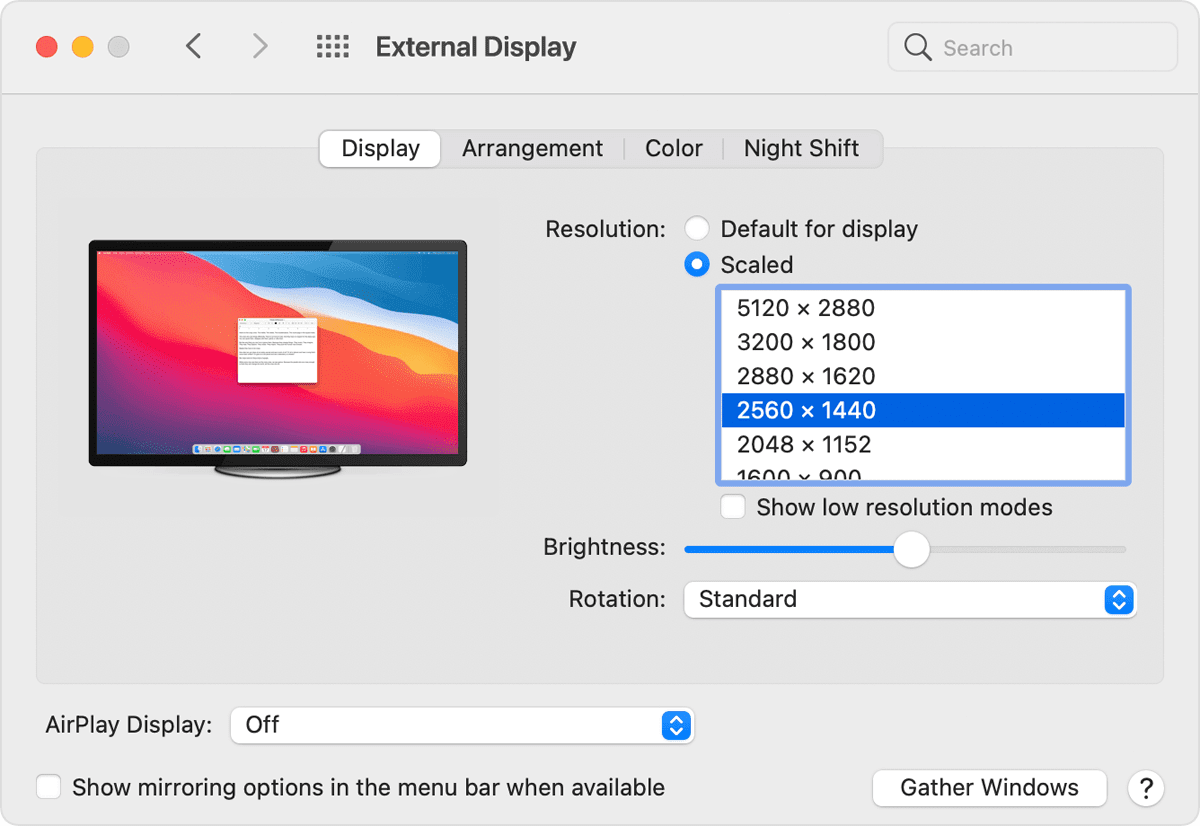
If you're using more than one display, and you can see the image on one of the displays, you can also use Displays preferences to check for connected displays.
If the expected resolution doesn't appear for your display, check the specifications page to see what your Mac supports.
You can also use the brightness adjustment for each connected display in System Preferences > Displays.
Displays not made by Apple sometimes have brightness and color adjustments built into the display. Check the documentation for your display to see if it includes built-in controls.
Should it persist, what happens if you test this further using safe mode? Learn how to boot there here: How to use safe mode on your Mac (Booting here is slower than normal, some apps and processes will also not work there, which is expected.)
Have you had a chance to disconnect all the cables, the monitor, and the MacBook Pro, then reconnect them? If not, that might a good steps next.
Hoping to hear back, take care.



