GET INFO IN A separate TABLE FROM OTHER TWO TABLES

HELLO everyone

can you help me to get this ..... I have two tables 1and 2 containing many moves for many people and i want to collect all of these moves in one table Let’s say table 3 or by choosing one person and view all of his moves from tow tables in table 3


MacBook Pro (2020 and later)

Posted on Mar 10, 2022 5:23 AM

Reply
Question marked as Top-ranking reply

Posted on Mar 12, 2022 6:23 AM

What you are doing (mixing data up like this) is rather odd but here is a way to do it that is simple. I am showing it with the filter off. When the filter is on, all the empty rows in Table 3 will be hidden.
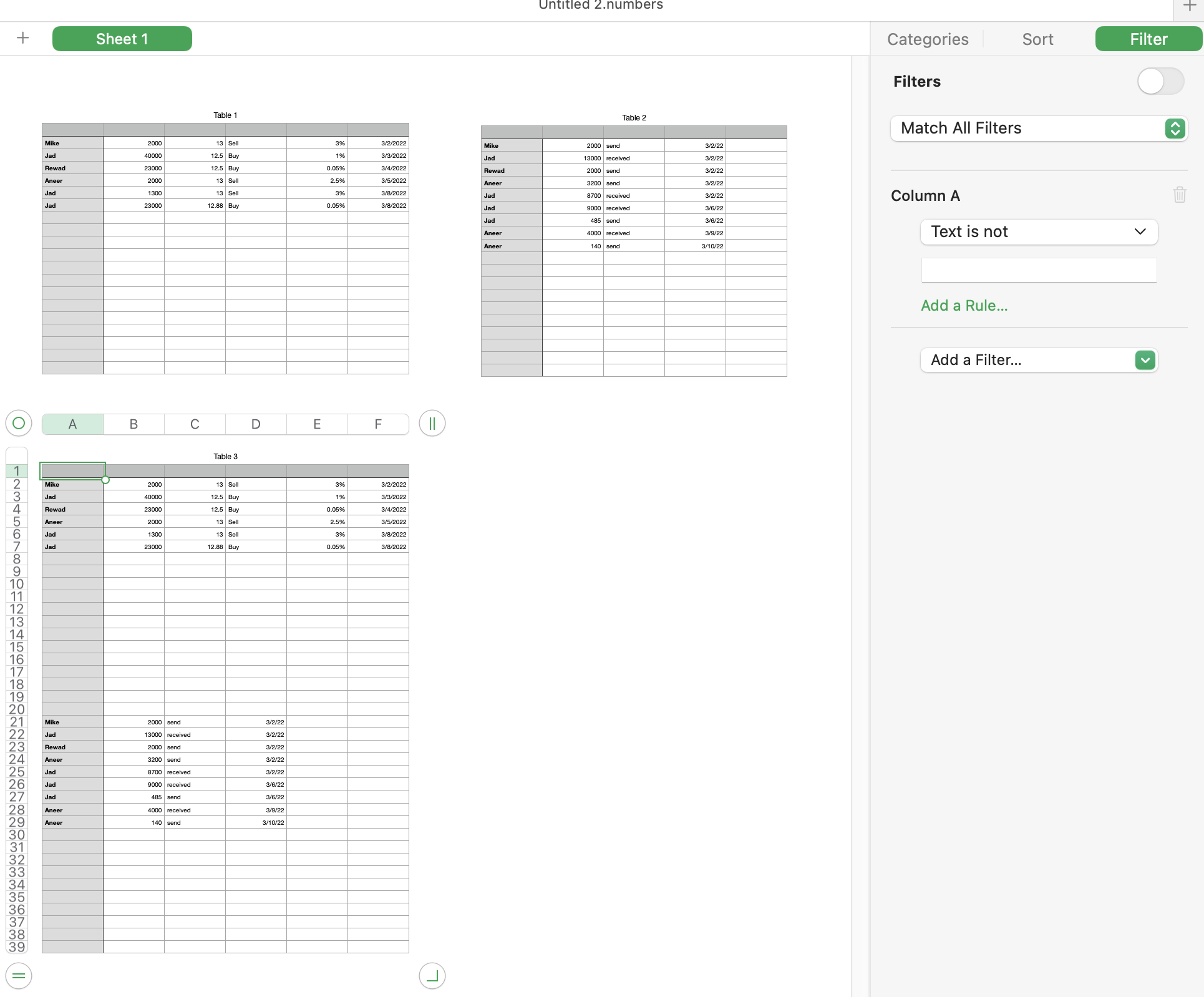


Table 3 is two parts. The top half brings in Table 1, the bottom half brings in Table 2.


Give Tables 1 and 2 as many rows as you think they will ever need. I used 20 rows for the example. Give table 3 the number of rows to fit both Table 1 and Table 2. This was 39 rows for the example. You cannot add new rows to Table 1 or 2 at a later time without remaking Table 3.


Formula in cell A2 =IF(Table 1::A2≠"",Table 1::A2," ")

Copy/paste down to row 20 and into B2 through F20 to complete the top half of the table


Formula in cell A21 =IF(Table 2::A2≠"",Table 2::A2," ")

Copy/paste down to row 20 and into B21 through E39 (not F39) to complete the bottom half of the table


The filter is "show rows where column A text is not a space character". You cannot see the space character in the filter but it is there. When the filter is on, you will see only the rows where a name appears in column A.


You can sort Table 3 to gather names together. This shuffles the formulas around, which will make a mess of the table in that respect. Just remember that there is no provision to sort it back to its original condition (other than using UNDO). You can add an additional column and put index numbers in it (1,2,3, etc as actual numbers not formulas) so you can sort back to the original state.


Be careful how you edit Tables 1 and 2. You can type data, you can copy/paste data, you can drag-fill data but do not select a cell and drag it to a new location in the table. That relocates the cell and the formula in Table 3 that references it will adjust to follow that cell to its new location, which is not what you want. And you cannot add new rows to Tables 1 or 2 without remaking Table 3.



18 replies
Question marked as Top-ranking reply

Mar 12, 2022 6:23 AM in response to Rabeeeee

What you are doing (mixing data up like this) is rather odd but here is a way to do it that is simple. I am showing it with the filter off. When the filter is on, all the empty rows in Table 3 will be hidden.


Table 3 is two parts. The top half brings in Table 1, the bottom half brings in Table 2.


Give Tables 1 and 2 as many rows as you think they will ever need. I used 20 rows for the example. Give table 3 the number of rows to fit both Table 1 and Table 2. This was 39 rows for the example. You cannot add new rows to Table 1 or 2 at a later time without remaking Table 3.


Formula in cell A2 =IF(Table 1::A2≠"",Table 1::A2," ")

Copy/paste down to row 20 and into B2 through F20 to complete the top half of the table


Formula in cell A21 =IF(Table 2::A2≠"",Table 2::A2," ")

Copy/paste down to row 20 and into B21 through E39 (not F39) to complete the bottom half of the table


The filter is "show rows where column A text is not a space character". You cannot see the space character in the filter but it is there. When the filter is on, you will see only the rows where a name appears in column A.


You can sort Table 3 to gather names together. This shuffles the formulas around, which will make a mess of the table in that respect. Just remember that there is no provision to sort it back to its original condition (other than using UNDO). You can add an additional column and put index numbers in it (1,2,3, etc as actual numbers not formulas) so you can sort back to the original state.


Be careful how you edit Tables 1 and 2. You can type data, you can copy/paste data, you can drag-fill data but do not select a cell and drag it to a new location in the table. That relocates the cell and the formula in Table 3 that references it will adjust to follow that cell to its new location, which is not what you want. And you cannot add new rows to Tables 1 or 2 without remaking Table 3.


Mar 10, 2022 10:08 AM in response to Rabeeeee

It can be done, but, as SGIII has noted, entering the data on a single table, then reading it into one or more 'summary' tables is the more efficient route.


Your two data tables are quite different in content.

What columns do you want to include in the larger table?

How do you want those columns arranged?

Each of the data tables have a Date column. Is this data to be collected in two different columns on the larger table, or are dates from both data tables to be displayed in one column of the larger table?


Regards,

Barry

Mar 15, 2022 12:58 AM in response to Rabeeeee

Hi Rabeeeee,


I'd write that formula in Table3::A2 this way:


IF(Table 1::A2=""," ",Table 1::A2


In English, this says IF cell A2 of Table 1 is 'empty', place a space ( " " ) in this cell, otherwise copy the contents of cell A2 of Table 1 to this cell.


And in Table 3::A21, this way:


IF(Table 2::A2=""," ",Table 2::A2


Regards,

Barry

Mar 12, 2022 1:42 AM in response to SGIII

HOW to do that , sorry I am not professional in numbers

The reason for using two tables is that each task schedule is different from the other.

The third table can contain all the columns in the two tables. The important thing is to group all the movements into one table and it does not matter in order, all I want is that every movement written in any of the tables is added to the large table, thank you very much for your cooperation.

Mar 12, 2022 1:42 AM in response to Barry

The reason for using two tables is that each task schedule is different from the other.

The third table can contain all the columns in the two tables. The important thing is to group all the movements into one table and it does not matter in order, all I want is that every movement written in any of the tables is added to the large table, thank you very much for your cooperation.

Mar 14, 2022 12:23 PM in response to Rabeeeee

What is the error. That is the correct formula, at least for recent versions of Numbers. Older versions would have it as


=IF(Table 1::A2<>"",Table 1::A2," ")


If it is a reference error, it may be that the table name is not correct. It appears to be named "Table 1" in your screenshot but it looks like "Table 2" has been renamed as "TABLE 2" so maybe you renamed Table 1 as well and it has an extra space or something I am not seeing.

This thread has been closed by the system or the community team. You may vote for any posts you find helpful, or search the Community for additional answers.

GET INFO IN A separate TABLE FROM OTHER TWO TABLES

Welcome to Apple Support Community
A forum where Apple customers help each other with their products. Get started with your Apple Account.