it powers up to an orange flashing light but Airport Utility can not see i
Just to add a bit to Bob's post. If your Airport Utility on a computer cannot even find the unconfigured Express, then I strongly suggest using iOS device instead. The iOS version utility works better than the computer one to at least find the Express.. it is a lot messier in terms of configuration.. but finding the Express on the network is the first step. After a partial configuration you can then get a computer version airport utility to adjust some settings.
The flashing orange light is good sign.. it is at least still alive to some degree.
My suggestion is to plug it directly to your computer by ethernet if the above fails.. ie using iPad or iPhone.
Ethernet is much more reliable. If you don't have a Mac with ethernet port use PC with airport utility or buy a suitable dongle.
For older version with just one ethernet or the Gen2 you can also plug it directly to your main router and then proceed to do the configuration.
One other trick is to use manual setup..
Airport Utility does offer an alternative approach but you must know the ethernet address of the Airport.
For example.. I reset a Gen1 Express and plug it by ethernet to my main router.
Now you can go to the main router of your network and look up the DHCP table. (called different names in different places)
On my Synology router I can go to a few different places.. but it is named DHCP clients under local network.
If the list does not include the Express (MAC address on the side is a give away) then you can try a software network analyser like Fing (free version for iOS or Mac is perfectly adequate).
Fing will give you the IP.
Then in Airport Utility do as follows.
Top menu, File, Configure Other

Fill in the IP address you discovered. No password needed for reset Express. Click OK

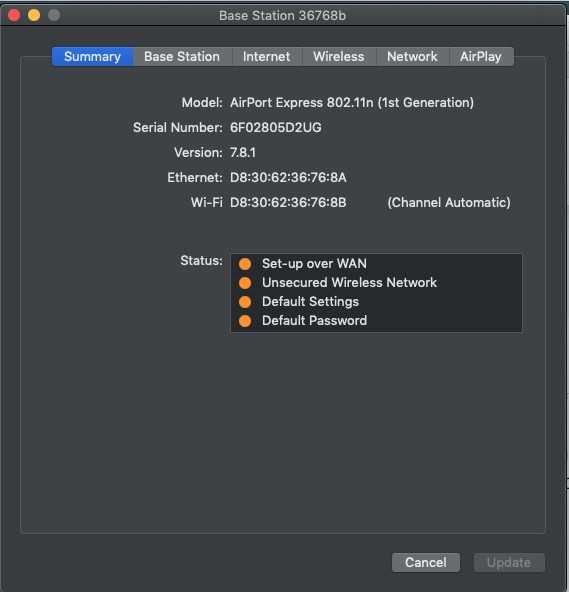
And there.. lo and behold.. your Express appears
Now you will need to go to each of the tabs along the top and fill in all the details. Not hard..
If you need more details.. tell us make and model of your main router.
And what version of the Express you are using.
I haven't done a repair of the Gen2 yet. Dead ones haven't come up and they sell for ridiculous prices.. but it should be simple as the Gen1.
Here is a youtube replacement video.. https://www.youtube.com/watch?v=sksY8ftBFHE
I would do something similar.
You can use the same method for a Gen1 Express.




