Apple Thunderbolt Display 2011 and new Mac Studio desktop

I'm interested in purchasing the new Mac Studio desktop.

Does anyone know if it would compatible with my old 2011 Thunderbolt Display?

I am running an M1 Mac mini with my 2011 Thunderbolt Display with the Thunderbolt 2 to 3 adapter.

Would this run with the Thunderbolt ports on the back of new Mac Studio?

Also would the Thunderbolt Display recognise the Mac Studio desktop?


Sorry for posting this in here - the options wouldn't let me add 'Thunderbolt Display' or "Mac Studio' to the support topics??


Thanks

Posted on Mar 11, 2022 12:10 PM

Reply
Question marked as Top-ranking reply

Posted on Mar 11, 2022 12:22 PM

ltr_phild wrote:

I'm interested in purchasing the new Mac Studio desktop.
Does anyone know if it would compatible with my old 2011 Thunderbolt Display?

It will, just like with the Mac mini, but will be limited in terms of resolution. The 2011 Thunderbolt Displays maxes out 2560x1440. That is to say, the full potential of editing 4K and 8K video would be seriously hampered by the 2011 display. You'd honestly be wasting a ton of potential from the studio with the 2011 TB display.


I am running an M1 Mac mini with my 2011 Thunderbolt Display with the Thunderbolt 2 to 3 adapter.
Would this run with the Thunderbolt ports on the back of new Mac Studio?

Yes.


Also would the Thunderbolt Display recognise the Mac Studio desktop?

It's the other way around. The Studio is what would recognize the Thunderbolt display, but again would have to limit its video output resolution to what the Display can handle.


In other words, if you don't need the full 4K / 6K output, the Studio is serious overkill. If you do need it, then the display is the limiting factor.


18 replies
Question marked as Top-ranking reply

Mar 11, 2022 12:22 PM in response to ltr_phild

ltr_phild wrote:

I'm interested in purchasing the new Mac Studio desktop.
Does anyone know if it would compatible with my old 2011 Thunderbolt Display?

It will, just like with the Mac mini, but will be limited in terms of resolution. The 2011 Thunderbolt Displays maxes out 2560x1440. That is to say, the full potential of editing 4K and 8K video would be seriously hampered by the 2011 display. You'd honestly be wasting a ton of potential from the studio with the 2011 TB display.


I am running an M1 Mac mini with my 2011 Thunderbolt Display with the Thunderbolt 2 to 3 adapter.
Would this run with the Thunderbolt ports on the back of new Mac Studio?

Yes.


Also would the Thunderbolt Display recognise the Mac Studio desktop?

It's the other way around. The Studio is what would recognize the Thunderbolt display, but again would have to limit its video output resolution to what the Display can handle.


In other words, if you don't need the full 4K / 6K output, the Studio is serious overkill. If you do need it, then the display is the limiting factor.


May 11, 2022 7:00 AM in response to remy275

There are two very similar displays from that era:

• The Thunderbolt Display has a cable with ThunderBolt-2 and MagSafe, ONLY.

• The LED Cinema Display has a cable with Mini DisplayPort (which looks EXACTLY the same as ThunderBolt-2, but does not have the ThunderBolt symbol), USB-A, and MagSafe.


The Thunderbolt Display can be connected with the Apple ThunderBolt-3 <-> ThunderBolt-2 adapter, and will work fine.


The LED Cinema Display will not show ANYTHING when connected that way. It requires a USB-C (computer-end) to Mini DisplayPort adapter, and Apple does not sell that. (but they are readily available.(

Mar 11, 2022 12:41 PM in response to ltr_phild

Short answer, yes. I have three of them. As long as you use them with the appropriate Thunderbolt2->Thunderbolt3 (USBc) adapter then you're fine.


As others have noted, the resolution of this monitor is old-school 2K. There are much better monitors out there, and if you're considering the latest Mac Studio, do the system a service and get at least a 4K monitor, or better yet the 5K Studio Display that was introduced with it. Your eyes and images will thank you for it.

Mar 21, 2022 6:12 PM in response to ltr_phild

I second all other fellow users’ comments regarding the limited 2K resolution of the 2011 TB Display, and I’ll also add this tidbit from my area of expertise, typography.


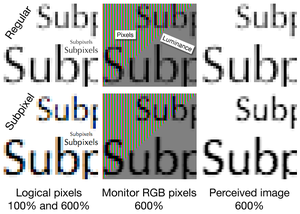
Since Apple started introducing Retina-class screens, first in 2011 with the iPhone 4, and later in 2013, with the 15’’ Retina MacBook Pro, they’ve been moving away from a very important text-rendering technology for conventional LCD (as in @1x, or non-Retina, ≈110 ppi) screens (which Retina screens made obsolete and effectively unnecessary): sub-pixel rendering anti-aliasing.


By using pixels with specific colours (instead of pure grays/opacity levels of a specific colour) at the edges of stems and curves in letters, so that their respective red, green and blue sub-pixel components light up in specific patterns according to their relative positions, this technology effectively triples the available resolution on the x-axis for text rendering.


Here’s the thing: the first versions of macOS which started deprecating this technology still allowed users to set an invisible preference list flag to reactivate it, then during a transitional phase it was still possible to do so but only parts of the UI still used APIs which were compatible with it, and the latest ones (including all versions compatible with M1 Macs, and the Studio obviously comes pre-installed with the latest macOS 12.3 build) lost this functionality altogether.


So effectively text will now be rendered only in dumb gradations of whatever its colour is, and look much worse on your 2011 screens than you ever remember it (especially if you’ve kept using them with older versions of macOS in the meantime).


That’s yet another reason (and, to me, the most importan) why I second all those suggestions, and will add that a 27’’ 4K screen, even with a 5K resolution downsampled to 4K to make the UI scale match up with that of your old TB displays, looks much better than any non-Retina display, especially when it comes to text rendering.


I know that, because I’ve been using an LG 27UK670-B display just like that, paired to my current 5K iMac, and although the iMac’s panel is indeed noticeably better (and MUCH better than that from my old OG 2009 27’’ iMac, which was roughly equivalent to your displays, or the older 24’’ Philips screen I was using before, which had the same pixel density/ppi value), the cheaper LG is, in fact, so good that I’ve bought another one to pair them with the Mac Studio I’ve ordered a few days ago.


Mar 22, 2022 1:16 AM in response to ltr_phild

I would imagine you would have no problems with the correct adaptor, I intend using my old TB 27 Display with the new Mac Studio, the TB27 is an fantastic display and the resolution is fine for what I want, running Pro Tools and Logic, as others have said though for video work, there are newer higher res monitors for that kind of work. If my old TB27 screen stopped working however, I would still buy another one, as its amazing, has a hub at the back too.

May 18, 2022 5:14 AM in response to remy275

My T'bolt display NEVER worked with my Mac Mini but always with my Mac Pro laptop. With the upgrade to 12.3.1 the display started working. Before the OS update, I spent HOURS on the phone with Apple, they still have an open trouble ticket and were "getting back to me" a month ago. I asked if it was an OS problem and got "crickets" back.....then, with 12.3.1, it started working. (Must have been magic!)


I now have a Mini Studio. Using the same Apple USBC to T'bolt interface dongle, the display turns on "sometimes". (It is my second display, to use the first Mini, I bought one of the 4K Hi res LG displays from Apple. If Apple did not specify the T'bolt display worked with the Mini, I never would have bought such an I/O limited device.


When the display does not tun on, "About this Mac" does not show it in "Graphics/Displays". The problem is at start up. After I log in to the Mac Studio IF it is going to turn on, both displays go black then the LG or both with start. This is obviously a problem Apple is aware of but is not interested in fixing..


PS What is with the Bluetooth interface on both the Mini and Mac Studio. There was a delay before the Apple wireless keyboard or mouse would work with the Mini, now with the Studio, the delay is probably three times longer. Did Apple test the minis' Bluetooth interfaces with their own peripherals?


I've had Macs since the very first 64K machine (if someone tells me the first Mac was a 128K machine, I'll know they are a "newbie".) Apple may be worth billions of dollars (not today!) but their ability to maintain their own systems is sadly lacking.

Mar 11, 2022 4:16 PM in response to ltr_phild

I have a TB display and two 5K monitors. While the 5k has higher resolution you will probably have to reduce the resolution because of small font size (unless you have eagle eyes). As a result the picture between the TB and 5k display is not that much different however the 5K displays have a much brighter (nits) picture which makes them much better than the TB display IMHO.

Mar 27, 2022 9:06 PM in response to Mainyehc

Thanks for this excellent response. Everyone else comes across as very condescending, saying “ You should just by the new $2000 Apple studio display. Well, we don’t all have thousands extra laying around. And also, I find 4k in a 27 inch monitor WAY too small, so I much prefer the lower resolution of a QHD monitor like the TB display.


But, with your explanation I now see why I won’t be able to see text as well. So alas, I now have to find decent 32 inch 4k display that is less than $800.

May 11, 2022 7:15 AM in response to ltr_phild

Hi everyone,


Thanks for all your helpful replies.


I've decided to put some money away for the brand new Mac Studio and Mac Studio Display.

I'm just dealing with some life stuff at the moment.

I definitely want to upgrade. The 2011 TB Display is beautiful and still works fine, it's just limiting for what artwork I'd want to make going forward. And I agree with the helpful comments, it wouldn't be a good idea running a new Mac on an old Display.

May 11, 2022 3:22 PM in response to ltr_phild

Of course, the new Studio displays are gorgeous. Expensive yes, but nonetheless they are arguably the best-in-class for many.


If your TB displays work fine, exactly what is limiting about it? As I mentioned above, I have three of them. Two are connected to my 2015 iMac at the office, and one is connected to my 2020 iMac here at home. I do professional underwater photography and with both monitors calibrated, they don't limit my workflow. Yes, would be nice to have a 5K resolution like my main iMac, but it's not slowing me down at all.


The only difference is when I really need to take advantage of the resolution to work on a particular photo, my 5K display is where I do that and the TB displays are for reference of other panels in my workflow.

This thread has been closed by the system or the community team. You may vote for any posts you find helpful, or search the Community for additional answers.

Apple Thunderbolt Display 2011 and new Mac Studio desktop

Welcome to Apple Support Community
A forum where Apple customers help each other with their products. Get started with your Apple Account.

