How can I set up my AirPods to read me the text messages and reply back?
hiw can I set up my AirPods to read me the text messages and reply back
[Re-Titled by Moderator]
iPad Air, iOS 12
hiw can I set up my AirPods to read me the text messages and reply back
[Re-Titled by Moderator]
iPad Air, iOS 12
Hey there jamilett241,
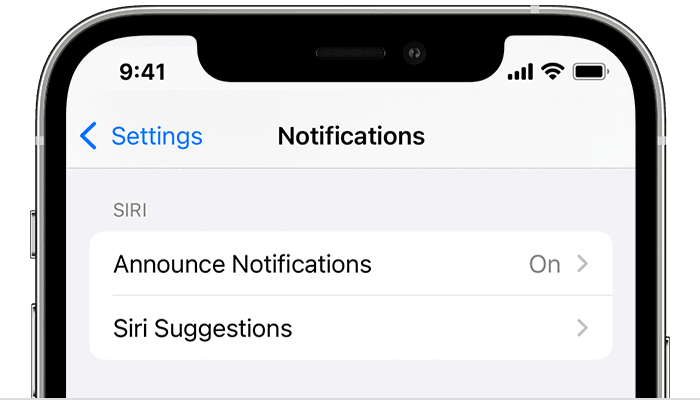
Thanks for reaching out to the Apple Support Communities. To set up your AirPods to announce and reply to notifications this would require AirPods (2nd generation) or later, that's paired with an iOS or iPadOS device running iOS 15 or later. If using AirPods (2nd generation) or later with a device with the compatible software, check out the steps below on how to turn on Announce Notifications:
1. Open the Settings app.
2. Tap Notifications.
3. Tap Announce Notifications.
4. Turn on Announce Notifications.
These steps and how to use Announce Notifications can be found in the 'Related Article' that was shared on this thread. Here's that link again, just incase: Announce notifications with Siri on AirPods or Beats
Take care!
Hey there jamilett241,
Thanks for reaching out to the Apple Support Communities. To set up your AirPods to announce and reply to notifications this would require AirPods (2nd generation) or later, that's paired with an iOS or iPadOS device running iOS 15 or later. If using AirPods (2nd generation) or later with a device with the compatible software, check out the steps below on how to turn on Announce Notifications:
1. Open the Settings app.
2. Tap Notifications.
3. Tap Announce Notifications.
4. Turn on Announce Notifications.
These steps and how to use Announce Notifications can be found in the 'Related Article' that was shared on this thread. Here's that link again, just incase: Announce notifications with Siri on AirPods or Beats
Take care!
How can I set up my AirPods to read me the text messages and reply back?