roblox
Apple ban my kids roblox account and now she can’t get it back has this happened to anyone else
iPad Pro 12.9-inch, 3rd Gen, Wi-Fi
Apple ban my kids roblox account and now she can’t get it back has this happened to anyone else
iPad Pro 12.9-inch, 3rd Gen, Wi-Fi
Hello Clarky578,
If the issue only involves Roblox, we would suggest that you reach out to Roblox for assistance. They are going to be in the best position to assist further.
Here is how to contact a developer:
Contact the developer of an iOS, iPadOS, or watchOS app
1. Open the App Store on your iPhone, iPad, or iPod touch.
2. Search for the app, then tap it. If you can't find it, tap the account buttonor your photo at the top of the screen, tap Purchased, tap "Not on this [device]," then tap the app.
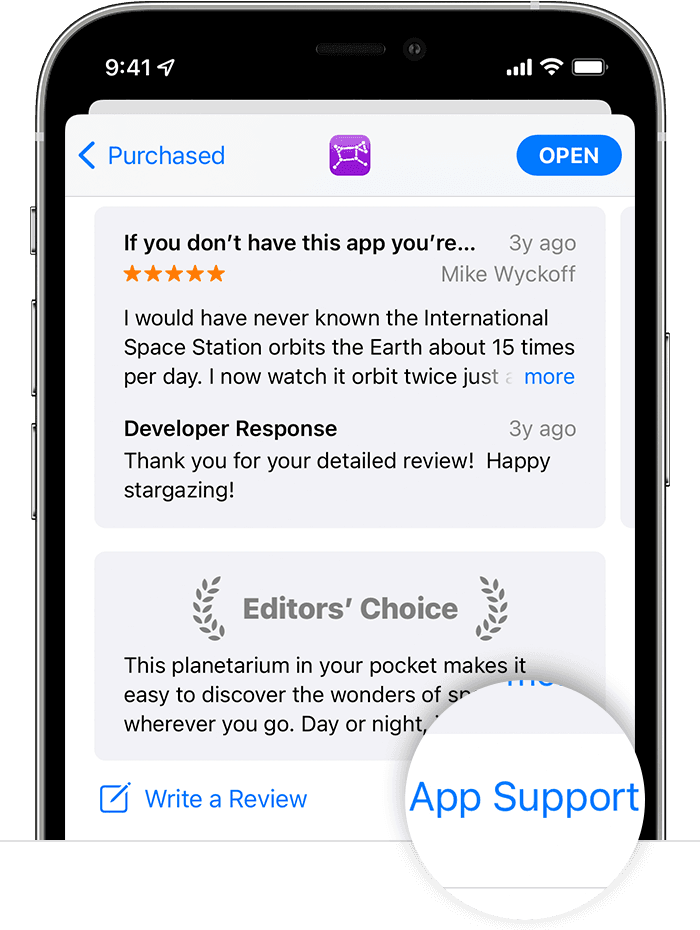
3. The app's product page appears. Scroll to the Ratings & Reviews section, then tap App Support. If you don't see App Support, make sure that you're signed in with the correct Apple ID.
More information can be found here: How to contact an app developer - Apple Support
This link may also help: Roblox Account – Roblox Support
Have a good day.
Hello Clarky578,
If the issue only involves Roblox, we would suggest that you reach out to Roblox for assistance. They are going to be in the best position to assist further.
Here is how to contact a developer:
Contact the developer of an iOS, iPadOS, or watchOS app
1. Open the App Store on your iPhone, iPad, or iPod touch.
2. Search for the app, then tap it. If you can't find it, tap the account button
3. The app's product page appears. Scroll to the Ratings & Reviews section, then tap App Support. If you don't see App Support, make sure that you're signed in with the correct Apple ID.
More information can be found here: How to contact an app developer - Apple Support
This link may also help: Roblox Account – Roblox Support
Have a good day.
roblox