How do I create an Apple ID after I already started my iphone

How can I create an Apple ID after I already set up my iphone

Posted on Mar 21, 2022 8:17 AM

Reply
Question marked as Top-ranking reply

Posted on Mar 22, 2022 10:54 AM

Hey m_a_r_i_c_e_l_a,


Thanks for using Apple Support Communities. It looks like you may have already seen the resource below, but if you've already set your device up you would use the steps under "Create an Apple ID using the App Store on your device"


  1. Open the App Store and tap the sign-in button .
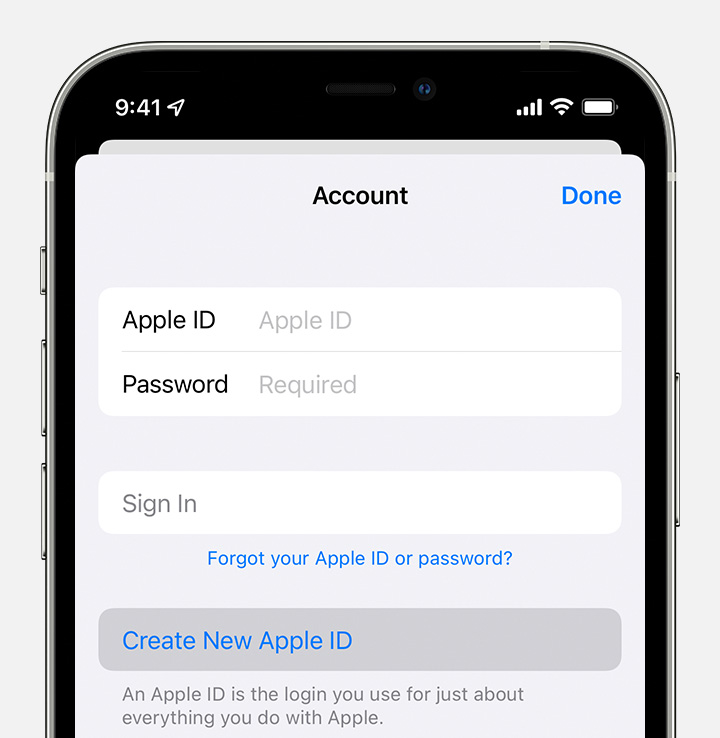
  2. Tap Create New Apple ID. If you don't see this option, make sure that you're signed out of iCloud.

  3. Follow the onscreen steps. The email address that you provide will be your new Apple ID.*
  4. Enter your credit card and billing information, then tap Next. You can also choose None. Learn what to do if None isn't showing or you can't select it. You won't be charged until you make a purchase. 
  5. Confirm your phone number. This can help to verify your identity and recover your account if needed. Tap Next.
  6. Check your email for a verification email from Apple and verify your email address. 

After you verify your email address, you can use your Apple ID to sign in to the iTunes Store, App Store, and other Apple services such as iCloud.


See more here: How to create a new Apple ID


Thanks

1 reply
Question marked as Top-ranking reply

Mar 22, 2022 10:54 AM in response to m_a_r_i_c_e_l_a

Hey m_a_r_i_c_e_l_a,


Thanks for using Apple Support Communities. It looks like you may have already seen the resource below, but if you've already set your device up you would use the steps under "Create an Apple ID using the App Store on your device"


  1. Open the App Store and tap the sign-in button .
  2. Tap Create New Apple ID. If you don't see this option, make sure that you're signed out of iCloud.

  3. Follow the onscreen steps. The email address that you provide will be your new Apple ID.*
  4. Enter your credit card and billing information, then tap Next. You can also choose None. Learn what to do if None isn't showing or you can't select it. You won't be charged until you make a purchase. 
  5. Confirm your phone number. This can help to verify your identity and recover your account if needed. Tap Next.
  6. Check your email for a verification email from Apple and verify your email address. 

After you verify your email address, you can use your Apple ID to sign in to the iTunes Store, App Store, and other Apple services such as iCloud.


See more here: How to create a new Apple ID


Thanks

This thread has been closed by the system or the community team. You may vote for any posts you find helpful, or search the Community for additional answers.

How do I create an Apple ID after I already started my iphone

Welcome to Apple Support Community
A forum where Apple customers help each other with their products. Get started with your Apple Account.