How to recover old photos
How to get old photos from iCloud. One day I woke up and majority of my photos was deleted
iPhone 12, iOS 15
How to get old photos from iCloud. One day I woke up and majority of my photos was deleted
iPhone 12, iOS 15
Hi lakenyah,
Photos are priceless memories, and we'll be happy to do all we can to help. There are several places to look for your photos and that's where we'll begin.
These steps are found in the article If you're missing photos or videos in the Photos app.
Check your Recently Deleted folder
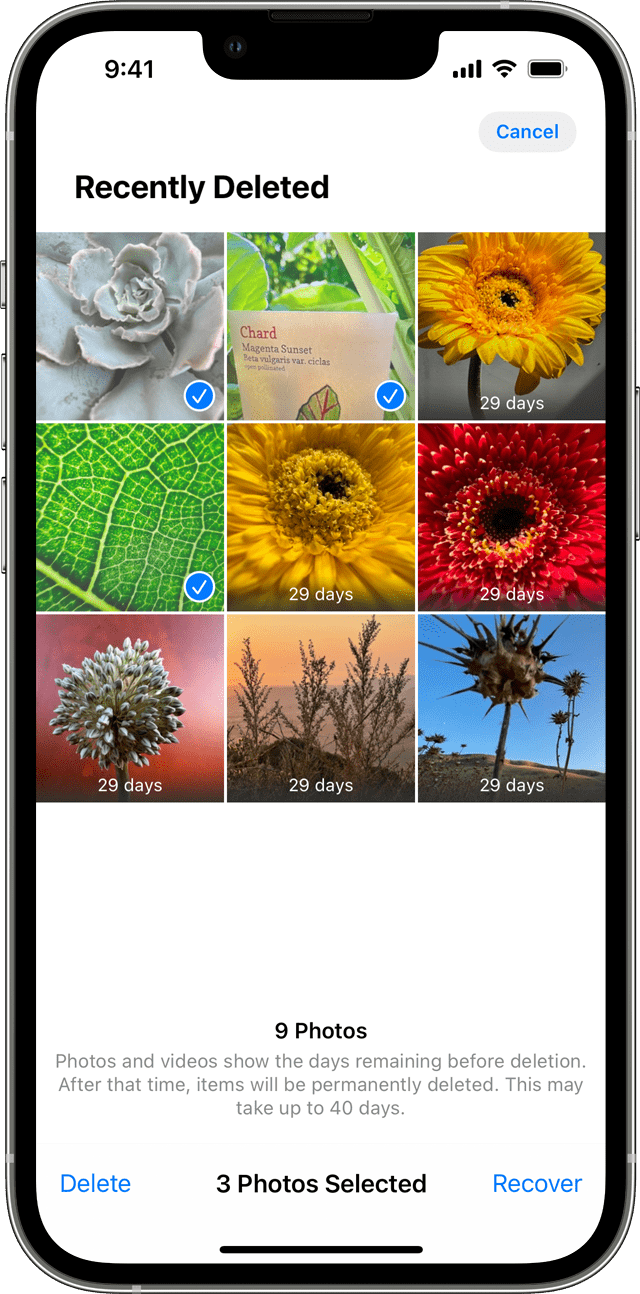
If you accidentally delete your photo or video, it will move to the Recently Deleted folder. Go to Photos > Albums and tap Recently Deleted in the Utilities section. If you see the missing photo or video, you can move it back into your Recents album.
On your iPhone, iPad or iPod touch
1. Tap the photo or video, then tap Recover.
2. Confirm that you want to recover the photo.
To recover multiple photos
1. Tap Select.
2. Tap the photos or videos, then tap Recover.
3. Confirm that you want to recover the photos or videos.
Did you have iCloud Photos turned on? Using a computer, go to iCloud and sign in, and select Photos to see if your missing photos are there.
iCloud Photos stores all of your photos and videos securely in iCloud so that you can access them on all of your devices. If you've taken a photo on your iPhone but can't see it on your other devices, check your settings by following these steps.
Is it possible the photos are hidden?
Unhide your photos
If you hide photos and videos, you'll only see them in your Hidden album, so it might seem as though they're missing. But you can unhide your photos and videos whenever you want to. With iOS 14 and later, you can hide the Hidden album so it doesn't appear anywhere in the Photos app. So if you're missing photos or videos, make sure the Hidden album is turned on so you can see it.
If you use iCloud Photos, the photos you've hidden on one device will be hidden on your other devices too.
On your iPhone, iPad or iPod touch
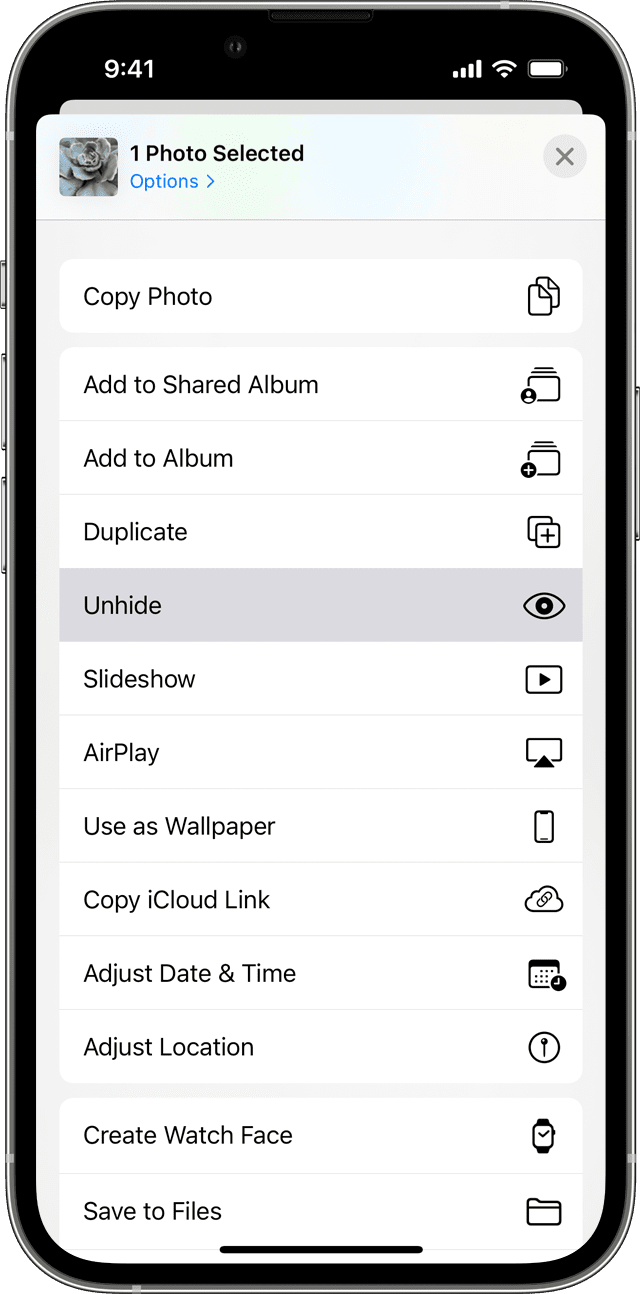
1. Open Photos and go to the Albums tab.
2. Tap Hidden under Utilities.
3. Select the photo or video you want to unhide.
4. Tap the Share button, then tap Unhide.
Any of the above steps can help you look for the missing photos. If you still can't find the photos, how long have they been missing? Do you device back up nightly?
Good luck!
Hi lakenyah,
Photos are priceless memories, and we'll be happy to do all we can to help. There are several places to look for your photos and that's where we'll begin.
These steps are found in the article If you're missing photos or videos in the Photos app.
Check your Recently Deleted folder
If you accidentally delete your photo or video, it will move to the Recently Deleted folder. Go to Photos > Albums and tap Recently Deleted in the Utilities section. If you see the missing photo or video, you can move it back into your Recents album.
On your iPhone, iPad or iPod touch
1. Tap the photo or video, then tap Recover.
2. Confirm that you want to recover the photo.
To recover multiple photos
1. Tap Select.
2. Tap the photos or videos, then tap Recover.
3. Confirm that you want to recover the photos or videos.
Did you have iCloud Photos turned on? Using a computer, go to iCloud and sign in, and select Photos to see if your missing photos are there.
iCloud Photos stores all of your photos and videos securely in iCloud so that you can access them on all of your devices. If you've taken a photo on your iPhone but can't see it on your other devices, check your settings by following these steps.
Is it possible the photos are hidden?
Unhide your photos
If you hide photos and videos, you'll only see them in your Hidden album, so it might seem as though they're missing. But you can unhide your photos and videos whenever you want to. With iOS 14 and later, you can hide the Hidden album so it doesn't appear anywhere in the Photos app. So if you're missing photos or videos, make sure the Hidden album is turned on so you can see it.
If you use iCloud Photos, the photos you've hidden on one device will be hidden on your other devices too.
On your iPhone, iPad or iPod touch
1. Open Photos and go to the Albums tab.
2. Tap Hidden under Utilities.
3. Select the photo or video you want to unhide.
4. Tap the Share button
Any of the above steps can help you look for the missing photos. If you still can't find the photos, how long have they been missing? Do you device back up nightly?
Good luck!
How to recover old photos