Hello Solus Venator,
Welcome to Apple Support Communities. You can switch from listening to one device with your AirPods to listening to another either automatically or manually.
Switch automatically
AirPods are connected to your iPhone and Apple Watch at the same time. Sound switches between them automatically.
To switch between devices automatically1 with your AirPods (2nd generation), AirPods (3rd generation), AirPods Pro, or AirPods Max:
- Make sure that you have an iPhone, iPad, or iPod touch with the latest version of iOS or iPadOS, a Mac with the latest version of macOS, or an Apple TV with the latest version of tvOS
- Sign in with the same Apple ID using two-factor authentication
If you're signed in with the same Apple ID on your devices, your AirPods will automatically switch from listening to music on your iPad to answering a phone call on your iPhone, for example.
In some situations with macOS Big Sur or later, you'll see a notification about your AirPods on the screen of your Mac. Click Connect to confirm that you want your AirPods to switch to your Mac or stay with your Mac.

Switch manually
If necessary, follow these steps to choose a different device to play audio or to switch the audio to different headphones or speakers.
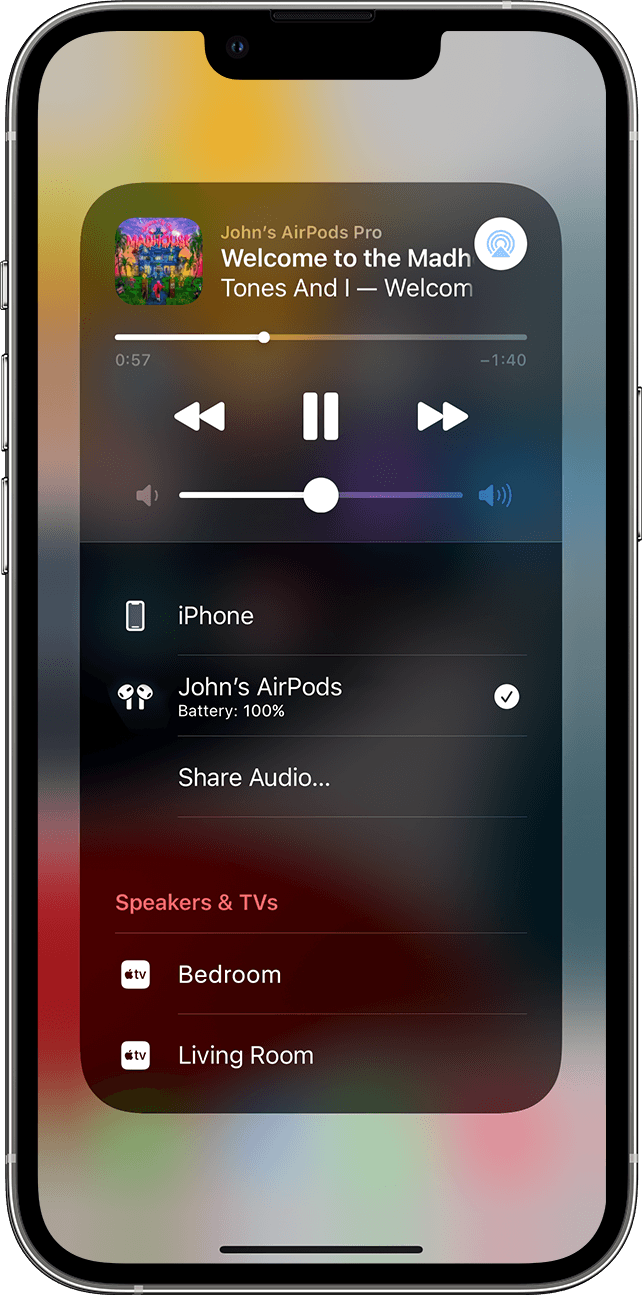
On your iPhone, iPad, or iPod touch
1-Open Control Center on your iPhone, iPad, or iPod touch.
2-Touch and hold the audio card in the upper-right corner of Control Center to control audio.
3-Tap  , then choose the device that you want from the list.2
On your Mac
Click the volume control  in the menu bar and choose your AirPods3 or speakers under Output. If you're using macOS Big Sur or later, sound controls are in Control Center.
On your Apple TV
1-Make sure that you're signed in to iCloud on your Apple TV.
2-With your AirPods in your ears, go to Settings > Remotes and Devices > Bluetooth.
3-Choose your AirPods.
4-Choose Connect. On your Apple TV, your AirPods should now appear in My Devices.
Switch your AirPods to another device
Also, check this out: Switch AirPods between Apple devices
Regarding using Siri with your AirPods:
You can use Siri with your AirPods Pro to get answers to questions, control apps, and more. See Find out what Siri can do in the iPhone User Guide.
Use Siri with AirPods Pro
Also, check out this helpful link:
How 'Hey Siri' works with multiple devices
You can submit product feedback about this at http://apple.co/Feedback
Apple has a team, who's entire job is dedicated to reviewing this feedback, and escalating it to the proper outlets.
We hope this information is useful. Kind regards.


