Hello DamirMCG,
Thanks for choosing the Apple Support Communities. Here are some steps which may help you successfully log in to apps using Sign in with Apple. Cheers!
How to use Sign in with Apple - Apple Support
"Create an account using Sign in with Apple on your iPhone, iPad, iPod touch, or MacTap the Sign in with Apple button on the participating app or website.*If you're asked to provide your name and email address, Sign in with Apple automatically fills in the information from your Apple ID. You can edit your name if you like and choose Share My Email or Hide My Email. Learn more about Hide My Email. 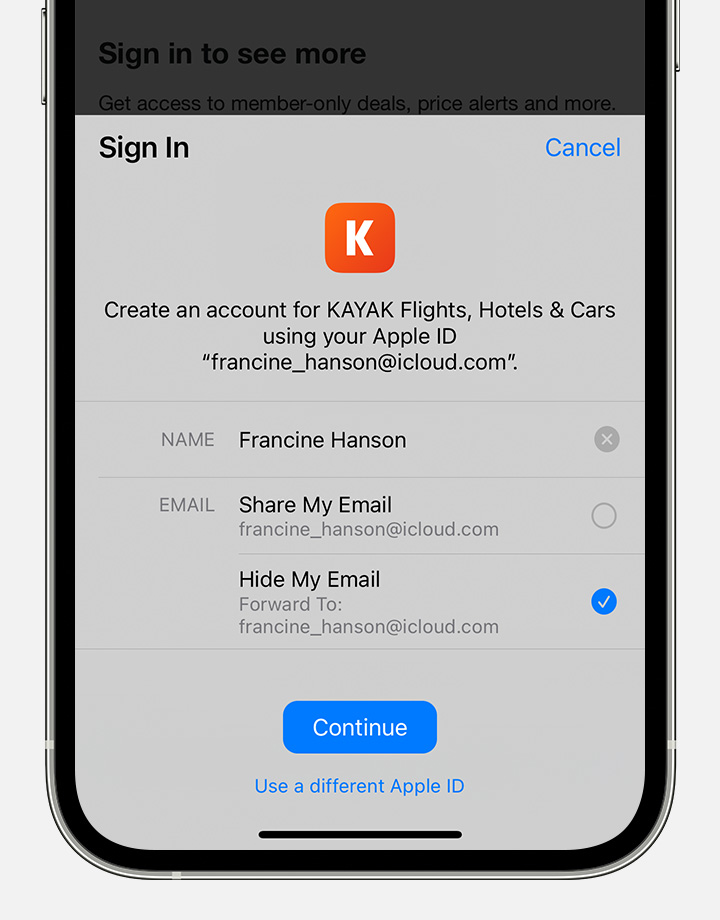 Tap Continue and confirm with Face ID, Touch ID, or your device passcode to sign in. If you don't have Face ID, Touch ID, or a passcode set up, enter your Apple ID password. Anytime you need to sign in to that app or website, just tap the Sign in with Apple button and complete a Face ID, Touch ID, or passcode confirmation. Sign in with Apple works the same way on your other Apple devices that you're signed into with the same Apple ID.* You need to be signed in with your Apple ID in System Preferences > Apple ID on your Mac or Settings > [your name] on your iPhone, iPad, or iPod touch. You also need two-factor authentication turned on. "
We hope this helps.
Cheers!


