haptics and scrolling

i have a new iphone se and when i’m scrolling through web pages the phone with out my direction will suddenly engage a haptic then scroll back up the screen on its own. it’s becoming very annoying and frustrating any of my previous iphones didn’t do this. i do not want to turn haptics completely off because i want it to vibrate when i receive calls. i really don’t want to have any other haptics responses operating for anything else the phone does. any suggestions on what is causing this? and can it be fixed or set differently?

iPhone SE (Gen 3)

Posted on Apr 12, 2022 5:56 AM

Reply
Question marked as Top-ranking reply

Posted on Apr 13, 2022 7:37 AM

Hello davanthone,


It sounds like you are having issues with Haptic Touch sensitivity on your iPhone SE. We know how important having a working iPhone is for you, and you’re in the right place to find a resolution. Have you tried adjusting the Touch Duration from Fast to Slow? This simple step can often resolve these types of issues.


How to turn on 3D or Haptic Touch
1. Open Settings and tap Accessibility.


2. Tap Touch.


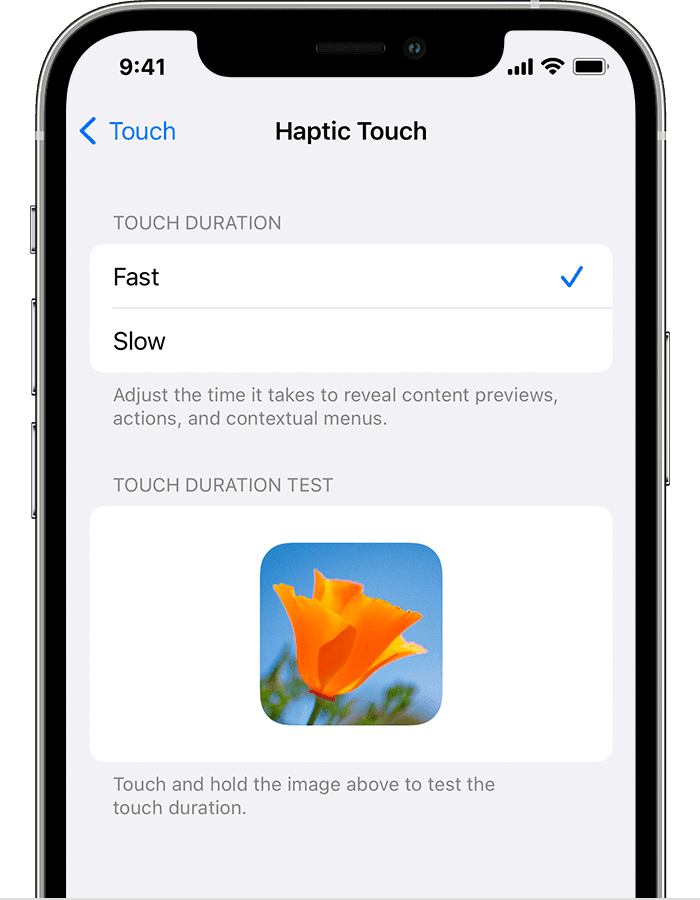
3. Tap 3D & Haptic Touch. Depending on the device you have, only the 3D Touch or the Haptic Touch option might appear. For 3D Touch, turn on the feature, then use the slider to select a sensitivity level. For Haptic Touch, choose a touch duration speed, then tap the image to test your setting.


The Haptic Touch settings on iPhone


This information is located in this support article:

Change 3D or Haptic Touch sensitivity on your iPhone


Take Care!

2 replies
Question marked as Top-ranking reply

Apr 13, 2022 7:37 AM in response to davanthone

Hello davanthone,


It sounds like you are having issues with Haptic Touch sensitivity on your iPhone SE. We know how important having a working iPhone is for you, and you’re in the right place to find a resolution. Have you tried adjusting the Touch Duration from Fast to Slow? This simple step can often resolve these types of issues.


How to turn on 3D or Haptic Touch
1. Open Settings and tap Accessibility.


2. Tap Touch.


3. Tap 3D & Haptic Touch. Depending on the device you have, only the 3D Touch or the Haptic Touch option might appear. For 3D Touch, turn on the feature, then use the slider to select a sensitivity level. For Haptic Touch, choose a touch duration speed, then tap the image to test your setting.


The Haptic Touch settings on iPhone


This information is located in this support article:

Change 3D or Haptic Touch sensitivity on your iPhone


Take Care!

May 1, 2022 5:46 AM in response to Mike_P1

This reply was absolutely worthless. The speed with which it responds has nothing to do with the question. The question is and was can haptics be turned off completely while still having vibration for incoming phone calls and notifications. Yes or no. If this can’t be done then Apple needs to alter the software so it can be. I do not need the phone to respond to any touches when I’m using it. It’s annoying as ****. Fix it.

This thread has been closed by the system or the community team. You may vote for any posts you find helpful, or search the Community for additional answers.

haptics and scrolling

Welcome to Apple Support Community
A forum where Apple customers help each other with their products. Get started with your Apple Account.