How do I reject a call on slide to answer?

So I’ve recently switched to 15.4.1 and it always gives me the slide to answer option when receiving a call and I can’t really seem to figure out how the heck I am supposed to reject it.

iPhone 13 Pro Max, iOS 15

Posted on Apr 16, 2022 5:42 AM

Reply
Question marked as Top-ranking reply

Posted on Apr 17, 2022 7:42 AM

Hello Sterx,


Thanks for choosing the Apple Support Communities. Here is a set of instructions on how to decline a call on your iPhone 13 Pro max.


Answer or decline incoming calls on iPhone - Apple Support


"Silence a call

Press the side button or Sleep/Wake button (depending on your model) or either volume button.

You can still answer a silenced call until it goes to voicemail.

Decline a call and send it directly to voicemail

Do one of the following:

  • Press the side button or Sleep/Wake button (depending on your model) twice quickly.
  • Tap the Decline Call button.
  • Swipe up on the call banner.

You can also swipe down on the call banner for more options.
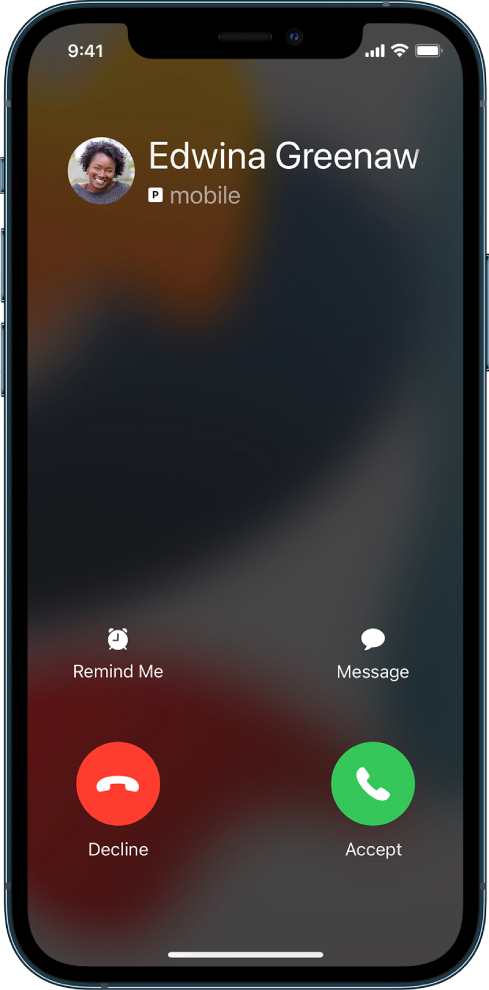
A screen showing a notification of an incoming call at the top. The Decline and Accept buttons are at the top right.

Do any of the following:

  • Tap Remind Me, then choose when you want a reminder to return the call.
  • Tap Message, then choose a default reply or tap Custom.
  • To create your own default replies, go to Settings  > Phone > Respond with Text, then tap any default message and replace it with your own text.

Note: In some countries or regions, declined calls are disconnected without being sent to voicemail."


Cheers!


1 reply
Question marked as Top-ranking reply

Apr 17, 2022 7:42 AM in response to Sterx

Hello Sterx,


Thanks for choosing the Apple Support Communities. Here is a set of instructions on how to decline a call on your iPhone 13 Pro max.


Answer or decline incoming calls on iPhone - Apple Support


"Silence a call

Press the side button or Sleep/Wake button (depending on your model) or either volume button.

You can still answer a silenced call until it goes to voicemail.

Decline a call and send it directly to voicemail

Do one of the following:

  • Press the side button or Sleep/Wake button (depending on your model) twice quickly.
  • Tap the Decline Call button.
  • Swipe up on the call banner.

You can also swipe down on the call banner for more options.

A screen showing a notification of an incoming call at the top. The Decline and Accept buttons are at the top right.

Do any of the following:

  • Tap Remind Me, then choose when you want a reminder to return the call.
  • Tap Message, then choose a default reply or tap Custom.
  • To create your own default replies, go to Settings  > Phone > Respond with Text, then tap any default message and replace it with your own text.

Note: In some countries or regions, declined calls are disconnected without being sent to voicemail."


Cheers!


This thread has been closed by the system or the community team. You may vote for any posts you find helpful, or search the Community for additional answers.

How do I reject a call on slide to answer?

Welcome to Apple Support Community
A forum where Apple customers help each other with their products. Get started with your Apple Account.