
My iPad Pro screen will not respond
I updated my iPad Pro to iOS 15.4.1
My screen will not respond frozen want do a hard rest
[Re-Titled by Moderator]
iPad Pro, iPadOS 15
I updated my iPad Pro to iOS 15.4.1
My screen will not respond frozen want do a hard rest
[Re-Titled by Moderator]
iPad Pro, iPadOS 15
How to force restart: On your iPad without a Home button
 If your iPad doesn't turn on, follow these steps to check your hardware and charge your device. You might need to charge for up to an hour.
If your iPad still doesn't turn on, contact Apple Support.
On your iPad with a Home button
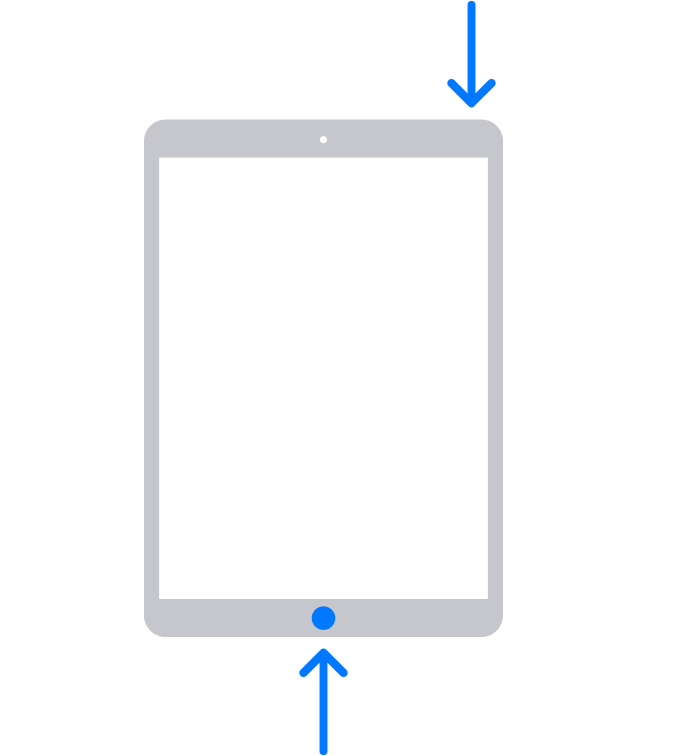
If your iPad doesn't turn on, follow these steps to check your hardware and charge your device. You might need to charge for up to an hour.
If your iPad still doesn't turn on, contact Apple Support.
How to force restart: On your iPad without a Home button
If your iPad doesn't turn on, follow these steps to check your hardware and charge your device. You might need to charge for up to an hour.
If your iPad still doesn't turn on, contact Apple Support.
On your iPad with a Home button
If your iPad doesn't turn on, follow these steps to check your hardware and charge your device. You might need to charge for up to an hour.
If your iPad still doesn't turn on, contact Apple Support.
From the link lobsterghost provided above and the content
provided by Meisnotcool:
No mention was made of depressing buttons 5x rapidly.
Please try procedure below and post results.
If your screen is black or frozen
Follow the steps for your device.
On your iPad without a Home button
Then you are not using the Forced Restart as detailed in the link, which does NOT require the screen to be touched at all.
my iPad have no home button
1)depress volume up button rapidly 5x
2) depress volume down button rapidly 5x
3)hold power button on top of tablet
those are one set of instructions I have read
Information only
my iPad will not respond to a hard reset touch sensitive not responding have to use power button to wake
apple repair wants to charge me $499.00 dollars to repair after up dating to IOS 15.4.1
this is definitely going to social media post
I'm not sure why you copied the directions from inside the link I provided the OP and posted them to me? I'm sure the OP could click on the link I provided them. And I'm not the OP to begin with.
my tablet will not respond to the steps in the reset power off will appear but you can’t slide the power off button
the screen isn’t responding to touch commands
power off will appear but you can’t slide the power off button
the screen isn’t responding to touch commands
thank for the help
perfect all is well thanks so much 👍🏽👍🏽🙏🏽
Happy Easter 🐣🐇🐰
Thank you for the update. Glad your problem is resolved.
Should you have any other questions, please start a new thread
and some one will offer a solution.
My iPad Pro screen will not respond

