Apple Music not syncing across devices

I have five apple devices (iPhone, iMac, MacBook, iPad, Apple TV) and my playlists will only keep in sync on four of them, but the iMac does not sync up. My iMac is my primary device and is the computer I purchase my music and make my playlists. It's really frustrating that it isn't in sync with the machines. This started a couple of months ago after years of working just fine. Another quirk - if I "love" a song then it becomes "unloved" after its finished playing.


I have tried turning sync on/off on my Mac but to no avail.


Any ideas for a fix?

Thanks.

Posted on Apr 27, 2022 11:30 AM

Reply
Question marked as Top-ranking reply

Posted on Apr 30, 2022 7:27 AM

There seems to be an ongoing issue with Apple Music for some users where changes made on a computer don't get uploaded to the iCloud Music Library, and are later reverted. Results may be better immediately after rebooting, and/or if you disable Home Sharing. Hopefully this issue will be resolved in the next OS release.


tt2

3 replies
Question marked as Top-ranking reply

Apr 30, 2022 7:27 AM in response to clemenchuchu

There seems to be an ongoing issue with Apple Music for some users where changes made on a computer don't get uploaded to the iCloud Music Library, and are later reverted. Results may be better immediately after rebooting, and/or if you disable Home Sharing. Hopefully this issue will be resolved in the next OS release.


tt2

Apr 28, 2022 11:09 AM in response to clemenchuchu

Hey there clemenchuchu,


Thanks for reaching out to Apple Support Communities. We understanding your iMac will not sync your music. We're happy to provide some assistance.


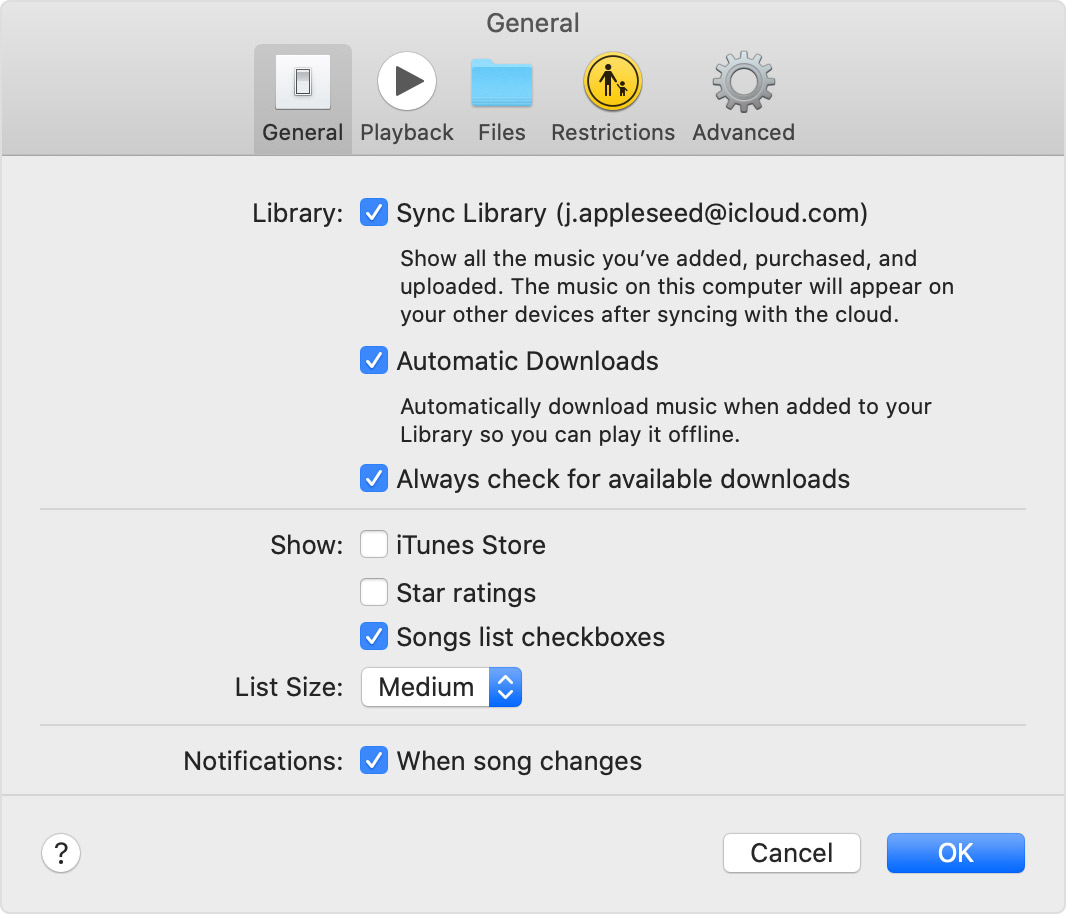
Let's first make sure all of your devices are associated to the same Apple ID. This is required to sync music across devices. Once done, let's make sure the "Sync Library" option is enabled as outlined here:


On your Mac
Open the Apple Music app.
From the menu bar at the top of your screen, choose Music > Preferences.
Go to the General tab and select Sync Library to turn it on. If you don't subscribe to Apple Music or iTunes Match, you won’t see an option to turn on Sync Library.
Click OK.
If you have a large music library, it might take some time to upload and sync your music library across all of your devices.


Also, is your Mac up-to-date? Updating your software can potentially resolve unexpected issue:


Update macOS on Mac


If the issue persists, was anything updated or changed when you first noticed this? Are you subscribed to Apple Music or iTunes Match? Do you purchase your music on iTunes? This will help us determine how to proceed.


Keep us posted.


Have a great day!

This thread has been closed by the system or the community team. You may vote for any posts you find helpful, or search the Community for additional answers.

Apple Music not syncing across devices

Welcome to Apple Support Community
A forum where Apple customers help each other with their products. Get started with your Apple Account.