
iTunes pass
Hi I have been trying to add iTunes pass to
my iPhone 12 and when I look under my
Apple ID Settings in the iTunes Store app
there is no setup iTunes pass button.
iPhone 12
Hi I have been trying to add iTunes pass to
my iPhone 12 and when I look under my
Apple ID Settings in the iTunes Store app
there is no setup iTunes pass button.
iPhone 12
Hello Iphoneuser1976,
The iTunes Pass has expired, and this has been adjusted to adding funds to your Apple ID balance.
Here's the steps on how to do this:
"Add funds to your Apple ID balance on an iPhone, iPad, or iPod touch
 at the top of the screen.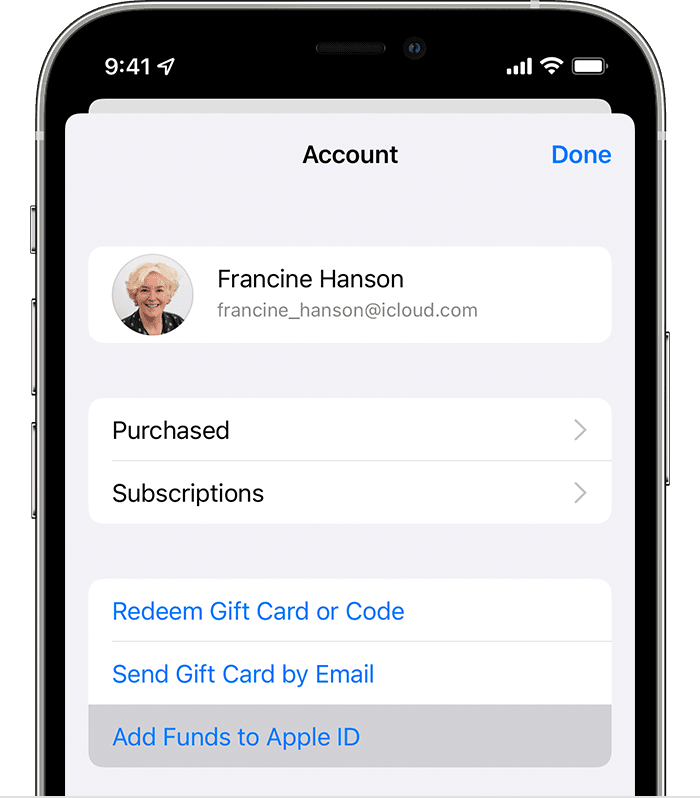
4.To add funds instantly, tap the amount that you want to add. Or to automatically add to your balance in the future, tap Set Up Auto Reload. What's Auto Reload?
5.Follow the onscreen instructions to complete the purchase. Some payment methods might prompt you to verify your purchase with a text message or other method."
This is found in Add money to your Apple ID balance. By using this method, it will allow you to "use your Apple ID balance to buy apps, games, music, iCloud storage, and more." Go through this guide and it should answer any questions you might have as it even includes a link to check your Apple ID balance.
We hope this helped out.
Kind regards.
Hello Iphoneuser1976,
The iTunes Pass has expired, and this has been adjusted to adding funds to your Apple ID balance.
Here's the steps on how to do this:
"Add funds to your Apple ID balance on an iPhone, iPad, or iPod touch
at the top of the screen.
4.To add funds instantly, tap the amount that you want to add. Or to automatically add to your balance in the future, tap Set Up Auto Reload. What's Auto Reload?
5.Follow the onscreen instructions to complete the purchase. Some payment methods might prompt you to verify your purchase with a text message or other method."
This is found in Add money to your Apple ID balance. By using this method, it will allow you to "use your Apple ID balance to buy apps, games, music, iCloud storage, and more." Go through this guide and it should answer any questions you might have as it even includes a link to check your Apple ID balance.
We hope this helped out.
Kind regards.
iTunes pass

