Why can't I track my iPhone 12 with iOS 15?

My girlfriend's 16 year old daughter was assaulted last night in a park in Heredia and had her iPhone 12 Pro Max stolen, I bought it for her for Christmas. Supposedly in iOS 15 or later for iPhones newer than 11, it shouldn't matter if the thief turns off the phone. However, he did something, and fairly soon after the event, to cause it to stop tracking, what was it? Why doesn't it work? Supposedly it should work even if the battery is dead or someone manages to factory reset the phone. Find My iPhone has never served me in any case in which I have used it in the 10 years or so since it was invented. Now they claim it works when turned off, so what am I doing wrong? I can't get support on the phone because I can't log in without the phone, and they won't send an approval email to get around that 2FA feature that fails with a stolen phone.


[Edited by Moderator]

iPhone 13 Pro Max, iOS 15

Posted on May 5, 2022 1:10 PM

Reply
Question marked as Top-ranking reply

Posted on May 5, 2022 1:17 PM

Did you enable Find My?


If you didn't turn on Find My [device] before your device was lost or stolen, it can't be used to locate your device nor you can use the IMEI number for tracking the device.


The best action would be to Change your Apple ID password and change the passwords for other internet accounts on your device. This can include email accounts, Facebook, Twitter, etc...



Don'ts

If you remove the device from your account after you erase it, Activation Lock will be turned off. This allows another person to turn on and use your device.


Find IMEI & Serial No. of the Lost Device


  1. If your iPhone, iPad, or iPod touch is lost or stolen - Apple ...
  2. Find the serial number or IMEI on your iPhone, iPad, or iPod ...

You may use a web browser to get the Serial Number and the IMEI Number. You cannot track using the IMEI number. but you may need it so keep it handy

Log in to https://appleid.apple.com with your Apple ID credentials. All your devices will be listed there. Click on any to get the details.


Do's


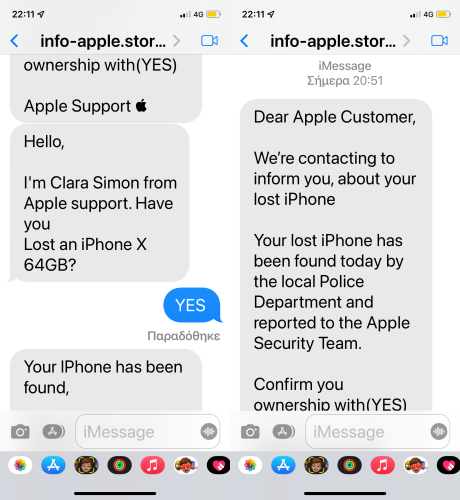
Beware of Phishing!


Be careful and be smart to --> Recognize and avoid phishing messages, phoney support calls ...

Note: Apple will never send you any info on Lost/Found iPhones. It (Phishing) may appear as the image given below.


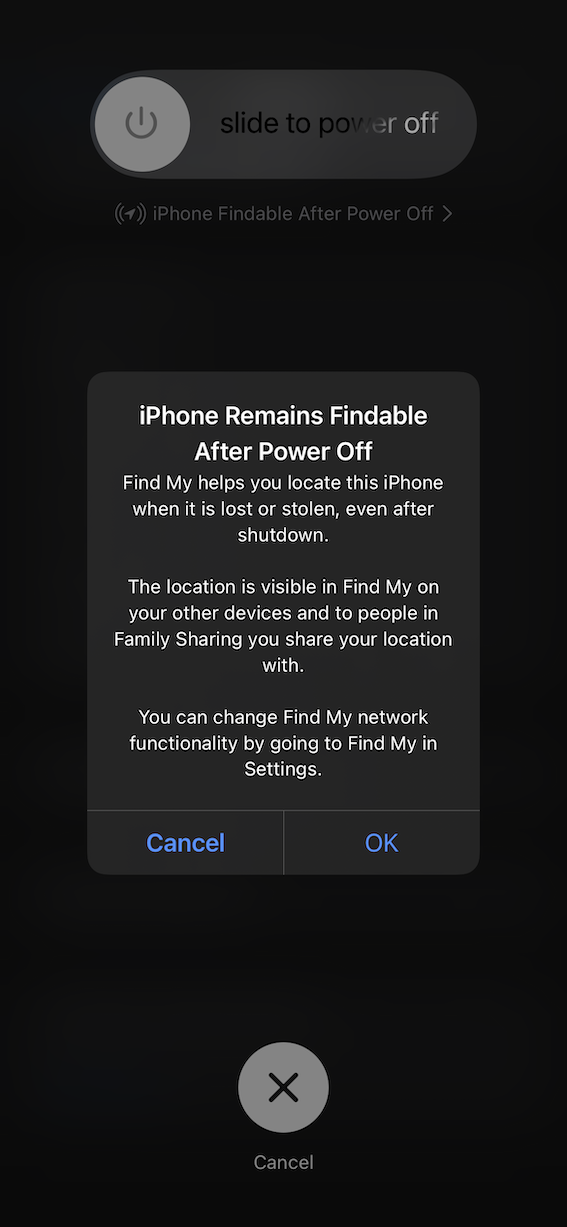
Switched Off? Still traceable


Even if the iPhone is switched off it is findable, see the pic below.


Device Offline?


I see my device in Find My, but it's offline
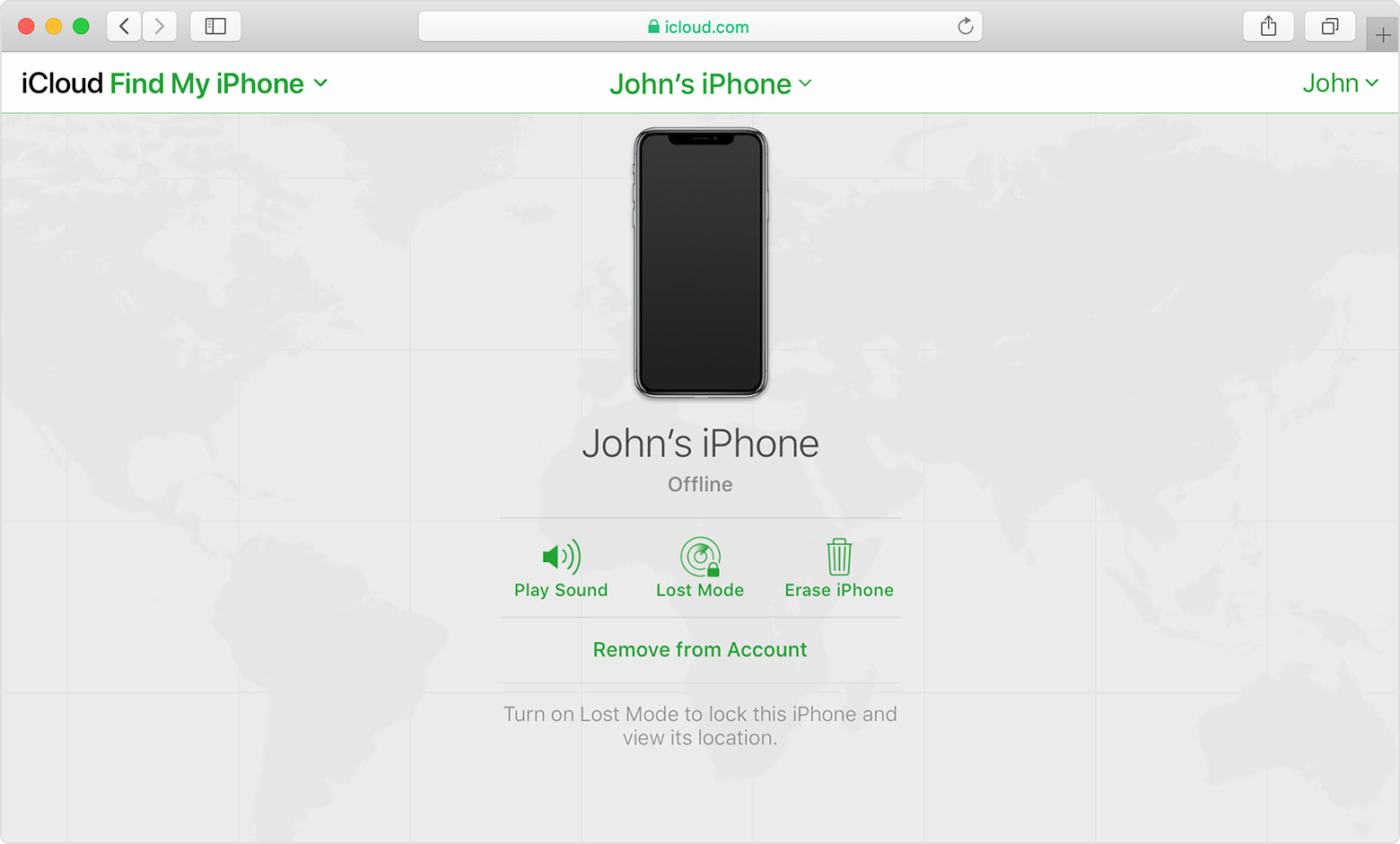

If you see "Offline," "No location available," or "Location Services Off," your device might be offline for one of these reasons:

  • It's powered off, the battery has run out, or more than 24 hours passed since the last location was sent to Apple (if Send Last Location is turned on). When your device is connected to the Internet, you can see the remaining battery in the upper-right corner of the information pane. 
  • Your Find My compatible device isn't connected to a known Wi-Fi or data network. Wait a few minutes and try again.
  • You're in a country or region where we don't offer this feature. This feature might not be available in your country or region due to technical limitations or local law.


You can still play a sound, send a message, issue a lock request, or start an erase of your iOS device with Find My [device]. Your device receives the command after you turn on your device and connect to the Internet.


If you contact your wireless service provider to report your device lost or stolen, they might deactivate your SIM card or account. This turns off service for your iPhone and you won't be able to find, play a sound, send a message, issue a lock request, or start an erase of your iOS device with Find My [device]. However, we'll help you learn how to protect your information.


Your device's last known location is available for one day. If your device is offline or can't connect to Find My [device] for more than 24 hours, you won't be able to see the last known location.


17 replies
Question marked as Top-ranking reply

May 5, 2022 1:17 PM in response to Nathan McKaskle

Did you enable Find My?


If you didn't turn on Find My [device] before your device was lost or stolen, it can't be used to locate your device nor you can use the IMEI number for tracking the device.


The best action would be to Change your Apple ID password and change the passwords for other internet accounts on your device. This can include email accounts, Facebook, Twitter, etc...


Don'ts

If you remove the device from your account after you erase it, Activation Lock will be turned off. This allows another person to turn on and use your device.


Find IMEI & Serial No. of the Lost Device


  1. If your iPhone, iPad, or iPod touch is lost or stolen - Apple ...
  2. Find the serial number or IMEI on your iPhone, iPad, or iPod ...

You may use a web browser to get the Serial Number and the IMEI Number. You cannot track using the IMEI number. but you may need it so keep it handy

Log in to https://appleid.apple.com with your Apple ID credentials. All your devices will be listed there. Click on any to get the details.


Do's


Beware of Phishing!


Be careful and be smart to --> Recognize and avoid phishing messages, phoney support calls ...

Note: Apple will never send you any info on Lost/Found iPhones. It (Phishing) may appear as the image given below.


Switched Off? Still traceable


Even if the iPhone is switched off it is findable, see the pic below.


Device Offline?


I see my device in Find My, but it's offline


If you see "Offline," "No location available," or "Location Services Off," your device might be offline for one of these reasons:

  • It's powered off, the battery has run out, or more than 24 hours passed since the last location was sent to Apple (if Send Last Location is turned on). When your device is connected to the Internet, you can see the remaining battery in the upper-right corner of the information pane. 
  • Your Find My compatible device isn't connected to a known Wi-Fi or data network. Wait a few minutes and try again.
  • You're in a country or region where we don't offer this feature. This feature might not be available in your country or region due to technical limitations or local law.


You can still play a sound, send a message, issue a lock request, or start an erase of your iOS device with Find My [device]. Your device receives the command after you turn on your device and connect to the Internet.


If you contact your wireless service provider to report your device lost or stolen, they might deactivate your SIM card or account. This turns off service for your iPhone and you won't be able to find, play a sound, send a message, issue a lock request, or start an erase of your iOS device with Find My [device]. However, we'll help you learn how to protect your information.


Your device's last known location is available for one day. If your device is offline or can't connect to Find My [device] for more than 24 hours, you won't be able to see the last known location.


May 5, 2022 2:22 PM in response to Nathan McKaskle

Well, every article doesn’t provide all of the needed information. It can still be trackable, even if powered off, but only if:

  • Find My Network was enabled before it was lost (Settings/[Apple ID name]/Find My/Find My Network)
  • The phone was immediately put into Lost mode before it could be powered off
  • There are other iPhones nearby close enough to detect the phone’s Bluetooth signal (which remains on for a while after the phone is powered off)
  • The phone has not been placed in an Faraday shielded container of any kind, such as a Faraday bag, shoplift’s shielded tote, a metal box, or wrapped in aluminum foil that will block the Bluetooth signal from the phone.


Essentially the Find My network is a crowd-sourced locating system.

May 5, 2022 2:30 PM in response to deggie

This explicative bag of explicative wouldn't have the first clue what a faraday bag is, or how to block signals, he was a drug addict she says and clearly high. I guess it's lost forever, especially now that the device magically got deleted from her account and says that no devices have been set up, which is the opposite of what it was showing an hour ago. This was discovered soon after I got a text stating the device appeared back online, an alert I set up yesterday. It had a link that did not appear to be a valid apple address.

May 5, 2022 2:35 PM in response to Nathan McKaskle

I’m sure that anyone who makes a habit of stealing iPhones knows how to shield a phone, or their fence does. If it isn’t doesn’t appear when you go to https://icloud.com/find, that is doesn’t show it as offline, most likely she or someone fell for a very common phishing scam: You may get a text or email from “Apple” or “Apple Security” (or sometimes “Police”) saying your phone has been found and to click on a link to see its location. This is NEVER from Apple or from law enforcement; it is from the thief or fence to steal your Apple ID and identity. Delete any such message without responding to it. Apple never gets involved in lost or stolen devices.

May 5, 2022 2:20 PM in response to Nathan McKaskle

Nothing happens magically.

It can track with the battery off IF the iPhone is connected to cell data or WiFi. It isn't that hard to avoid this, just place the phone somewhere with a lot of metal, i.e. put it in a dead zone. But experienced phone thieves carry a faraday bag they can drop it into. Or someone told the attacker it could be traced and they smashed the iPhone.


The only way they could remove it from her account would be if the passcode was weak on the iPhone and they were able to get through it and then erase the iPhone. Or, as pointed out in the other article, someone texted and information was provided to remove the Activation Lock and tracking. But doing this will not change the IMEI on the phone and the police can still track it if it is connected to a cell tower.

May 6, 2022 5:41 AM in response to Nathan McKaskle

Nathan McKaskle wrote:

They were not able to tell me the IMEI because I didn't buy it through the carrier, I don't have the box anymore and I don't know how to find it when I have neither the phone nor the box. That link takes me to login and I see no info on the IMEI anywhere.

You can probably find the IMEI yourself if you log into your account on your carrier's website. It's usually every easy to find.

May 5, 2022 1:33 PM in response to Nathan McKaskle

I do hope the young woman is okay and gets any help that she needs. Keep in mind that the police can get a warrant to track the iPhone by other means than Apple supplies (Find My really isn't designed for theft) and if the iPhone is turned on at any point they can see the connection instantly with the cell network. And not even with the phone off or on it has to be connected to either WiFi or cell data to be traceable, it is not really hard to prevent that.

May 5, 2022 4:53 PM in response to Nathan McKaskle

The should be able to because the IMEI is registered in your account. It is how the network identifies your phone. So call their tech support and ask to speak to a tier 2 technician. If you ever synced the phone to iTunes you can find the IMEI in iTunes also. And it will also be in https://appleid.apple.com using the Apple ID that the phone is logged in to.


Click on Devices, then the phone, and scroll down to see the IMEI.

May 5, 2022 2:14 PM in response to Nathan McKaskle

I can{t seem to edit my post with the additional information that while the iPhone was trackable for a short period after it was stolen, it stopped updating after about an hour. Every article out there says this shouldn't matter. Every article out there about the new iOS 15 Find my Phone says that even if the battery runs out it's trackable. And now, after a few hours since posting this question, the device magically erased itself from her account.

May 5, 2022 2:35 PM in response to deggie

Yes, this happened quite magically. How can anyone remove her phone from her account? How is this possible? The phone fully alpha numeric password was not weak, it was actually quite strong because face ID makes it less of a hassle to type. I helped her make the password myself. It would take a super computer decades to break in by brute force, possibly centuries. I can't log in with her account to find the IMEI either, because of the 2FA issue. It takes 24 hours for them to get us into her account which by that time it's going to be too late to do anything at all.

This thread has been closed by the system or the community team. You may vote for any posts you find helpful, or search the Community for additional answers.

Why can't I track my iPhone 12 with iOS 15?

Welcome to Apple Support Community
A forum where Apple customers help each other with their products. Get started with your Apple Account.


