Apple Watch Unlock Mac - Previous Watch is still there in Security & Privacy

I use my Apple Watch to unlock my Macs. After pairing my new Apple Watch 7 yesterday, I next set up the new Watch to unlock my Mac.


I now have both the Apple Watch 7 and also the previous Apple Watch 4 showing.


Is there a way to remove my previous Watch ? This is only a cosmetic issue, but would prefer to have just the current Watch showing.


And yes, I did unpair the Apple Watch 4 yesterday.

Posted on May 6, 2022 12:59 PM

Reply
1 reply

May 7, 2022 11:49 AM in response to John Paterson1

Hello JohnPaterson1,


Let's see if we can help you get the previous Apple Watch removed from the list of devices. We understand you're not wanting it to appear any longer.


You mentioned you have erased the Apple Watch, but let's see if it still appears in iCloud associated with your devices. In Remove a device from Find My iPhone on iCloud.com, it has the following: Remove a device from the Devices list
If you’re not using a device, you can temporarily remove it from your account so it doesn’t show up in your Devices list. When the device goes online again, it reappears in the list if it has Activation Lock turned on (for an iPhone, iPad, iPod touch, Mac, or Apple Watch) or is paired with your iOS or iPadOS device (for AirPods or a Beats product).
1. Turn off the device, or put AirPods in their case. The device must be offline before you can remove it from the Devices list.
2. In Find My iPhone on iCloud.com, click All Devices, then select the device you want to remove.
If you don’t see All Devices, it’s because you’ve already selected a device. Click the name of the current device in the center of the toolbar to see the Devices list, then select a new device.
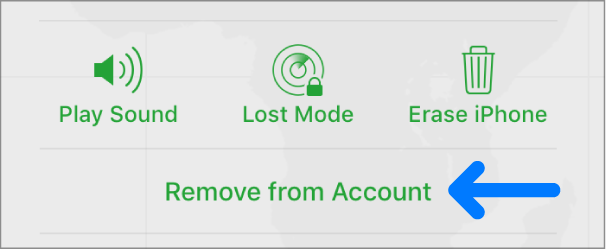
3. Click Remove from Account.
The Remove from Account button.
Note: You can also remove your iPhone, iPad, iPod touch, or Mac by turning off iCloud completely on that device. Turning off iCloud turns off all iCloud features on the device.

If trying this step does not resolve the issue, reach back out to us.


Have a great day!

This thread has been closed by the system or the community team. You may vote for any posts you find helpful, or search the Community for additional answers.

Apple Watch Unlock Mac - Previous Watch is still there in Security & Privacy

Welcome to Apple Support Community
A forum where Apple customers help each other with their products. Get started with your Apple Account.