
"Turn Trackpad Commander on or off" I can't find this on monterey 12.3.1
please help we to find Trackpad Commander
MacBook Pro 15″, macOS 10.15
please help we to find Trackpad Commander
MacBook Pro 15″, macOS 10.15
evgeniya241 wrote:
yes. with prevues version I was able to remove blue circle (Please see attached screenshoot) . How I can to do it with Monterey 12.3?
https://discussions.apple.com/content/attachment/7cc7b189-01fe-49bc-8f7a-12df9a6288d5
this is as close as I could get:
Turn Trackpad Commander on or off
You can turn Trackpad Commander on or off using VoiceOver Utility:
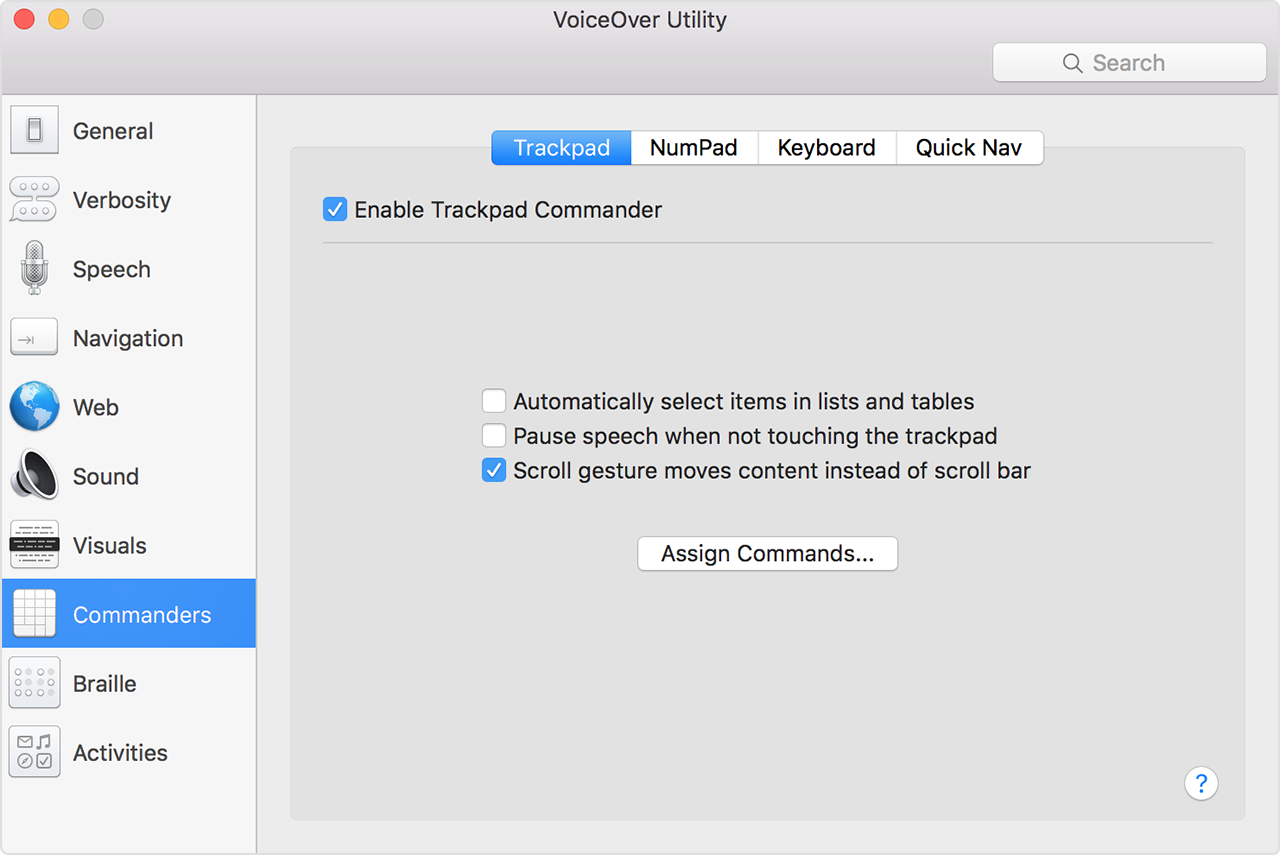
You can also turn Trackpad Commander on or off using your keyboard:
reference—
Control VoiceOver with Trackpad Commander - Apple Support
more—
VoiceOver User Guide for Mac - Apple Support
Trackpad, Commanders category, VoiceOver Utility on Mac - Apple Support
Call for accessibility support
United States: 1-877-204-3930
How to contact Apple for accessibility support - Apple Support
evgeniya241 wrote:
yes. with prevues version I was able to remove blue circle (Please see attached screenshoot) . How I can to do it with Monterey 12.3?
https://discussions.apple.com/content/attachment/7cc7b189-01fe-49bc-8f7a-12df9a6288d5
this is as close as I could get:
Turn Trackpad Commander on or off
You can turn Trackpad Commander on or off using VoiceOver Utility:
You can also turn Trackpad Commander on or off using your keyboard:
reference—
Control VoiceOver with Trackpad Commander - Apple Support
more—
VoiceOver User Guide for Mac - Apple Support
Trackpad, Commanders category, VoiceOver Utility on Mac - Apple Support
Call for accessibility support
United States: 1-877-204-3930
How to contact Apple for accessibility support - Apple Support
evgeniya241 wrote:
please help we to find Trackpad Commander
Trackpad does not turn off in any user preferences...
How to use the Force Touch trackpad - Apple Support
How to use the Force Touch trackpad - Apple Support
Use Multi-Touch gestures on your Mac - Apple Support
Use Multi-Touch gestures on your Mac - Apple Support
Change Mouse & Trackpad preferences for accessibility on Mac
Change Mouse & Trackpad preferences for accessibility on Mac - Apple Support
Change how your trackpad works with Mac - Apple Support
Change Trackpad preferences on Mac - Apple Support
Turn on "three finger drag" for your Force Touch trackpad - Apple Support
Turn on three finger drag for your Mac trackpad - Apple Support
evgeniya241 wrote:
still can't remove blue circle when turn on A11y.
Are you asking about an Accessibility feature...(?)
>System Preferences>Accessibility
Set Accessibility preferences on Mac - Apple Support
Use the Accessibility Shortcuts panel on Mac - Apple Support
Turn on accessibility options in the login window on Mac
still can't remove blue circle when turn on A11y.
yes. with prevues version I was able to remove blue circle (Please see attached screenshoot) . How I can to do it with Monterey 12.3?
"Turn Trackpad Commander on or off" I can't find this on monterey 12.3.1
