Unkown setup app in iCloud settings on iPhone

Hi everyone, after updating to iOS 15.5, there's an unknown app that appears in my iCloud settings on my iPhone 11 Pro. I completely have no idea what is it related to and hope it's not any malware or fishy apps. I've always used my iPhone safely and did not download any apps outside of the App Store. Would appreciate if anyone could advice on this issue.

iPhone 11 Pro, iOS 15

Posted on May 18, 2022 6:44 AM

Reply
Question marked as Top-ranking reply

Posted on May 19, 2022 7:51 AM

Welcome ISAranghae,


In the screenshot provided, it appears that this app is no longer on your device. The icon no longer appears there, which tells us it has been removed.


When we look on our devices, we are unable to see this app listed in Settings > [Your Name] > iCloud. Which also tells us this may be related to a specific app you've purchased in the past.


Does it show up in your purchase history? See more at: View your purchase history for the App Store, iTunes Store, and other Apple media services - Apple Support


On your iPhone, iPad, or iPod touch

1. Open the Settings app.
2. Tap your name, then tap Media & Purchases. 
3. Tap View Account. You might be asked to sign in.
4. Tap Purchase History.
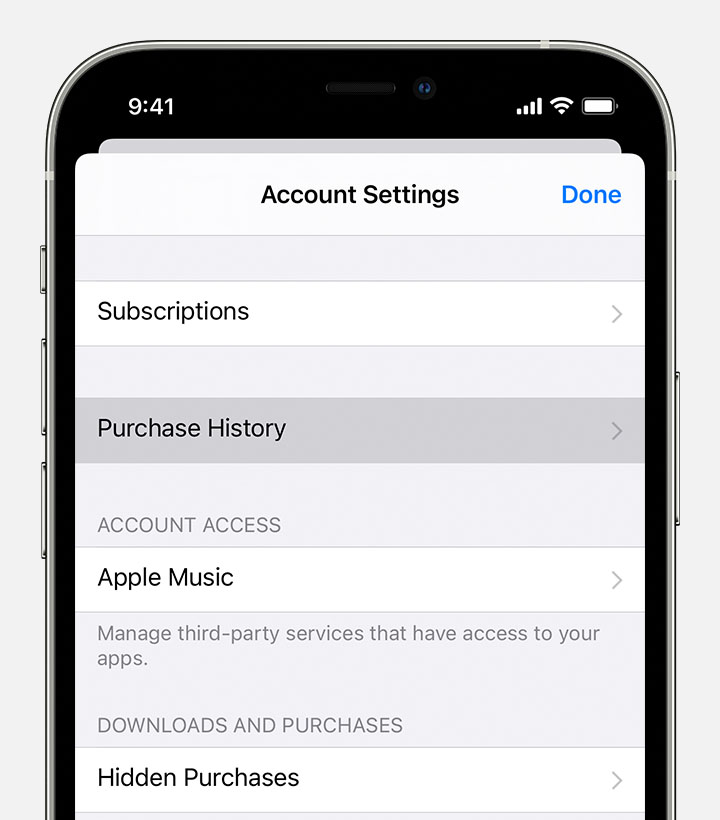
iPhone showing the Purchase History menu option in Settings.

5. Your purchase history appears. Tap Last 90 Days, then select a different date range.

Learn what to do if you can't find the item that you’re looking for or if you find unexpected charges.


If not, is this your personal, work, or school device? Could there be a management profile added to this device? This explains more about profiles: Install or remove configuration profiles on iPhone - Apple Support


Hoping this helps out, take care.

12 replies
Question marked as Top-ranking reply

May 19, 2022 7:51 AM in response to ISAranghae

Welcome ISAranghae,


In the screenshot provided, it appears that this app is no longer on your device. The icon no longer appears there, which tells us it has been removed.


When we look on our devices, we are unable to see this app listed in Settings > [Your Name] > iCloud. Which also tells us this may be related to a specific app you've purchased in the past.


Does it show up in your purchase history? See more at: View your purchase history for the App Store, iTunes Store, and other Apple media services - Apple Support


On your iPhone, iPad, or iPod touch

1. Open the Settings app.
2. Tap your name, then tap Media & Purchases. 
3. Tap View Account. You might be asked to sign in.
4. Tap Purchase History.
iPhone showing the Purchase History menu option in Settings.

5. Your purchase history appears. Tap Last 90 Days, then select a different date range.

Learn what to do if you can't find the item that you’re looking for or if you find unexpected charges.


If not, is this your personal, work, or school device? Could there be a management profile added to this device? This explains more about profiles: Install or remove configuration profiles on iPhone - Apple Support


Hoping this helps out, take care.

This thread has been closed by the system or the community team. You may vote for any posts you find helpful, or search the Community for additional answers.

Unkown setup app in iCloud settings on iPhone

Welcome to Apple Support Community
A forum where Apple customers help each other with their products. Get started with your Apple Account.