App Store problems

I just got the iPhone 12 and I am having problems with the App Store. I have a gmail account that I am using to log in and when I go to sign in it says it has to sign in and review my account, so I sign in with my information and it says this account has not been used in the iTunes Store. I press another sign in button that takes me to another page, but this time it says use existing account or cancel. So I press use existing account and put my Apple ID in and type in my password and press sign in and it just starts all the way over again. Someone please help me

iPhone 12, iOS 15

Posted on May 18, 2022 8:00 AM

Reply
Question marked as Top-ranking reply

Posted on May 19, 2022 8:36 AM

Hey there, joseph22potterf.


To use the App Store own your new iPhone 12, you'll want to make sure you have a payment method added to your Apple ID account. Making sure you have a payment method on file can possibly help get you past the review your account message and prompt about your Apple ID not being used in the App Store app yet.


The steps below, from the following article, show how to add a payment method on your iPhone: Change, add, or remove Apple ID payment methods - Apple Support


"How to change your payment method on your iPhone, iPad, or iPod touch

  1. Open the Settings app.
  2. Tap your name.
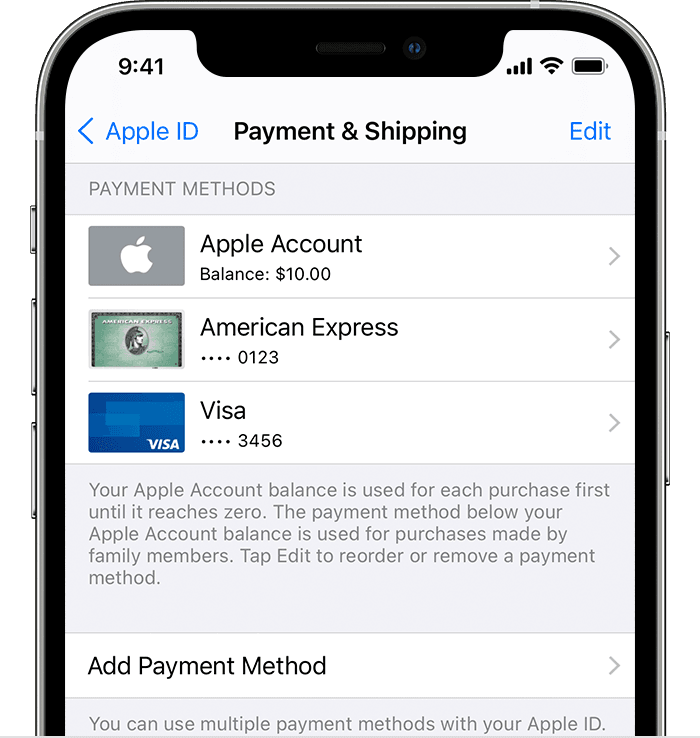
  3. Tap Payment & Shipping. You might be asked to sign in with your Apple ID.
  4. From here, you can do these things:

iPhone showing payment methods including Apple ID balance and credit cards

    • Add a payment method — Tap Add Payment Method."


Once that has been added, please try opening the App Store again. We hope this helps.


Take care.

1 reply
Question marked as Top-ranking reply

May 19, 2022 8:36 AM in response to joseph22potterf

Hey there, joseph22potterf.


To use the App Store own your new iPhone 12, you'll want to make sure you have a payment method added to your Apple ID account. Making sure you have a payment method on file can possibly help get you past the review your account message and prompt about your Apple ID not being used in the App Store app yet.


The steps below, from the following article, show how to add a payment method on your iPhone: Change, add, or remove Apple ID payment methods - Apple Support


"How to change your payment method on your iPhone, iPad, or iPod touch

  1. Open the Settings app.
  2. Tap your name.
  3. Tap Payment & Shipping. You might be asked to sign in with your Apple ID.
  4. From here, you can do these things:

iPhone showing payment methods including Apple ID balance and credit cards

    • Add a payment method — Tap Add Payment Method."


Once that has been added, please try opening the App Store again. We hope this helps.


Take care.

This thread has been closed by the system or the community team. You may vote for any posts you find helpful, or search the Community for additional answers.

App Store problems

Welcome to Apple Support Community
A forum where Apple customers help each other with their products. Get started with your Apple Account.