
My screen is black
My screen is black
My screen is black
If your Mac starts up to a blank screen
A blank screen (black, gray, or blue) should appear once or more during startup. If your Mac appears to be stuck on a blank screen, follow these steps.

Try to start up from macOS Recovery
If your Mac seems to be turned on but nothing appears on your display, determine whether you're using a Mac with Apple silicon, then follow the appropriate steps:
Apple silicon
Intel processor


Use Disk Utility to repair your startup disk
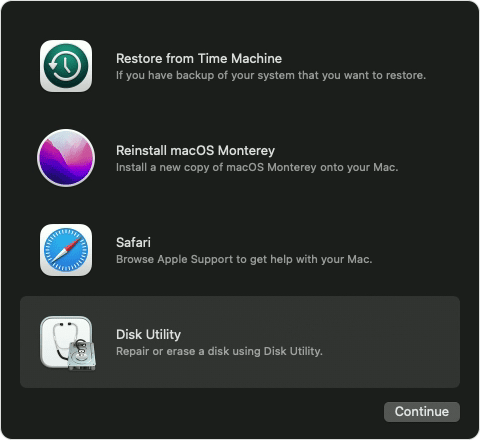
If your Mac successfully started up from macOS Recovery, you should see a utilities window that includes Disk Utility. Use Disk Utility to repair your startup disk.
If Disk Utility found no errors, reinstall macOS.
If Disk Utility found errors and repaired them, restart your Mac. If the issue returns after restarting, reinstall macOS.
If you still need help, please contact Apple Support.
Published Date: April 15, 2022
If your Mac starts up to a blank screen
A blank screen (black, gray, or blue) should appear once or more during startup. If your Mac appears to be stuck on a blank screen, follow these steps.
Try to start up from macOS Recovery
If your Mac seems to be turned on but nothing appears on your display, determine whether you're using a Mac with Apple silicon, then follow the appropriate steps:
Apple silicon
Intel processor
Use Disk Utility to repair your startup disk
If your Mac successfully started up from macOS Recovery, you should see a utilities window that includes Disk Utility. Use Disk Utility to repair your startup disk.
If Disk Utility found no errors, reinstall macOS.
If Disk Utility found errors and repaired them, restart your Mac. If the issue returns after restarting, reinstall macOS.
If you still need help, please contact Apple Support.
Published Date: April 15, 2022
Tracydenise Said:
"My screen is black: My screen is black"
-------
Troubleshooting a Black Mac Screen:
A. Go Here: If your Mac doesn't Turn On or Start Up - Apple Support
B. Reset the SMC and your NVRAM:
(Applies yo Intel-Based Macs Only) Sometimes when changes are made to the system(i.e. Updates), system configurations (i.e. for Power) become manipulated, technically. So, reset the SMC and NVRAM. Try performing each thrice. It may take sometime, being certain you have the time to perform these resets.
Get expert service and support at the Genius Bar.
Click ▶︎ Start a Service Request. ⚛️
Need more help?
Click ▶︎ Check Repair Status.
My screen is black


