
Carplay and Skype
How can I add Skype to Carplay?
iPhone 8, iOS 15
How can I add Skype to Carplay?
iPhone 8, iOS 15
Hi Simon-in-Wicklow,
It doesn't look like this is an option at this time. However, you'll want to check with the Skype app developer to see if there's a capability to make calls using CarPlay with the app to be sure . How to contact an app developer
You can also view and arrange your CarPlay apps with the section 'Arrange your CarPlay apps' in the article here Use CarPlay with your iPhone and quoted below.
"While using CarPlay, the display in your car will show your available apps. To add, remove, or arrange the order of the apps on your iPhone:
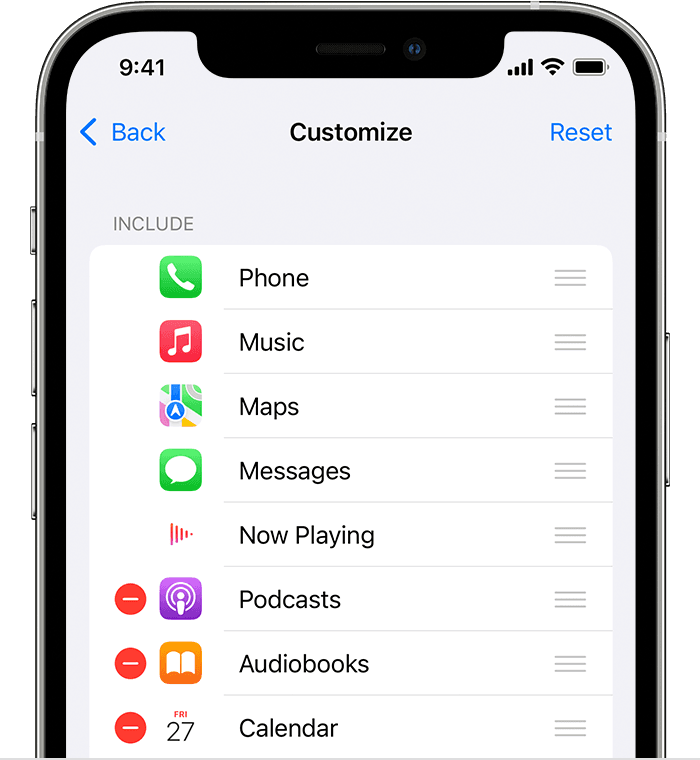
 or Delete button
  to add and remove apps. Tap and drag an app to change the order the apps appear in.
The next time you connect your iPhone to CarPlay, the new order of your apps should appear on the display. Only apps that are supported by CarPlay will appear on your display."
If needed, the guide page here has the steps to make calls using the Phone app and CarPlay Make and receive phone calls with CarPlay
Best.
Hi Simon-in-Wicklow,
It doesn't look like this is an option at this time. However, you'll want to check with the Skype app developer to see if there's a capability to make calls using CarPlay with the app to be sure . How to contact an app developer
You can also view and arrange your CarPlay apps with the section 'Arrange your CarPlay apps' in the article here Use CarPlay with your iPhone and quoted below.
"While using CarPlay, the display in your car will show your available apps. To add, remove, or arrange the order of the apps on your iPhone:
or Delete button to add and remove apps. Tap and drag an app to change the order the apps appear in.The next time you connect your iPhone to CarPlay, the new order of your apps should appear on the display. Only apps that are supported by CarPlay will appear on your display."
If needed, the guide page here has the steps to make calls using the Phone app and CarPlay Make and receive phone calls with CarPlay
Best.
Carplay and Skype

