Can i see on my iphone my password log in
Can i see on my phone my password log in?
Can i see on my phone my password log in?
Welcome Abigail_pmntl,
Sounds like you want to know how to find the passwords on your iPhone.
In order to do this, you'll want to follow: How to find saved passwords on your iPhone - Apple Support
View saved passwords in Settings
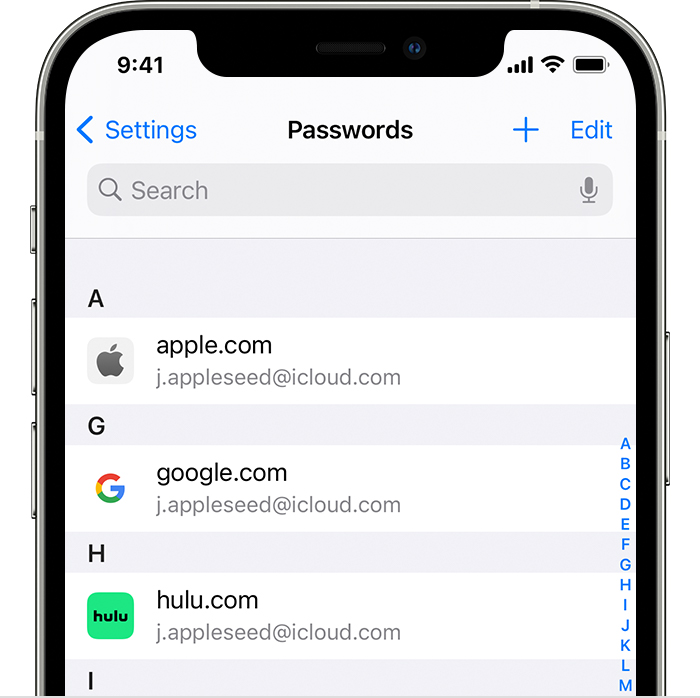
1. Tap Settings, then select Passwords. In iOS 13 or earlier, select Passwords & Accounts, then tap Website & App Passwords.
2. Use Face ID or Touch ID when prompted, or enter your passcode.
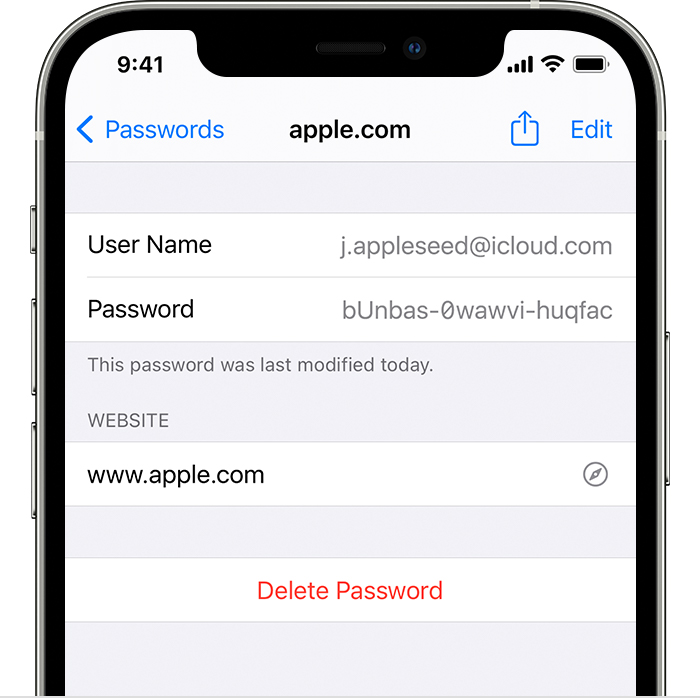
3. To see a password, select a website.
- To delete a saved password, tap Delete Password.
- To update a password, tap Edit.
Or see: Make your passwords available on all your devices with iPhone and iCloud Keychain - Apple Support If you've used iCloud Keychain in the past but it isn't set up yet, that would assist further.
Let us know if this helps out, cheers!
Welcome Abigail_pmntl,
Sounds like you want to know how to find the passwords on your iPhone.
In order to do this, you'll want to follow: How to find saved passwords on your iPhone - Apple Support
View saved passwords in Settings
1. Tap Settings, then select Passwords. In iOS 13 or earlier, select Passwords & Accounts, then tap Website & App Passwords.
2. Use Face ID or Touch ID when prompted, or enter your passcode.
3. To see a password, select a website.
- To delete a saved password, tap Delete Password.
- To update a password, tap Edit.
Or see: Make your passwords available on all your devices with iPhone and iCloud Keychain - Apple Support If you've used iCloud Keychain in the past but it isn't set up yet, that would assist further.
Let us know if this helps out, cheers!
Can i see on my iphone my password log in