iPad/iPhone Lock Screen displays messages from unknown senders . . .

Greetings wise, and knowledgeable countrymen! Question please. I greatly appreciate your kind help.


Issue: On my iPad, and iPhone I receive notification of text messages from unknown senders on my Lock Screen. I do not see the actual messages in the Messages App., as I only allow messages from numbers in my contacts. However, I cannot figure out how to prevent the unknown sender's messages from appearing on my lock screen.

I'm sure I'm missing something. Will someone please tell me how I can fix this?


I greatly appreciate your time, and expertise! It's always good to learn new information. In exchange, I can only offer the following senior observation. (Not sure this one counts as wisdom.)

In my experience, I have found that the old adage, "You can't teach an old dog new tricks," just ain't true! You can indeed teach us; however, there exists a disproportionate probability that you will have to teach us again tomorrow. Just my experience.


Cheers!

iPad Air 5 Wi-Fi

Posted on Jun 17, 2022 9:05 PM

Reply
Question marked as Top-ranking reply

Posted on Jun 19, 2022 8:35 AM

Hello Senior.Moment,


Thank you for the tip you shared! We understand not wanting to see the notifications if you have the unknown senders/callers blocked.


To confirm, did you turn on the setting for "Filter Unknown Messages"? Block phone numbers, contacts, and emails on your iPhone, iPad, or iPod touch - Apple Support


"Filter messages from unknown senders

You can filter messages from people who aren't saved in your Contacts.

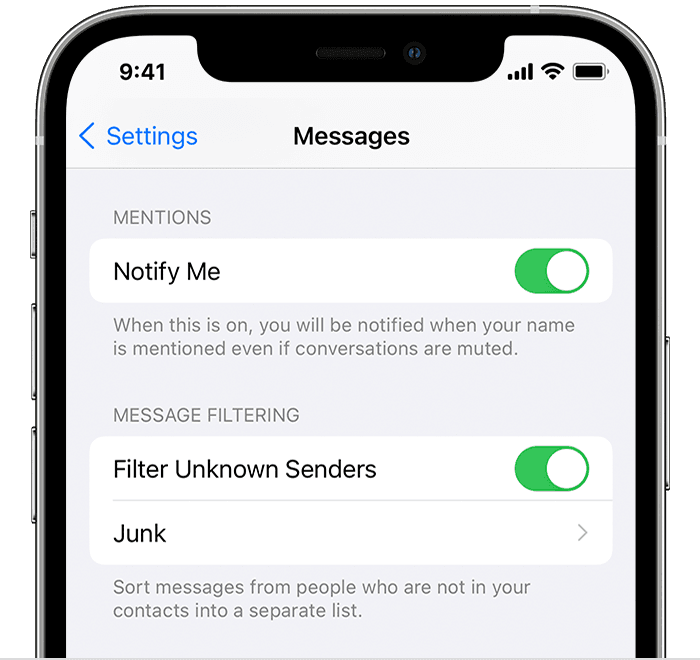
iPhone showing how to filter Unknown Senders

To filter messages, go to Settings > Messages, scroll down and turn on Filter Unknown Senders.

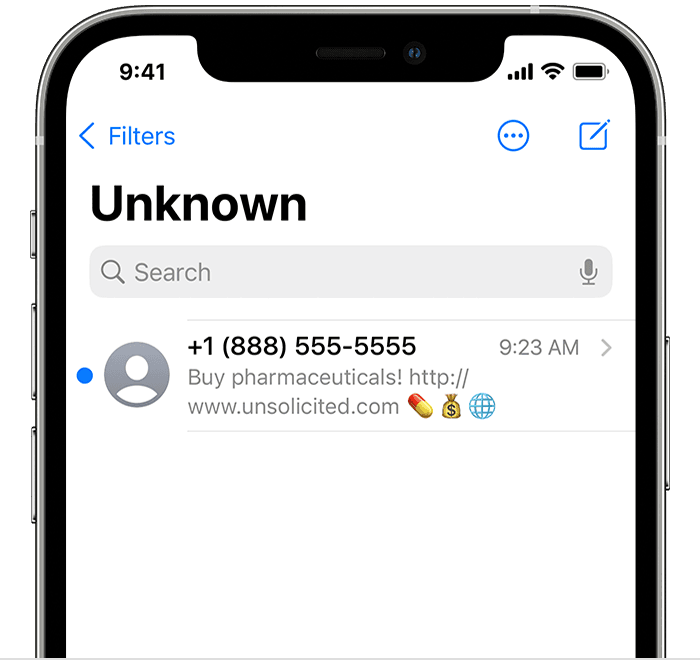
iPhone showing a filtered message

In Messages, tap  Filters, then tap Unknown Senders. You won't get notifications for these messages."


If this doesn't help, make sure that you're updated and restart your iPad:


Restart your iPad - Apple Support


Update your iPhone, iPad, or iPod touch - Apple Support


Take care!


1 reply
Question marked as Top-ranking reply

Jun 19, 2022 8:35 AM in response to Senior.Moment

Hello Senior.Moment,


Thank you for the tip you shared! We understand not wanting to see the notifications if you have the unknown senders/callers blocked.


To confirm, did you turn on the setting for "Filter Unknown Messages"? Block phone numbers, contacts, and emails on your iPhone, iPad, or iPod touch - Apple Support


"Filter messages from unknown senders

You can filter messages from people who aren't saved in your Contacts.

iPhone showing how to filter Unknown Senders

To filter messages, go to Settings > Messages, scroll down and turn on Filter Unknown Senders.

iPhone showing a filtered message

In Messages, tap  Filters, then tap Unknown Senders. You won't get notifications for these messages."


If this doesn't help, make sure that you're updated and restart your iPad:


Restart your iPad - Apple Support


Update your iPhone, iPad, or iPod touch - Apple Support


Take care!


This thread has been closed by the system or the community team. You may vote for any posts you find helpful, or search the Community for additional answers.

iPad/iPhone Lock Screen displays messages from unknown senders . . .

Welcome to Apple Support Community
A forum where Apple customers help each other with their products. Get started with your Apple Account.