DND on my WhatsApp voice calls

My WhatsApp voice calls are being silenced by Do Not Disturb. How do I stop this from happening?

iPhone XS Max, iOS 15

Posted on Jun 28, 2022 6:46 AM

Reply
1 reply

Jun 29, 2022 10:02 AM in response to tsitsi1981

Hello tsitsi1981,


Thank you for reaching out to Apple Support Communities, and we'll be happy to help in any way we can. We understand you're having issues with DO Not Disturb silencing certain calls. You can turn this feature off, or change the settings as described here: Use Do Not Disturb on your iPhone, iPad, and iPod touch - Apple Support


"Change your Do Not Disturb settings

If you don't want to be disturbed at a certain time, you can set a schedule and change other Do Not Disturb features to help you concentrate. Here's how with iOS 15 and iPadOS 15:
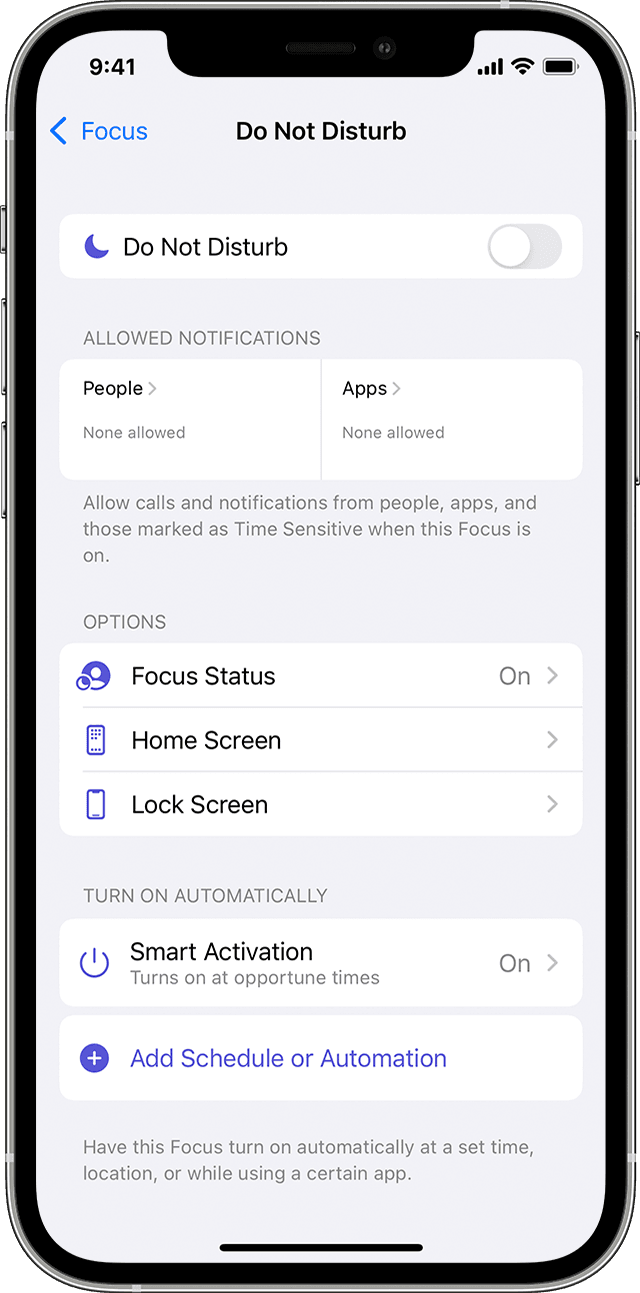
iPhone screen showing how to adjust Do not Disturb settings 

  1. Go to Settings > Focus. 
  2. Tap Do Not Disturb.
  3. Select settings for Allowed Notifications, Focus Status, Smart Activation, and more.

With iOS 14 or earlier, or iPadOS 14:

  1. Go to Settings > Do Not Disturb.
  2. Turn on Scheduled and set a schedule. 
  3. Choose when you want to receive alerts, calls, and notifications:
    • Silence: Choose to silence calls and notifications always or only when the device is locked.
    • Allow Calls From: Allow calls from everyone, no one, your favorites, or specific contact groups stored on your device or iCloud.
    • Repeated Calls: If someone calls you twice within three minutes, the second call isn't silenced."


We hope this helps.


Cheers!


This thread has been closed by the system or the community team. You may vote for any posts you find helpful, or search the Community for additional answers.

DND on my WhatsApp voice calls

Welcome to Apple Support Community
A forum where Apple customers help each other with their products. Get started with your Apple Account.