iPhone Messages pictures become Tap to Download

I switch from Android to iPhone and used Move to iOS. Most of the pictures of the messages from Android got transferred to iPhone messages. But after a few days the pictures in iPhone show Tap to download instead. How do I get the pictures to permanently stay ( without have to Tap to download ) in iPhone messages? TIA.

iPhone 12

Posted on Jun 28, 2022 12:55 PM

Reply
Question marked as Top-ranking reply

Posted on Jun 29, 2022 11:55 AM

Hey thio8,


It sounds like you may have optimize iCloud Photos storage enabled on your iPhone. That would cause photos to be stored in iCloud rather than on your device.


You can learn more about that here: Manage your photo and video storage - Apple Support


"Store your photos and videos in iCloud

Your photos and videos are stored on your device in their original, high-resolution version. This means that they use a lot of space on your iPhone, iPad, and iPod touch. With iCloud Photos, you can make more space available on your device and have your entire collection, everywhere you go.

Get started with iCloud Photos:

  1. Tap Settings > [your name] > iCloud > Photos.
  2. Turn on iCloud Photos.
  3. Select Optimize iPhone Storage to save space on your device.
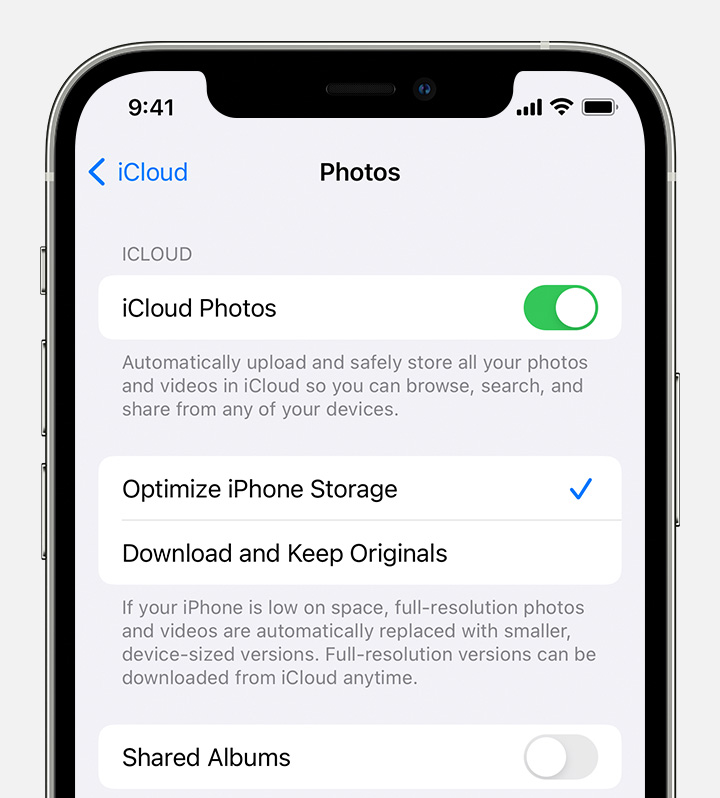
  4. Store photos and videos in iCloud Photos

With Optimize Storage, smaller, space-saving photos and videos are kept on your device while all of your original, full-resolution versions are stored in iCloud. And as long as you have enough space in iCloud, you can store as many photos and videos as you want."


Thanks!

1 reply
Question marked as Top-ranking reply

Jun 29, 2022 11:55 AM in response to thio8

Hey thio8,


It sounds like you may have optimize iCloud Photos storage enabled on your iPhone. That would cause photos to be stored in iCloud rather than on your device.


You can learn more about that here: Manage your photo and video storage - Apple Support


"Store your photos and videos in iCloud

Your photos and videos are stored on your device in their original, high-resolution version. This means that they use a lot of space on your iPhone, iPad, and iPod touch. With iCloud Photos, you can make more space available on your device and have your entire collection, everywhere you go.

Get started with iCloud Photos:

  1. Tap Settings > [your name] > iCloud > Photos.
  2. Turn on iCloud Photos.
  3. Select Optimize iPhone Storage to save space on your device.
  4. Store photos and videos in iCloud Photos

With Optimize Storage, smaller, space-saving photos and videos are kept on your device while all of your original, full-resolution versions are stored in iCloud. And as long as you have enough space in iCloud, you can store as many photos and videos as you want."


Thanks!

This thread has been closed by the system or the community team. You may vote for any posts you find helpful, or search the Community for additional answers.

iPhone Messages pictures become Tap to Download

Welcome to Apple Support Community
A forum where Apple customers help each other with their products. Get started with your Apple Account.