How do I stop scrolling on my iPad when I am in Facebook?

How do I stop scrolling when I am I. Facebook. I am 78 years old, am not computer smart so when someone give me help, I don’t know what to do because what they say never appears on the screen. Can anyone help me. This just started yesterday. Thank you.


[Re-Titled by Moderator]


Posted on Jun 30, 2022 7:47 AM

Reply
Question marked as Top-ranking reply

Posted on Jul 1, 2022 9:48 AM

Hi Muskratmom,


Thanks for using Apple Support Communities! 


We're not sure why this is happening for you either, so let's start with restarting your iPad. It's a simple step, but can resolve unusual issues.

Restart your iPad - Apple Support

You didn't mention which iPad you have, so the above article has steps for both types, with and without a Home button.


Next, if you're still having the same issue, let's make sure your iPad and Facebook app are up to date.

Update your iPhone, iPad, or iPod touch - Apple Support

Update your iPhone, iPad, or iPod touch wirelessly
1. Back up your device using iCloud or your computer.
2. Plug your device into power and connect to the internet with Wi-Fi.
3. Go to Settings > General, then tap Software Update.
4. If you see two software update options available, choose the one that you want to install.

The Settings app on iPhone showing options to update to iOS 14.8 or iOS 15.
5. Tap Install Now. If you see Download and Install instead, tap it to download the update, enter your passcode, then tap Install Now. If you don't know your passcode, learn what to do.
• You might see that your device is up to date and that there's an upgrade available. For example, even if your device is up to date with the latest version of iOS 14, there might be an option to upgrade to iOS 15. 

Then, to check if you have an update for your third-party apps.

How to manually update apps on your Apple device - Apple Support

How to manually update apps on your iPhone or iPad
1. Open the App Store.
2. Tap your profile icon at the top of the screen.
3. Scroll to see pending updates and release notes. Tap Update next to an app to update only that app, or tap Update All.
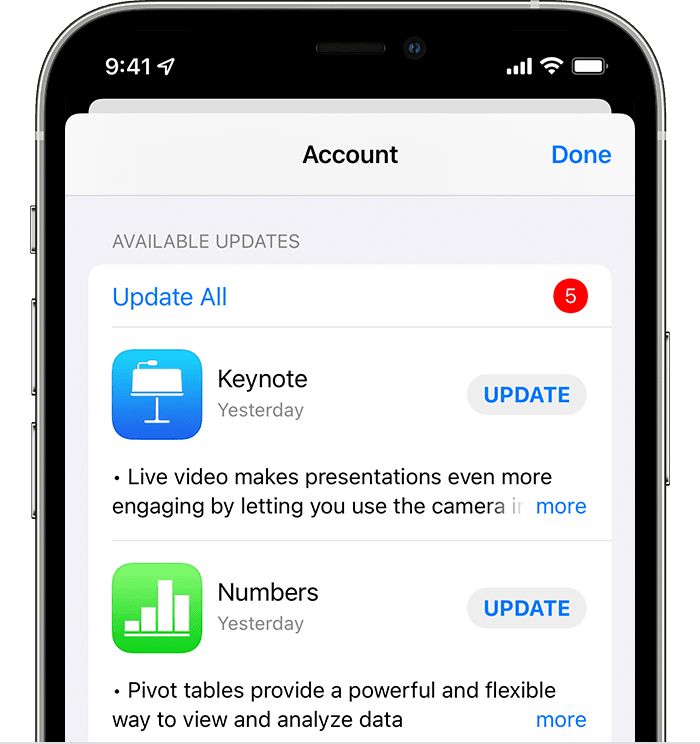
iPhone showing a list of available updates for 5 different apps.

If you need assistance with any of those steps, or the issue is still happening, you can contact Apple Support: Apple Support


Take care!

1 reply
Question marked as Top-ranking reply

Jul 1, 2022 9:48 AM in response to Muskratmom

Hi Muskratmom,


Thanks for using Apple Support Communities! 


We're not sure why this is happening for you either, so let's start with restarting your iPad. It's a simple step, but can resolve unusual issues.

Restart your iPad - Apple Support

You didn't mention which iPad you have, so the above article has steps for both types, with and without a Home button.


Next, if you're still having the same issue, let's make sure your iPad and Facebook app are up to date.

Update your iPhone, iPad, or iPod touch - Apple Support

Update your iPhone, iPad, or iPod touch wirelessly
1. Back up your device using iCloud or your computer.
2. Plug your device into power and connect to the internet with Wi-Fi.
3. Go to Settings > General, then tap Software Update.
4. If you see two software update options available, choose the one that you want to install.
The Settings app on iPhone showing options to update to iOS 14.8 or iOS 15.
5. Tap Install Now. If you see Download and Install instead, tap it to download the update, enter your passcode, then tap Install Now. If you don't know your passcode, learn what to do.
• You might see that your device is up to date and that there's an upgrade available. For example, even if your device is up to date with the latest version of iOS 14, there might be an option to upgrade to iOS 15. 

Then, to check if you have an update for your third-party apps.

How to manually update apps on your Apple device - Apple Support

How to manually update apps on your iPhone or iPad
1. Open the App Store.
2. Tap your profile icon at the top of the screen.
3. Scroll to see pending updates and release notes. Tap Update next to an app to update only that app, or tap Update All.
iPhone showing a list of available updates for 5 different apps.

If you need assistance with any of those steps, or the issue is still happening, you can contact Apple Support: Apple Support


Take care!

This thread has been closed by the system or the community team. You may vote for any posts you find helpful, or search the Community for additional answers.

How do I stop scrolling on my iPad when I am in Facebook?

Welcome to Apple Support Community
A forum where Apple customers help each other with their products. Get started with your Apple Account.