Finding my copy’s
Where do I find copied on my iPhone 6s?? Looking for my copied password from the contacts section ?? I did not paste anything to safari
iPhone 6s, iOS 15
Where do I find copied on my iPhone 6s?? Looking for my copied password from the contacts section ?? I did not paste anything to safari
iPhone 6s, iOS 15
Welcome SupportMEalways,
We're a bit confused by your post and wanted to make sure we're on the same page. Are you trying to locate a specific password on your iPhone 6s running iOS 15?
If so, this should help you to locate your saved passwords: How to find saved passwords on your iPhone - Apple Support
How to find saved passwords on your iPhone
Learn how to find and edit your saved passwords on your iPhone, iPad, or iPod touch.
Use Siri to find saved passwords
You can use Siri to view your passwords by saying something like "Hey Siri, show my passwords." If you're looking for the password to a specific app or website, you can also ask Siri. For example, "Hey Siri, what is my Hulu password?"
View saved passwords in Settings
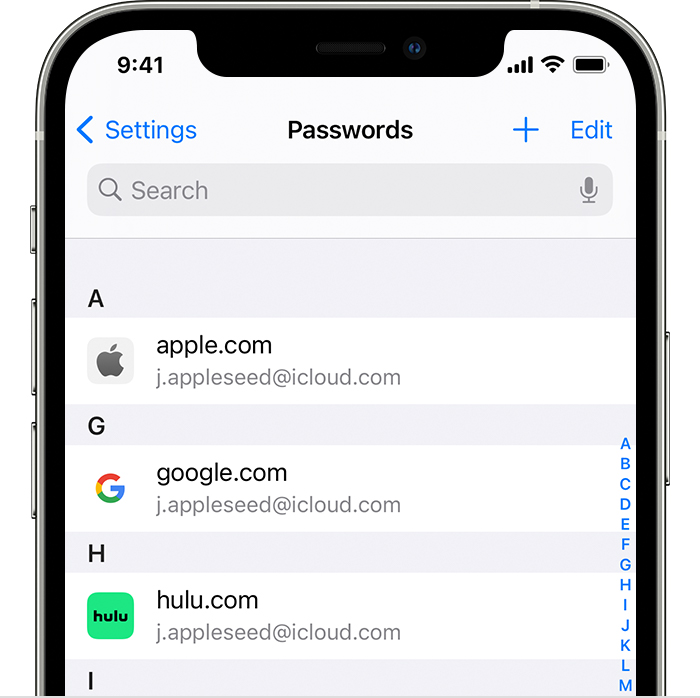
1. Tap Settings, then select Passwords. In iOS 13 or earlier, select Passwords & Accounts, then tap Website & App Passwords.
2. Use Face ID or Touch ID when prompted, or enter your passcode.
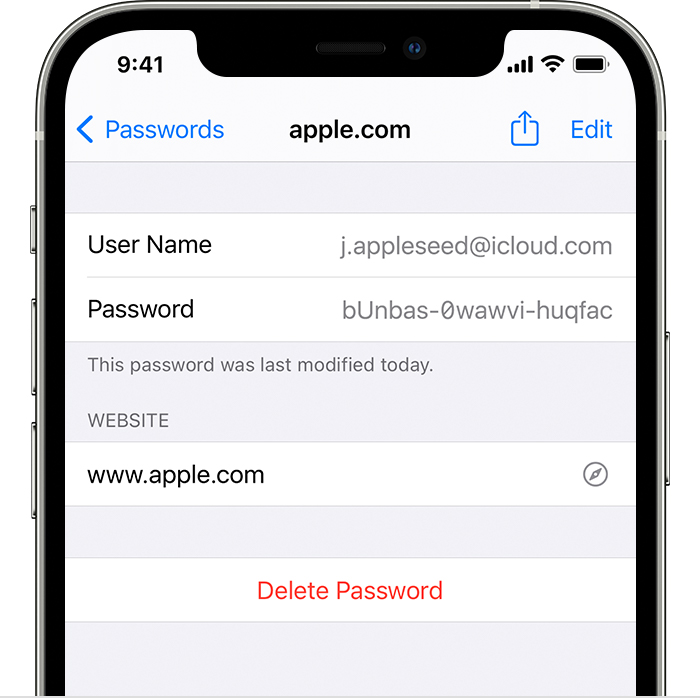
3. To see a password, select a website.
- To delete a saved password, tap Delete Password.
- To update a password, tap Edit.
In case you need to set up iCloud Keychain, see: Make your passwords available on all your devices with iPhone and iCloud Keychain - Apple Support
Please let us know if this helps out or not, take care.
Finding my copy’s