Hi I have iCloud storage tool backup on 6 months older but now I can’t retrieve , my iCloud back up is on everyday basis, is there any chance to get my older data ? Plz help me

Please let me know how I can retrieve my iCloud storage, I can’t retrieve my data after 6 months when I try I’m suspect that I have put on iCloud backup on by default so only recent days data is coming not on 6 month older data ?

iPhone XR, iOS 15

Posted on Aug 1, 2022 4:46 PM

Reply
Question marked as Top-ranking reply

Posted on Aug 2, 2022 12:57 PM

Hello Gemini__|,


Thank you for reaching out to Apple Support Communities, and we'll be happy to help in any way we can. We understand you're having issues with restoring an older iCloud backup. To view and manage your iCloud backups, check ou tthe details listed here: View and manage iCloud device backups - Apple Support


"If you turn off iCloud Backup for a device, any backups stored in iCloud are kept for 180 days before being deleted."


To restore from an older backup, check out this link: Restore your iPhone, iPad, or iPod touch from a backup - Apple Support


"Restore your device from an iCloud backup

  1. Turn on your device. You should see a Hello screen. If you already set up your device, you need to erase all of its content before you can use these steps to restore from your backup.
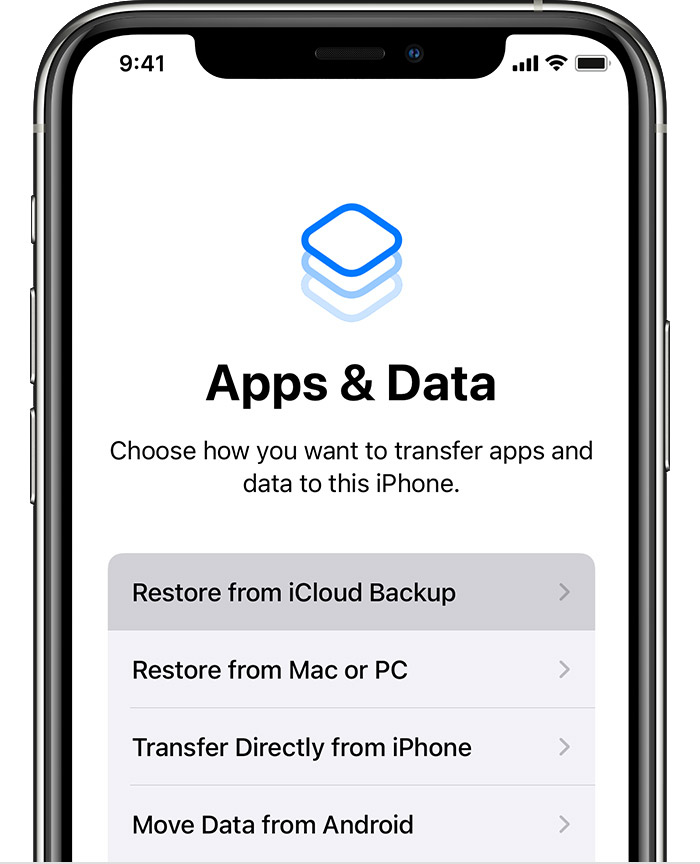
  2. Follow the onscreen setup steps until you reach the Apps & Data screen, then tap Restore from iCloud Backup. 
  3. An iPhone showing the Apps & Data screen with the first option, Restore from an iCloud Backup, selected.
  4. Sign in to iCloud with your Apple ID.
  5. Choose a backup. Look at the date and size of each and pick the most relevant. After you choose a backup, the transfer starts. If a message says that a newer version of software is required, follow the onscreen steps to update. If you don't see onscreen steps to help you update, learn what to do.
  6. When asked, sign in with your Apple ID to restore your apps and purchases. If you've purchased iTunes or App Store content using multiple Apple IDs, you'll be asked to sign in to each. If you can't remember your password, you can tap Skip this Step and sign in later. You won't be able to use the apps until you sign in with your Apple ID.
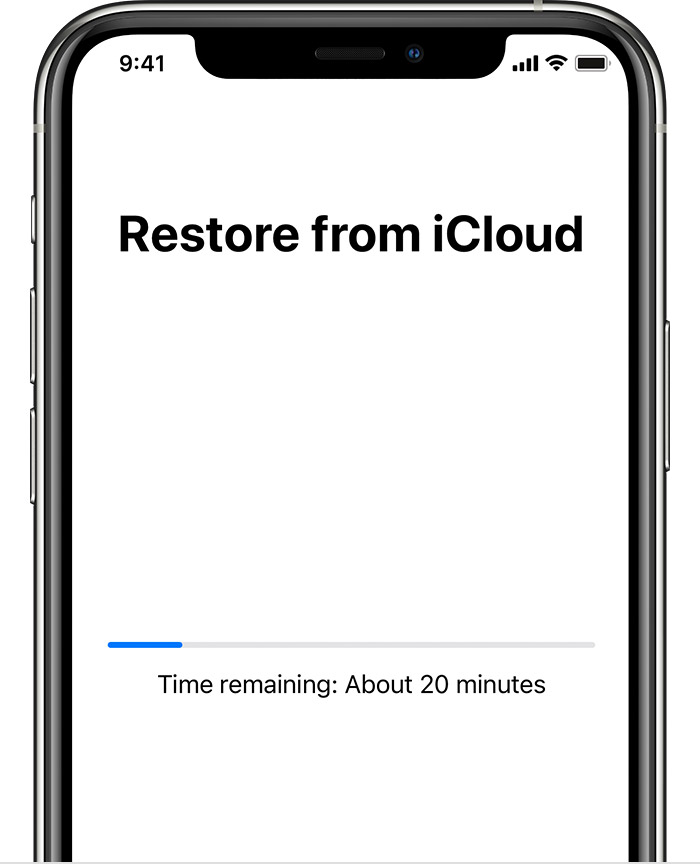
  7. Stay connected to Wi-Fi and wait for a progress bar to appear and complete. Depending on the size of the backup and the network speed, the progress bar might need a few minutes to an hour to complete. If you disconnect from Wi-Fi too soon, the progress will pause until you reconnect.
  8. An iPhone showing the Restore from iCloud screen with a progress bar. It says the time remaining is about 20 minutes.
  9. Now you can finish setup and enjoy your device. Content like your apps, photos, music, and other information will continue to restore in the background for the next several hours or days, depending on the amount of information there is. Try to connect often to Wi-Fi and power to let the process complete.

Get help with restoring from your iCloud backup."


We hope this helps.


Cheers!


3 replies
Question marked as Top-ranking reply

Aug 2, 2022 12:57 PM in response to Gemini__

Hello Gemini__|,


Thank you for reaching out to Apple Support Communities, and we'll be happy to help in any way we can. We understand you're having issues with restoring an older iCloud backup. To view and manage your iCloud backups, check ou tthe details listed here: View and manage iCloud device backups - Apple Support


"If you turn off iCloud Backup for a device, any backups stored in iCloud are kept for 180 days before being deleted."


To restore from an older backup, check out this link: Restore your iPhone, iPad, or iPod touch from a backup - Apple Support


"Restore your device from an iCloud backup

  1. Turn on your device. You should see a Hello screen. If you already set up your device, you need to erase all of its content before you can use these steps to restore from your backup.
  2. Follow the onscreen setup steps until you reach the Apps & Data screen, then tap Restore from iCloud Backup. 
  3. An iPhone showing the Apps & Data screen with the first option, Restore from an iCloud Backup, selected.
  4. Sign in to iCloud with your Apple ID.
  5. Choose a backup. Look at the date and size of each and pick the most relevant. After you choose a backup, the transfer starts. If a message says that a newer version of software is required, follow the onscreen steps to update. If you don't see onscreen steps to help you update, learn what to do.
  6. When asked, sign in with your Apple ID to restore your apps and purchases. If you've purchased iTunes or App Store content using multiple Apple IDs, you'll be asked to sign in to each. If you can't remember your password, you can tap Skip this Step and sign in later. You won't be able to use the apps until you sign in with your Apple ID.
  7. Stay connected to Wi-Fi and wait for a progress bar to appear and complete. Depending on the size of the backup and the network speed, the progress bar might need a few minutes to an hour to complete. If you disconnect from Wi-Fi too soon, the progress will pause until you reconnect.
  8. An iPhone showing the Restore from iCloud screen with a progress bar. It says the time remaining is about 20 minutes.
  9. Now you can finish setup and enjoy your device. Content like your apps, photos, music, and other information will continue to restore in the background for the next several hours or days, depending on the amount of information there is. Try to connect often to Wi-Fi and power to let the process complete.

Get help with restoring from your iCloud backup."


We hope this helps.


Cheers!


Aug 3, 2022 2:33 PM in response to Gemini__

Hello Gemini__,


Since the data you are trying to restore is from 2 specific apps, these apps may not have been enabled from Settings > [Your name] > iCloud. If that is the case, their data would not be included in your iCloud backup. There's a bit more information about using iCloud for third-party apps in Keep third-party app data up to date on all your Apple devices with iCloud - Apple Support. The app developers for these apps may have further guidance or may have some of your information stored if you are able to log in. Try reaching out to them directly. If you need help locating their contact information, use the steps in How to contact an app developer - Apple Support.


In regards to the other iPhone backup issue you mentioned, you can check to see if a backup was created in iCloud or on a computer. Check out Locate backups of your iPhone, iPad, and iPod touch - Apple Support.


Have a great day!

Aug 2, 2022 5:19 PM in response to K_Faith

Thanks for your prompt reply .


please find my questions below :

  1. When I tried to retrieve or restore from my iCloud backup, it’s not showing Feb month data
  2. unfortunately I used to backup on daily basis like the button on my phone iCloud back up daily basis.
  3. but I need to restore from iCloud on last Feb 2022 data. When I connect and do my iPad the date is shown last date is July 02nd for restore .
  4. mainly 2 app data which should be restored. , one is piclock , another one is photo vault. Actually I deleted this app and when I check with play store for recent purchase I can get this app but came new like new install .
  5. could you please help me on this to retrieve my 2 apps at least which deleted Feb 2022. Inside having lot of photos .
  6. I used to buy iCloud extra storage for 200gb. Every month I paid too.


another issue

***************


this is another apple

id issue…. Not this I’d my another phone issue .


one more iCloud storage can’t retrieve because last backup was done 2021 and when I connect to now it not at all showing the restore rom iCloud data, nothing to show restore from iCloud only shows restore from Mac or iTunes.


is there any chance to retrieve which iCloud backup I have managed 50 gb with pay.


plz help me to retrieve my app with this . Which includes lot of things inside .


This thread has been closed by the system or the community team. You may vote for any posts you find helpful, or search the Community for additional answers.

Hi I have iCloud storage tool backup on 6 months older but now I can’t retrieve , my iCloud back up is on everyday basis, is there any chance to get my older data ? Plz help me

Welcome to Apple Support Community
A forum where Apple customers help each other with their products. Get started with your Apple Account.