Random file name - why?

I was just looking through old holiday photos and noticed that just one photo in a series had a random long file name, instead of 2905.JPG:


IMG_2903.PNG

IMG_2904.MOV

5A8FE922-753A-4AFC-AF01-96A9216C95A3.jpg

IMG_2906.JPG

IMG_2907.PNG


Does anyone have any idea what's going on here? Also, it has no location data at all but all the others do.


Any help much appreciated! Thank you :-)

iPhone X, iOS 15

Posted on Aug 9, 2022 8:09 AM

Reply
Question marked as Top-ranking reply

Posted on Aug 9, 2022 9:04 AM

Where did you see the file names? If it was in the Title field of a Photos library the file may have been texted to you with that name. That long file name that you've posted looks like a file that was texted as I got this one not too long ago: 66942383451__231ECD9A-EC49-407D-81FC-171DE83B8E99.jpg. The system changes the name for whatever reason when it sends.


If you opened the library package and looked inside one of the sub-folders inside the Originals folder then you may have iCloud Library enabled. Photos renames the imported files to something like this:
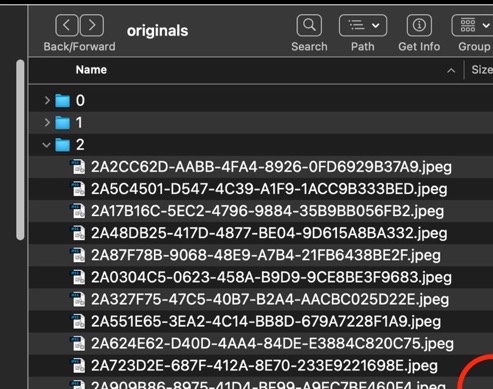


to facilitate a more efficient comparison and syncing with devices using iCloud Photos. The original file name is added to the database and is shown in the Title field.When exported the original file name will be used for the exported file.


Photos that were originally imported into an iPhoto library before it was converted to a Photos library would have the original file name in the subfolder.



2 replies
Question marked as Top-ranking reply

Aug 9, 2022 9:04 AM in response to Abstractman23

Where did you see the file names? If it was in the Title field of a Photos library the file may have been texted to you with that name. That long file name that you've posted looks like a file that was texted as I got this one not too long ago: 66942383451__231ECD9A-EC49-407D-81FC-171DE83B8E99.jpg. The system changes the name for whatever reason when it sends.


If you opened the library package and looked inside one of the sub-folders inside the Originals folder then you may have iCloud Library enabled. Photos renames the imported files to something like this:


to facilitate a more efficient comparison and syncing with devices using iCloud Photos. The original file name is added to the database and is shown in the Title field.When exported the original file name will be used for the exported file.


Photos that were originally imported into an iPhoto library before it was converted to a Photos library would have the original file name in the subfolder.


Aug 9, 2022 9:11 AM in response to Abstractman23

I"m almost certain this image was shared via Messages. It uses this pseudo-unique filename system - partly because a simple filename such as IMG_1234.JPG is quite likely to be used on the recipient's computer.


That also explains why they metadata (location, date, settings, etc.) are missing - Messages strips that data to avoid leaking potentially-sensitive information.


So, did someone send you this image via Messages, and you added it to your Photos library? that seems the likely scenario to me.

This thread has been closed by the system or the community team. You may vote for any posts you find helpful, or search the Community for additional answers.

Random file name - why?

Welcome to Apple Support Community
A forum where Apple customers help each other with their products. Get started with your Apple Account.