Apple Radio logo remains on my iPhone when I already close it

> When I ask Siri to play, say, radio station KDFC out of SF, I tell her to turn on radio station KDFC. She ogliges with her usual grace.

> Her gracefulness is not apparent, however, when I ask her to shut off said station, as KDFC subsequently NEVER disappears -- remaining, back hunched, ready to pounce.

> The broadcast only apparently stops yet is ALWAYS there, blatantly on screen, playing again like a Harpy whenever I mount my buds.

> Googling the problem leads to no viable solution. Is Apple me a Music subscription here? Is Trump involved?

> As I write this, the KDFC Radio logo remains on my iPhone. Swiping up is of no use. I am confounded.

> HELP!!!


[Re-Titled by Moderator]


Posted on Aug 12, 2022 12:10 PM

Reply
Question marked as Top-ranking reply

Posted on Aug 13, 2022 5:11 PM

Hi hiho.silver,


Welcome to Apple Support Communities. From the information you provided, it sounds like the Music app on your iPhone is unresponsive with a specific radio station. We can help point you in the right direction.


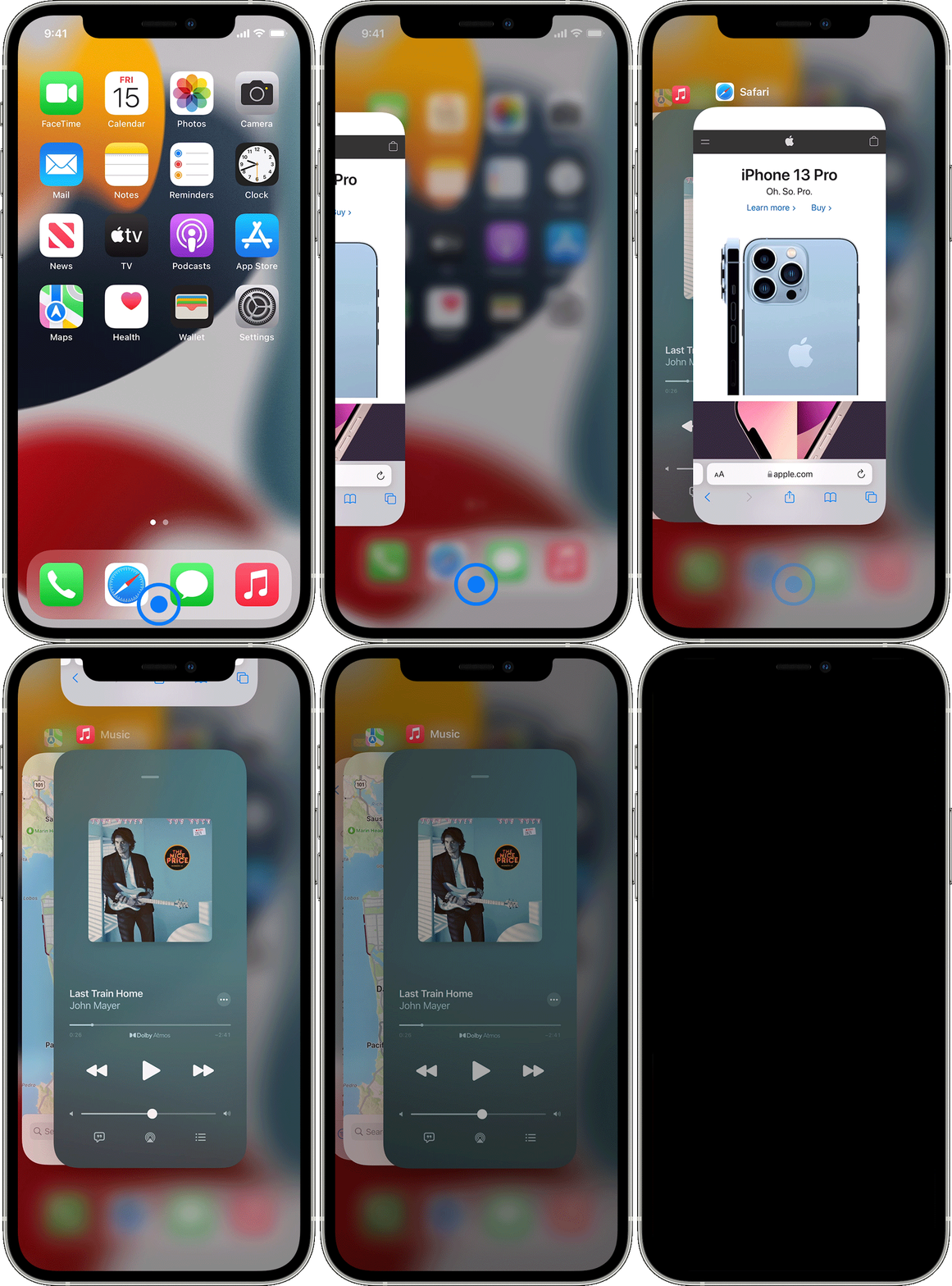
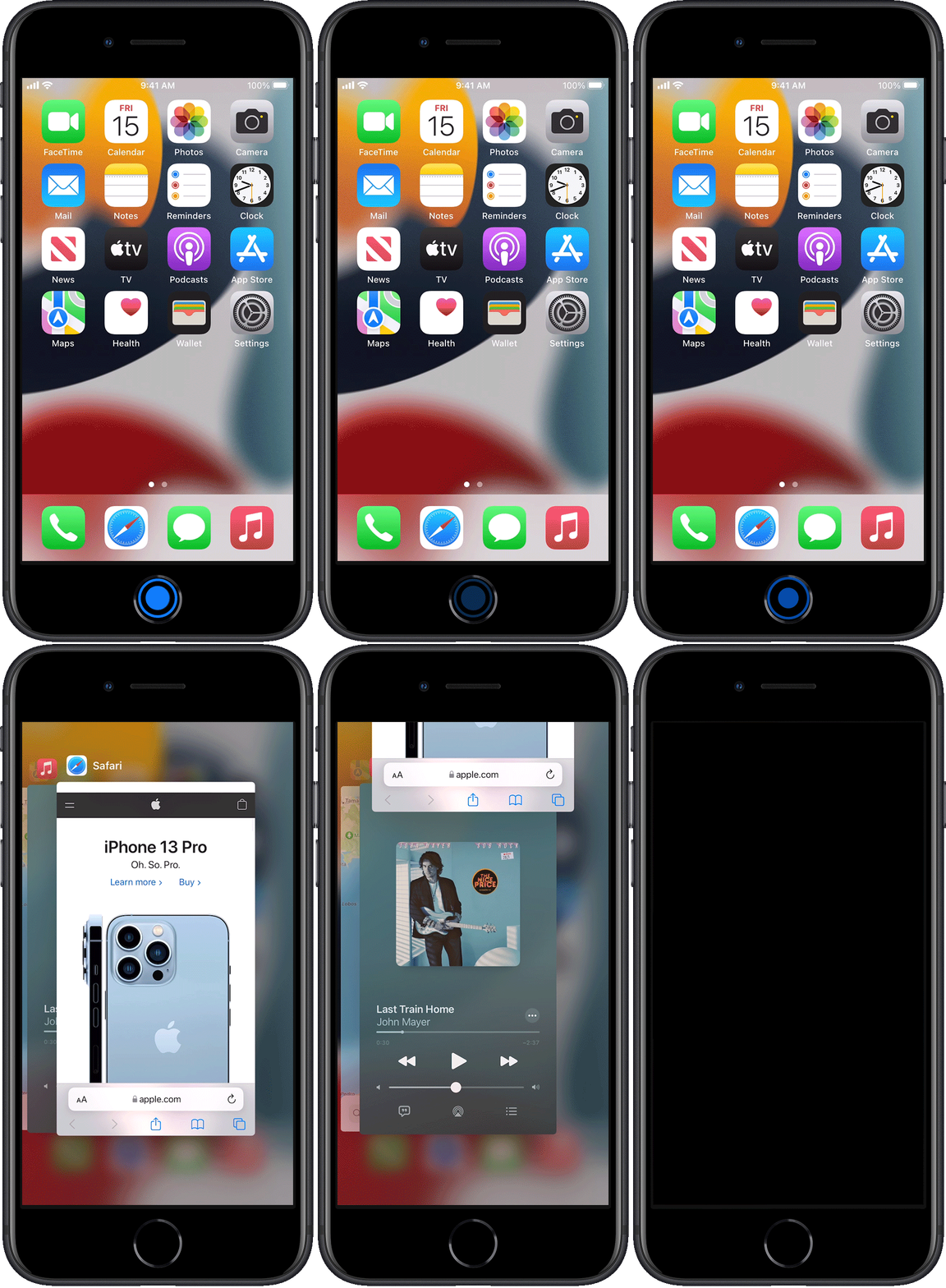
You mentioned swiping up. Just to be sure, did you force close the Music app?This is a step that may help resolve the issue you're experiencing. If you're unsure, here's how to properly close an app:


How to close an app


You should close an app only if it’s unresponsive. The way you close an app depends on the type of device that you have. Find your iPhone or iPod touch model below, then follow the steps. Or learn how to close an app on your iPad.


iPhone X and later


  1. From the Home Screen, swipe up from the bottom of the screen and pause in the middle of the screen.
  2. Swipe right or left to find the app that you want to close. 
  3. Swipe up on the app's preview to close the app. 


iPhone showing how to close an app


 iPhone SE, iPhone 8 and earlier, and iPod touch


  1. Double-click the Home button to show your most recently used apps. 
  2. Swipe right or left to find the app that you want to close. 
  3. Swipe up on the app's preview to close the app.


iPhone showing how to close an app 

This information is outlined in this helpful article: Close an app on your iPhone or iPod touch - Apple Support


We look forward to hearing back from you.


Kind regards.


Similar questions

1 reply
Question marked as Top-ranking reply

Aug 13, 2022 5:11 PM in response to hiho.silver

Hi hiho.silver,


Welcome to Apple Support Communities. From the information you provided, it sounds like the Music app on your iPhone is unresponsive with a specific radio station. We can help point you in the right direction.


You mentioned swiping up. Just to be sure, did you force close the Music app?This is a step that may help resolve the issue you're experiencing. If you're unsure, here's how to properly close an app:


How to close an app


You should close an app only if it’s unresponsive. The way you close an app depends on the type of device that you have. Find your iPhone or iPod touch model below, then follow the steps. Or learn how to close an app on your iPad.


iPhone X and later


  1. From the Home Screen, swipe up from the bottom of the screen and pause in the middle of the screen.
  2. Swipe right or left to find the app that you want to close. 
  3. Swipe up on the app's preview to close the app. 


iPhone showing how to close an app


 iPhone SE, iPhone 8 and earlier, and iPod touch


  1. Double-click the Home button to show your most recently used apps. 
  2. Swipe right or left to find the app that you want to close. 
  3. Swipe up on the app's preview to close the app.


iPhone showing how to close an app 

This information is outlined in this helpful article: Close an app on your iPhone or iPod touch - Apple Support


We look forward to hearing back from you.


Kind regards.


This thread has been closed by the system or the community team. You may vote for any posts you find helpful, or search the Community for additional answers.

Apple Radio logo remains on my iPhone when I already close it

Welcome to Apple Support Community
A forum where Apple customers help each other with their products. Get started with your Apple Account.