How do I Stop my Macbook from automatically Linking Mouse and Keyboard to iPad

Every time I move my Macbook to the edge of my screen, the mouse automatically moves to my iPad screen? How do I disable this? It's extremely obnoxious. If I go to system preferences > display on Mac and disable it manually, all it takes is my mouse moving to the edge of the screen of my mac for it to reappear.


iPad Pro 11-inch Wi-Fi, Cellular

Posted on Aug 16, 2022 8:00 PM

Reply

Similar questions

1 reply

Aug 17, 2022 4:52 PM in response to John_paradox

Hi John_paradox,


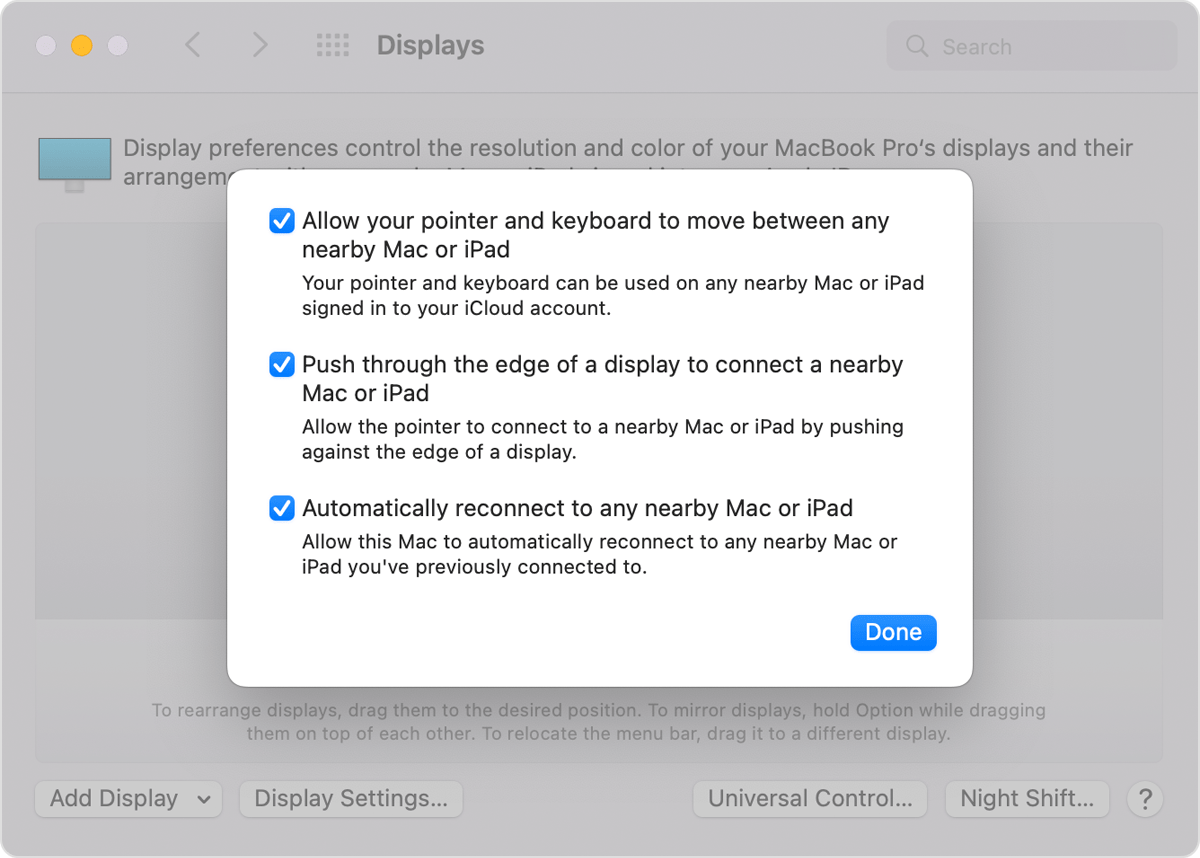
It sounds like you have the Universal Control feature enabled. For help with turning this off, test the steps below found in the article here: Universal Control: Use a single keyboard and mouse between Mac and iPad - Apple Support


"On your Mac


  1. Choose Apple menu  > System Preferences, then click Displays.
  2. Click the Universal Control button at the bottom of the preferences window.
  3. Select “Allow your pointer and keyboard to move between any nearby Mac or iPad.” Leave the other two settings selected for now.

Universal Control settings in Displays preferences


On your iPad

  1. Open the Settings app.
  2. Tap General, then tap AirPlay & Handoff.
  3. Turn on Cursor and Keyboard."


Of course in your case, you'll want to ensure both are off. You can also test using the Control-Option-Command-Delete on your keyboard to disconnect all devices.


Best.

This thread has been closed by the system or the community team. You may vote for any posts you find helpful, or search the Community for additional answers.

How do I Stop my Macbook from automatically Linking Mouse and Keyboard to iPad

Welcome to Apple Support Community
A forum where Apple customers help each other with their products. Get started with your Apple Account.