How do I find a deleted note? It’s not in the recently deleted folder.
i accidentally deleted an important file. How can I restore it? It’s not in the recently deleted file.
iPad mini, iOS 9
i accidentally deleted an important file. How can I restore it? It’s not in the recently deleted file.
iPad mini, iOS 9
Helo Niteowl810,
Thanks for reaching out in Apple support Communities. To clarify, do you use notes with other services such as Yahoo or Gmail? If so, did you complete the following steps from the resource,
"If you're missing notes on your iPhone, iPad, or iPod touch," you were reviewing:
If you delete a note from the Notes app, your third-party account will usually keep it in the Trash folder.
To recover a note from the Trash folder, you need to copy and paste the note to a new note in the Notes app.
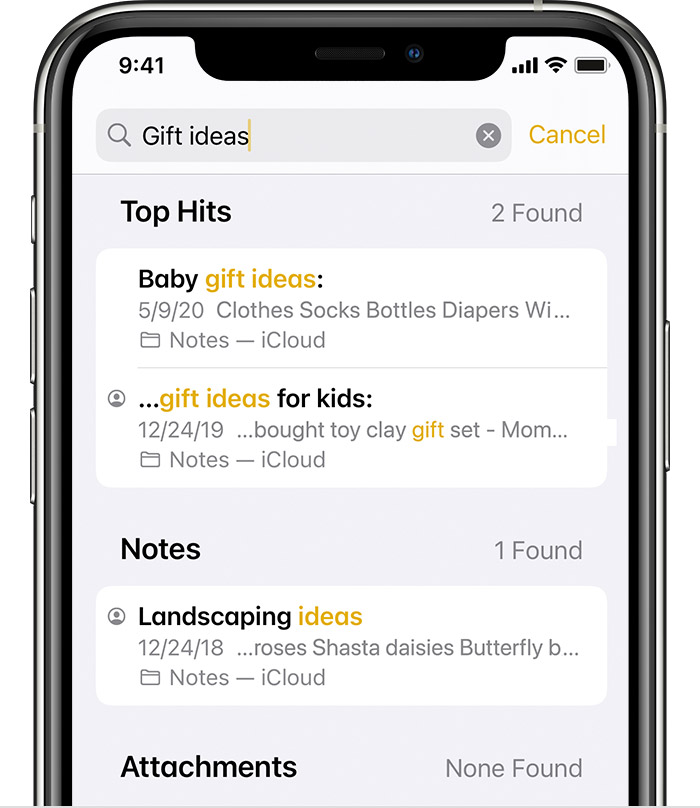
Use Search to find your notes
1. Open Notes, then tap the back icon until you see your list of notes.
2. Tap the Search bar and type a word, phrase, or the title from the note that you're looking for.
3. Make sure All Accounts is selected. Search will check all of your notes in each folder across your accounts, like an email account.
If you don't see the Search bar, you might need to scroll to find it. If you still can't find a note, you might have the note locked. Search
will only see the title of locked notes, so you might need to check all of your locked notes to find the specific note that you're looking for.
If so, be sure to restart your iPad as well. This step may seem unimportant but can resolve several issues: Restart your iPad
Let us know if this helps.
Take care.
Helo Niteowl810,
Thanks for reaching out in Apple support Communities. To clarify, do you use notes with other services such as Yahoo or Gmail? If so, did you complete the following steps from the resource,
"If you're missing notes on your iPhone, iPad, or iPod touch," you were reviewing:
If you delete a note from the Notes app, your third-party account will usually keep it in the Trash folder.
To recover a note from the Trash folder, you need to copy and paste the note to a new note in the Notes app.
Use Search to find your notes
1. Open Notes, then tap the back icon until you see your list of notes.
2. Tap the Search bar and type a word, phrase, or the title from the note that you're looking for.
3. Make sure All Accounts is selected. Search will check all of your notes in each folder across your accounts, like an email account.
If you don't see the Search bar, you might need to scroll to find it. If you still can't find a note, you might have the note locked. Search
will only see the title of locked notes, so you might need to check all of your locked notes to find the specific note that you're looking for.
If so, be sure to restart your iPad as well. This step may seem unimportant but can resolve several issues: Restart your iPad
Let us know if this helps.
Take care.
If you have not created any recent backup of the data on tbat iPad, either using Apple iCloud or by using a Mac or Windows PC, and/or backup to any other third party data storage backup services, then retrieval of any deleted files may no longer be possible.
Sorry.
Good afternoon Niteowl810,
Happy to hear you were able to recover your note. If you have iCloud enabled for Notes, the resource below may be helpful in the future. Be sure to have more than one copy of important data.
Archive or make copies of the information you store in iCloud
Enjoy your day!
Thanks. I tried this right after I deleted the note and nothing was in the trash folder. I tried it again today and there were a lot of files including the one I need. Thanks again.
How do I find a deleted note? It’s not in the recently deleted folder.