How do you adjust the brightness of the Control Strip on Macbook Pro 13-in M1 2020?

My control strip is very hard to see. It used to be brighter. How do you adjust the brightness of the Control Strip on Macbook Pro 13-in M1 2020?


I saw this answered here, but it seems to be out of date, as the answer is not actually in there. The reference to "Find system controls and settings in the Control Strip" doesn't exist in the document that is referenced.

Adjust brightness of Touch Bar - Apple Community


MacBook Pro 13″, macOS 11.6

Posted on Aug 17, 2022 1:44 PM

Reply

Similar questions

1 reply

Aug 18, 2022 2:24 PM in response to AdlerSan

Welcome AdlerSan,


Check out the info offered from Apple on how to customize and use the Touch Bar on your MacBook Pro:


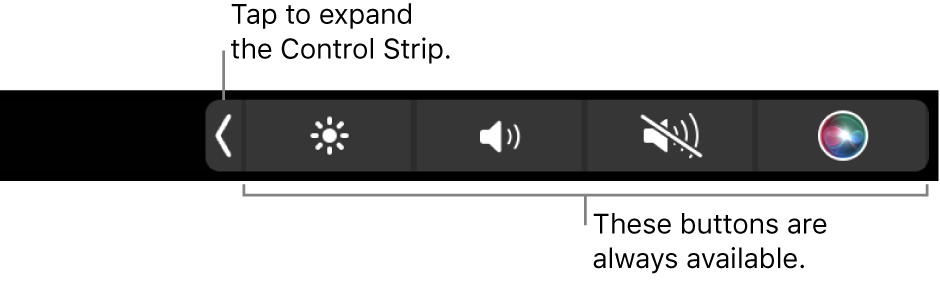
The buttons at the right end of the Touch Bar are the Control Strip—you use them to expand or collapse the Control Strip, change the brightness and volume, or activate Siri. The other buttons in the Touch Bar depend on the app you’re using.

A partial screen of the default Touch Bar, showing the collapsed Control Strip. Tap the expand button to show the full Control Strip.

Expand or collapse the Control Strip. Frequently used system controls, like volume and brightness, are located in the Control Strip on the right side of the Touch Bar. Tap the expand button to expand the strip, then tap buttons or sliders for the settings you want to change. Tap the X button when you finish, or leave the Control Strip open to keep the buttons available.


Change Control Strip buttons
1. On your Mac, choose Apple menu  > System Preferences, click Keyboard , then click Keyboard. 
2. Click Customize Control Strip.
Expand the Control Strip in the Touch Bar, if you want.
3. Add, rearrange, or remove buttons in the Control Strip.
- Add buttons: Use the trackpad or mouse to drag a button from the screen to the Control Strip; buttons in the Control Strip jiggle slightly.
- Rearrange buttons: Use your finger on the Control Strip to drag a button.
- Remove buttons: Use the trackpad or mouse to drag a button from the Control Strip to the screen.
4. When you’re finished, click Done on the screen (or tap Done in the Touch Bar, if it’s shown there).


Best wishes!

This thread has been closed by the system or the community team. You may vote for any posts you find helpful, or search the Community for additional answers.

How do you adjust the brightness of the Control Strip on Macbook Pro 13-in M1 2020?

Welcome to Apple Support Community
A forum where Apple customers help each other with their products. Get started with your Apple Account.