I had a subscription and I canceled it and it’s still asking me for money and every time I go to the apple store to download something it’s asking for my password for my payment method and asking me to varify I don’t know why.

I had a subscription and I canceled it and it’s still asking me for money and every time I go to the apple store to download something it’s asking for my password for my payment method and asking me to varify I don’t know why.

Posted on Aug 19, 2022 3:46 PM

Reply
Question marked as Top-ranking reply

Posted on Aug 21, 2022 11:18 AM

Hi sincere131,


Is it asking you to pay for a subscription or to update your payment method for current subscriptions? If so, do you have other subscriptions setup that require you to still have an active payment method on the account? You can check your subscriptions by completing the steps 1-3 below that are also listed here: If you want to cancel a subscription from Apple - Apple Support


How to cancel a subscription on your iPhone, iPad, or iPod touch
1. Open the Settings app.
2. Tap your name.
3. Tap Subscriptions.
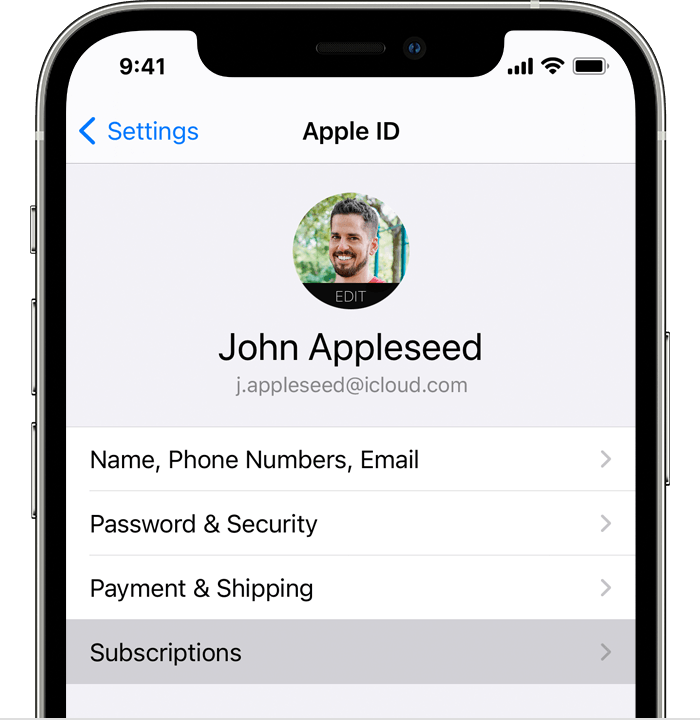
iPhone showing the Subscriptions menu option in Settings.

4. Tap the subscription.
5. Tap Cancel Subscription. You might need to scroll down to find the Cancel Subscription button. If there is no Cancel button or you see an expiration message in red text, the subscription is already canceled.


Even if you have canceled your subscriptions, it will still require you to keep an active payment method on the account. It could be asking you to verify the payment method information you currently have on file. You can check and update any payment methods by completing the steps below that are also listed here: Change, add, or remove Apple ID payment methods - Apple Support


"How to change your payment method on your iPhone, iPad, or iPod touch

  1. Open the Settings app.
  2. Tap your name.
  3. Tap Payment & Shipping. You might be asked to sign in with your Apple ID.
  4. From here, you can do these things:
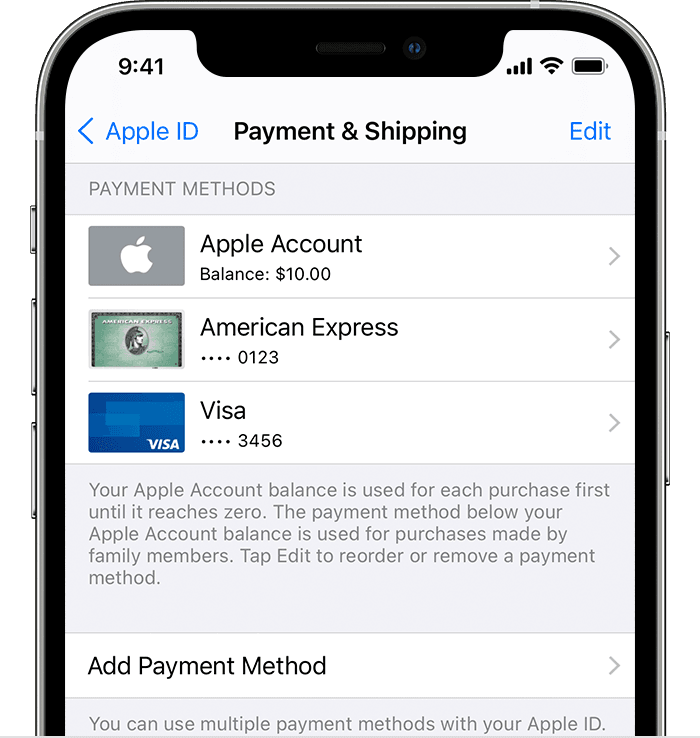
    • iPhone showing payment methods including Apple ID balance and credit cardsAdd a payment method — Tap Add Payment Method.
    • Update a payment method — Tap the payment method, then edit your information. You might need to enter the security code that's printed on your credit or debit card. If you use the card with Apple Pay, go to the Wallet app to edit the card information.
    • Remove a payment method — Tap Edit, tap the red Delete button, then tap Remove. If you have an unpaid balance, have subscriptions including an iCloud storage plan, or you use purchase sharing, you can't remove all payment methods. Learn how to remove all payment methods.
    • Change the order of your payment methods — Tap Edit, then drag the move order icon .*"


Best regards


1 reply
Question marked as Top-ranking reply

Aug 21, 2022 11:18 AM in response to sincere131

Hi sincere131,


Is it asking you to pay for a subscription or to update your payment method for current subscriptions? If so, do you have other subscriptions setup that require you to still have an active payment method on the account? You can check your subscriptions by completing the steps 1-3 below that are also listed here: If you want to cancel a subscription from Apple - Apple Support


How to cancel a subscription on your iPhone, iPad, or iPod touch
1. Open the Settings app.
2. Tap your name.
3. Tap Subscriptions.
iPhone showing the Subscriptions menu option in Settings.

4. Tap the subscription.
5. Tap Cancel Subscription. You might need to scroll down to find the Cancel Subscription button. If there is no Cancel button or you see an expiration message in red text, the subscription is already canceled.


Even if you have canceled your subscriptions, it will still require you to keep an active payment method on the account. It could be asking you to verify the payment method information you currently have on file. You can check and update any payment methods by completing the steps below that are also listed here: Change, add, or remove Apple ID payment methods - Apple Support


"How to change your payment method on your iPhone, iPad, or iPod touch

  1. Open the Settings app.
  2. Tap your name.
  3. Tap Payment & Shipping. You might be asked to sign in with your Apple ID.
  4. From here, you can do these things:
    • iPhone showing payment methods including Apple ID balance and credit cardsAdd a payment method — Tap Add Payment Method.
    • Update a payment method — Tap the payment method, then edit your information. You might need to enter the security code that's printed on your credit or debit card. If you use the card with Apple Pay, go to the Wallet app to edit the card information.
    • Remove a payment method — Tap Edit, tap the red Delete button, then tap Remove. If you have an unpaid balance, have subscriptions including an iCloud storage plan, or you use purchase sharing, you can't remove all payment methods. Learn how to remove all payment methods.
    • Change the order of your payment methods — Tap Edit, then drag the move order icon .*"


Best regards


This thread has been closed by the system or the community team. You may vote for any posts you find helpful, or search the Community for additional answers.

I had a subscription and I canceled it and it’s still asking me for money and every time I go to the apple store to download something it’s asking for my password for my payment method and asking me to varify I don’t know why.

Welcome to Apple Support Community
A forum where Apple customers help each other with their products. Get started with your Apple Account.