Copy-Paste fails. Need to increase available space on HD but cannot. Caught in a bit or a loop

Hi,


It all starts with the MacMini reporting, not enough space to upgrade OS. So, in needing to make space on the MacMini HD I have been trying to copy-paste the Home folder onto a Thunderbolt 3 connected SSD. The process is slow and then ultimately never completes. I have tried doing so in Safe Mode as well, but was too slow and looked like it had frozen. I did however manage to generate an Etrecheck report (I shall try to attach it below), which of course identifies the critically low HD space issue.


I am reluctant to try to copy-paste smaller sections of the Home folder and do it in batches as the last time I tried something similar, result in a problematic (incomplete or corrupted?) new Home folder and I ended up not having access to my profile. It was only with the help of Apple Support that I was able to get back in the MacMini!


Beyond that, I am trying to overcome the nerves of posting here, not an experienced poster or technically trained in IT. Apologies if I missed any key information I realize I should have kept a screenshot of the typical error message at the end of each copy-paste attempt. It seemed a fairly generic one that's why I did not record it at that time, If critical to the solution I can reattempt to generate one.


Finally, if any thoughts on the other issues flagged in the below attached EtreCheck Report, please share. I would be grateful for anything that helps resolve an issue, big or small.


Thanks


Mac mini, macOS 12.5

Posted on Aug 23, 2022 4:33 AM

Reply
Question marked as Top-ranking reply

Posted on Aug 23, 2022 10:41 AM

First, you're in very dangerous waters with only 2 GB of free space left. If you fill that in much more you could get into a situation where you would not be able to boot up. You can't move your Home folder to an external drive. It's not how macOS is setup to work.


The files that you have control over are located in the Documents, Downloads, Pictures, Music and Movies folders.  You can use either of these two free apps, GrandPerspective  or OmniDiscSweeper, to find the largest files on your drive so you can determine if they can be deleted or moved to an external HD for storage.  However, the drive must be formatted according to this screenshot depending on the type of drive it is:
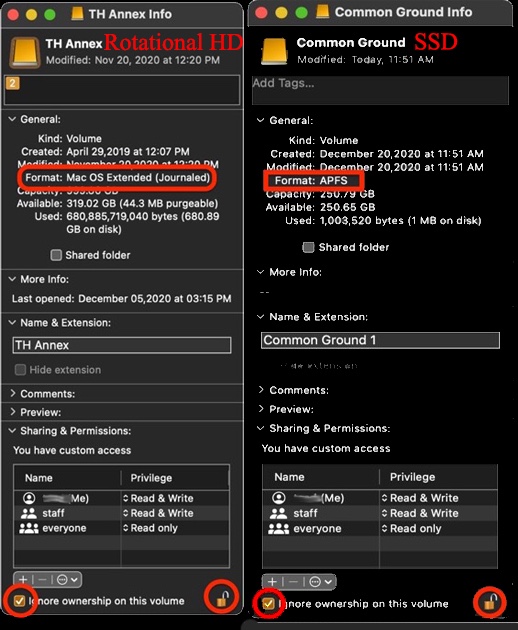


Note: you can empty the Downloads folder after the apps and/or updates that were downloaded have been installed or applied.  Many users have found a couple of Gigabytes of files in their Downloads folder which are no longer needed. 


The prime candidates for moving to an EHD are Photo libraries and Music libraries. If you have folders in your Documents folder that have large amounts of files you cn copy them to the EHD, make an alias for the folder and move the alias into the Documents folder. Make sure the copy went OK and the files can be opened before deleting the original folder from your internal boot drive.


For optimal system and application performance it's recommended to maintain a minimum of 100GB of free space on the boot drive.


Additionally, there is no reason to ever install or run any 3rd party "cleaning", "optimizing", "speed-up", anti-virus, VPN or security apps on your Mac.  This user tip describes what you need to know and do in order to protect your Mac: Effective defenses against malware and other threats - Apple Community.  


There are no known viruses, i.e. self propagating, for Macs.  There are, however, adware and malware which require the user to install although unwittingly most of the time thru sneaky links, etc.   


Anti Virus developers try to group all types as viruses into their ad campaigns of fear.  They do a poor job of the detecting and isolating the adware and malware.  Since there are no viruses these apps use up a lot of system resources searching for what is non-existent and adversely affect system and app performance.


Gemini 2 falls into these categories. Uninstall it according to the developer's instructions.


There is one app, Malwarebytes, which was developed by a long time contributor to these forums and a highly respected member of the computer security community, that is designed solely to seek out adware and known malware and remove it.  The free version is more than adequate for most users.  


Also, unless you're using a true VPN tunnel, such as between you and your employer, school or bank's servers, they are useless from a privacy standpoint.  Read these two articles: Public VPN's are anything but private and Former Malware Distributor Kape Technologies Now Owns ExpressVPN, CyberGhost, Private Internet Access, Zenmate, and a Collection of VPN “Review” Websites


Some users use VPNs so they can watch movies in other countries. That's OK but should not be used for general internet access.



Similar questions

13 replies
Question marked as Top-ranking reply

Aug 23, 2022 10:41 AM in response to tb46uk

First, you're in very dangerous waters with only 2 GB of free space left. If you fill that in much more you could get into a situation where you would not be able to boot up. You can't move your Home folder to an external drive. It's not how macOS is setup to work.


The files that you have control over are located in the Documents, Downloads, Pictures, Music and Movies folders.  You can use either of these two free apps, GrandPerspective  or OmniDiscSweeper, to find the largest files on your drive so you can determine if they can be deleted or moved to an external HD for storage.  However, the drive must be formatted according to this screenshot depending on the type of drive it is:


Note: you can empty the Downloads folder after the apps and/or updates that were downloaded have been installed or applied.  Many users have found a couple of Gigabytes of files in their Downloads folder which are no longer needed. 


The prime candidates for moving to an EHD are Photo libraries and Music libraries. If you have folders in your Documents folder that have large amounts of files you cn copy them to the EHD, make an alias for the folder and move the alias into the Documents folder. Make sure the copy went OK and the files can be opened before deleting the original folder from your internal boot drive.


For optimal system and application performance it's recommended to maintain a minimum of 100GB of free space on the boot drive.


Additionally, there is no reason to ever install or run any 3rd party "cleaning", "optimizing", "speed-up", anti-virus, VPN or security apps on your Mac.  This user tip describes what you need to know and do in order to protect your Mac: Effective defenses against malware and other threats - Apple Community.  


There are no known viruses, i.e. self propagating, for Macs.  There are, however, adware and malware which require the user to install although unwittingly most of the time thru sneaky links, etc.   


Anti Virus developers try to group all types as viruses into their ad campaigns of fear.  They do a poor job of the detecting and isolating the adware and malware.  Since there are no viruses these apps use up a lot of system resources searching for what is non-existent and adversely affect system and app performance.


Gemini 2 falls into these categories. Uninstall it according to the developer's instructions.


There is one app, Malwarebytes, which was developed by a long time contributor to these forums and a highly respected member of the computer security community, that is designed solely to seek out adware and known malware and remove it.  The free version is more than adequate for most users.  


Also, unless you're using a true VPN tunnel, such as between you and your employer, school or bank's servers, they are useless from a privacy standpoint.  Read these two articles: Public VPN's are anything but private and Former Malware Distributor Kape Technologies Now Owns ExpressVPN, CyberGhost, Private Internet Access, Zenmate, and a Collection of VPN “Review” Websites


Some users use VPNs so they can watch movies in other countries. That's OK but should not be used for general internet access.


Aug 24, 2022 2:56 AM in response to tb46uk

...and I have the answer to my question. Well almost.

The way to cut and paste your Home folder to an external SSD if one is having issues like I was is to log out of that profile, log in under a different one (a test one for example), and do the cut and paste form there. It runs smoothly.


Perversely it still would not load my profile from tath new folder, so I am stuck with a near full HD and unable to update the OS, but now that I know how to overcome cut and paste issues, it might be easier.


Thanks to all. who participated.

Aug 24, 2022 3:20 AM in response to tb46uk

The user may have solved the specific issue but is still facing the Other Issue - Lack of Empty Space on the Internal Drive.


Running with a 128 GB Internal Drive will be a really challenging in Catalina macOS 10.15 and for sure in Big Sur macOS 11 and now Monterey macOS 12


Do not remember if the Mac Mini 2018 internal Drive is solders to the LogicBoard but if it is - that closes the doors on an upgraded Internal Drive .


Possible investment in a Good Enclosure and a Good SSD Drive for the enclosure with a Large Drive Capacity may fit the bill.


Then Install Monterey directly to the External Drive and run Monterey from that drive.


A good starting point might be www.owc.com and they may have specific equipments to match up with this machine.

Aug 23, 2022 9:47 AM in response to tb46uk

I will offer several things to consider. I hope they are helpful.

  1. Installing an operating system onto an external disk will not in itself solve your space problem unless that disk is a much larger one.
  2. If it is , then it is good to do so. Then the external disk would be used as the startup disk.
  3. To install the OS, don't try to copy it as you have been doing. The proper thing to do is to download the OS installation file. Downloads are available from the Apple App Store and on the Apple web site. The file will download to your HD and then you select the external disk to install it onto.
  4. I suspect that you may not have space on your HD to accept the download file. I so, you will need to clear sufficient space by either deleting files or by copying files onto an external disk and then deleting them from your HD. (You can then also install the OS onto that disk.)
  5. When doing the OS download use a wired Ethernet connection, not Wi-Fi or a network. They are too slow for these very large files and the download almost always fails.
  6. You should know that if a HD gets too full it can freeze up and stop functioning.
  7. The download can take up to an hour, more or less and then the installation can take another 45 minutes, more or less with several automatic restarts.
  8. Be sure that the external disk you are going to use is an SSD or performance will suffer.

I hope this helps you to address your problem.

Aug 23, 2022 3:01 PM in response to tb46uk

Did you remove the Gemini 2 app according to the developer's instructions of just deleted the app from the Applications folder. If it's the later there will remain support file throughout the system. You can check to see if you've removed all of the supporting files by downloading and running the shareware app Find Any File to search for any files with the application's or the developer's name in the file name.  For the Gemini 1 software you'd do the following search(es): 


1 - Name contains gemini


Any files that are found can be dragged from the search results window to the Desktop or Trash bin in the Dock for deletion.


FAF can search areas that Spotlight can't like invisible folders, system folders and packages.  


Aug 24, 2022 9:17 AM in response to tb46uk

Boot into Safe Mode according to How to use safe mode on your Mac and run FAF again from there and try to delete. .


NOTE: Safe Mode boot can take up to 3 - 5 minutes as it's doing the following; 

• Verifies your startup disk and attempts to repair directory issues, if needed

• Loads only required kernel extensions (prevents 3rd party kernel/extensions from loading)

• Prevents Startup Items and Login Items from opening automatically

• Disables user-installed fonts 

• Deletes font caches, kernel cache, and other system cache files


Aug 23, 2022 10:17 AM in response to Ronasara

Hi Ronasara,


Thank you for the reply and advice. I am sorry for not explaining that the update has apparently been downloaded, it is during the install phase that I get the error message about the space.

The MacMini is ethernet connected to the router.

In essence, my problem is what you describe I should do in point 4. I am unable to copy-paste the Home folder from the Macintosh HD to the external SSD drive. The process takes ages and likely freezes before terminating unsuccessfully anyway.


Things I have tried so far unsuccessfully:

  1. Restarting
  2. Restarting in Safe Mode
  3. Copy-paste whilst in Safe Mode
  4. deleting pboard in Activity Monitor and restarting
  5. rendering the external SSD as 'private' for spotlight indexing purposes


Any suggestions on the cause or possible solution to this?


Thanks

Aug 23, 2022 2:23 PM in response to Old Toad

Hi, thank you, much appreciated. A lot to unpack there.

So, I migrated the TV library which is all there was in my Movies folder and the Photos library. I also deleted the Gemini2 app. So I managed to claw back 11GB of space.

I then decided to attempt another cut and paste of the slimmed-down Home folder, but the process eventually failed, and gave the attached random reason...


This is annoying. Will try to get my head round the Terminal way of moving the folder if possible.


I will report back, but at this stage I am not very hopeful. I mean to leave 100GB as a free buffer. Apple sold this Mac Mini with a 125GB HD. I got an external 2TB SSD drive and so far it has not been possible to release the pressure on the HD.


What am I missing here. Why would a folder not cut and paste? And why would the OS give such rubbish reason for said failure?


There has to be a logical explanation.

Aug 23, 2022 2:27 PM in response to Ronasara

I have migrated the larger libraries as per my previous message. Got up to 11Gb free space now on the HD. The majority of the space is occupied by my Applications and then MacOS and system files. There is actually not a lot of data under my user profile.


I wonder whether I can move the applications folder to the external SSD then...

Aug 23, 2022 4:23 PM in response to tb46uk

You said "Why would a folder not cut and paste? And why would the OS give such rubbish reason for said failure?" If there is a way to copy and paste the OS as you wish to do, I suspect that none of us here would know how to do that as the so-called normal way is to simply download and install an OS. That ensures that it is done correctly. I suggest that instead you take your desire to do this directly to Apple support for any direction.

Aug 23, 2022 4:42 PM in response to Old Toad

After scanning with F2F I remain with 222 files that it cannot delete. Yes, I previously deleted the app with the additional steps including searching for files generally, in the library, etc after deleting the main app based on the open files list in the activity monitor entry of the app. I deleted additional records after deleting the main app. Clearly, there were more files that were not being deleted. And so files remain undeleted. I did give F2F permissions under Security and Privacy btw.


Be that as it may, it won't make a difference to the problem I am facing which is how to copy and paste the Home folder out or whether I can migrate the Applications folder to the T3 connected SSD.

This thread has been closed by the system or the community team. You may vote for any posts you find helpful, or search the Community for additional answers.

Copy-Paste fails. Need to increase available space on HD but cannot. Caught in a bit or a loop

Welcome to Apple Support Community
A forum where Apple customers help each other with their products. Get started with your Apple Account.
