How do I add Visa?
How do I add Visa?
How do I add Visa?
Hey there 1949-Apple,
Thanks for reaching out to the Apple Support Communities. For help with adding a payment method to your Apple ID on your iOS device, check out the steps listed below from the following resource that can help: Change, add, or remove Apple ID payment methods - Apple Support
How to change your payment method on your iPhone, iPad, or iPod touch
1. Open the Settings app.
2. Tap your name.
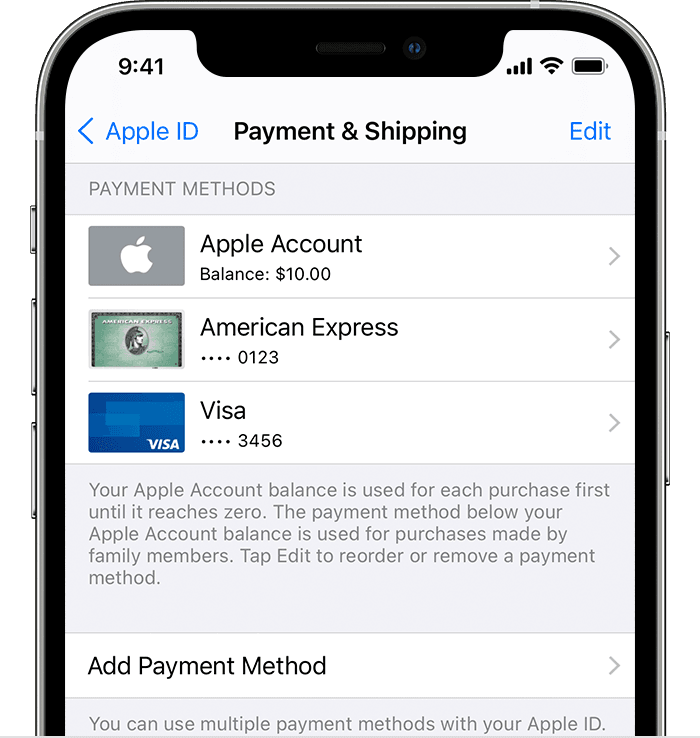
3. Tap Payment & Shipping. You might be asked to sign in with your Apple ID.
4. From here, you can do these things:
- Add a payment method — Tap Add Payment Method.
- Update a payment method — Tap the payment method, then edit your information. You might need to enter the security code that's printed on your credit or debit card. If you use the card with Apple Pay, go to the Wallet app to edit the card information.
- Remove a payment method — Tap Edit, tap the red Delete button, then tap Remove. If you have an unpaid balance, have subscriptions including an iCloud storage plan, or you use purchase sharing, you can't remove all payment methods. Learn how to remove all payment methods.
- Change the order of your payment methods — Tap Edit, then drag the move order icon.*
If this is a card you're trying to add to Apple Pay, check out this next link here instead under the "Add a new card on your iPhone" section: Set up Apple Pay - Apple Support
We hope that's able to help.
Cheers!
Hey there 1949-Apple,
Thanks for reaching out to the Apple Support Communities. For help with adding a payment method to your Apple ID on your iOS device, check out the steps listed below from the following resource that can help: Change, add, or remove Apple ID payment methods - Apple Support
How to change your payment method on your iPhone, iPad, or iPod touch
1. Open the Settings app.
2. Tap your name.
3. Tap Payment & Shipping. You might be asked to sign in with your Apple ID.
4. From here, you can do these things:
- Add a payment method — Tap Add Payment Method.
- Update a payment method — Tap the payment method, then edit your information. You might need to enter the security code that's printed on your credit or debit card. If you use the card with Apple Pay, go to the Wallet app to edit the card information.
- Remove a payment method — Tap Edit, tap the red Delete button, then tap Remove. If you have an unpaid balance, have subscriptions including an iCloud storage plan, or you use purchase sharing, you can't remove all payment methods. Learn how to remove all payment methods.
- Change the order of your payment methods — Tap Edit, then drag the move order icon
If this is a card you're trying to add to Apple Pay, check out this next link here instead under the "Add a new card on your iPhone" section: Set up Apple Pay - Apple Support
We hope that's able to help.
Cheers!
How do I add Visa?