pay icloud
how can i pay icloud with normal ebanking per computer?
how can i pay icloud with normal ebanking per computer?
Hello amande-71,
The following resource covers the payment methods that you can use with your Apple ID and iCloud+: Payment methods that you can use with your Apple ID - Apple Support
If you don't have access to an Apple device, you can update your payment method in iTunes using the steps below:
1. Open iTunes.
2. In the menu bar at the top of the iTunes window, tap or click Account, then tap or click View My Account.
3. Sign in with your Apple ID.
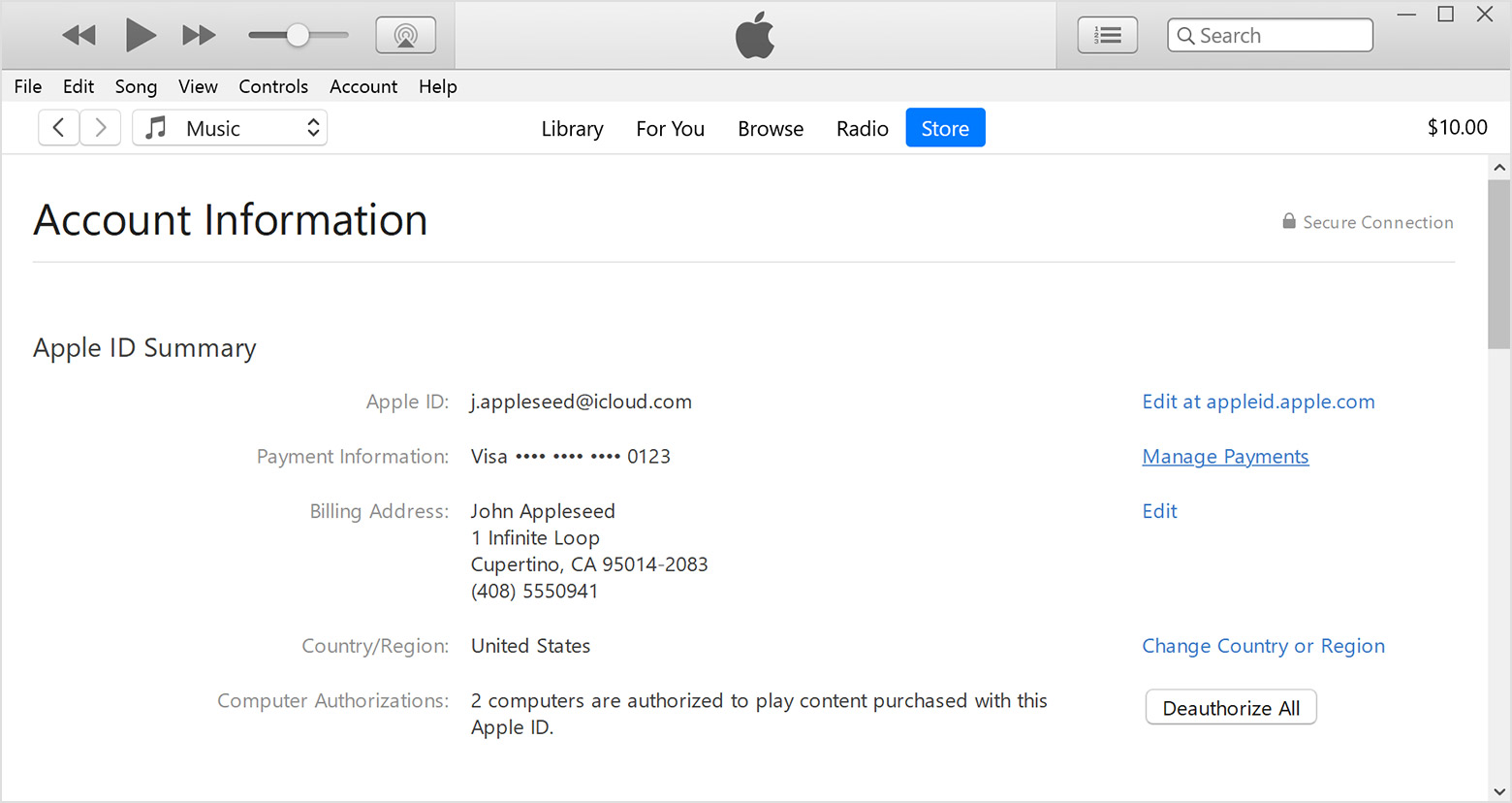
4. Make sure that what's listed on the Account Information page matches the information on file with your financial institution.
5. Tap or click Manage Payments to the right of Payment Information. (If you're using an older version of iTunes, tap or click Edit to the right of Payment Type.)
6. To update a payment method, tap or click Edit. To add a payment method, tap or click Add.
7. Update, remove, or add payment methods. If you have multiple payment methods, you can change the order. Apple will attempt to charge payment methods in order from top to bottom. You can't change the order in which Apple ID balance is charged.
You can also find those steps in this resource: Change your Apple ID payment method if you don't have an Apple device - Apple Support
Should you need any further assistance with paying for iCloud+ you'll want to reach out to Apple Support: Contact - Official Apple Support They'd be in the best position to look into your particular situation further.
Take care.
Hello amande-71,
The following resource covers the payment methods that you can use with your Apple ID and iCloud+: Payment methods that you can use with your Apple ID - Apple Support
If you don't have access to an Apple device, you can update your payment method in iTunes using the steps below:
1. Open iTunes.
2. In the menu bar at the top of the iTunes window, tap or click Account, then tap or click View My Account.
3. Sign in with your Apple ID.
4. Make sure that what's listed on the Account Information page matches the information on file with your financial institution.
5. Tap or click Manage Payments to the right of Payment Information. (If you're using an older version of iTunes, tap or click Edit to the right of Payment Type.)
6. To update a payment method, tap or click Edit. To add a payment method, tap or click Add.
7. Update, remove, or add payment methods. If you have multiple payment methods, you can change the order. Apple will attempt to charge payment methods in order from top to bottom. You can't change the order in which Apple ID balance is charged.
You can also find those steps in this resource: Change your Apple ID payment method if you don't have an Apple device - Apple Support
Should you need any further assistance with paying for iCloud+ you'll want to reach out to Apple Support: Contact - Official Apple Support They'd be in the best position to look into your particular situation further.
Take care.
pay icloud