iCloud is not sending verification code to trusted line on OS X Yosemite

I want to upgrade my iMac with OS X Yosemite 10.10.5 to Catalina but I need to back up my files with iCloud. Everytime i try to sign in with iCloud it never sends a 6-digit verification message to my trusted lines same thing with facetime(both are available in my country)

I have tried two-step verification code but its confusing and unclear. I do not have an iPhone or any order apple device apart from my iMac. Tutorials on how to fix this and forums that actually solve this problem are scarce, so I really need help pleaasee!!!!


Details about the iMac if needed:

iMac Line (2012 and Later)

Posted on Sep 3, 2022 10:01 AM

Reply
Question marked as Top-ranking reply

Posted on Sep 4, 2022 1:24 PM

Greetings jimi213,


It sounds like two-factor authentication was enabled for your Apple ID. Due to this, a verification code is required anytime you're required to sign in with your Apple ID credentials.


Check out this link to learn more about receiving verification codes: Get a verification code and sign in with two-factor authentication - Apple Support. Since you do not have access to a trusted device, you may want to follow these steps:

Get a text or phone call

If you don’t have a trusted device handy, you can have a verification code sent to your trusted phone number as a text message or phone call.

1. Click Didn't get a verification code on the sign in screen.
2. Choose to have the code sent to your trusted phone number.
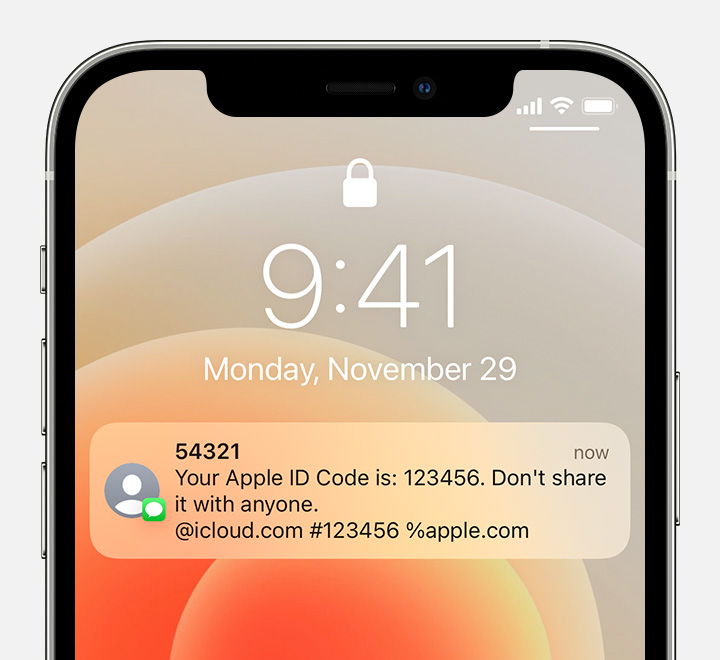
3. You'll get a text message or phone call from Apple with your verification code. This text message might include an additional domain validation line. This line includes the @ symbol, the website name, and your code (for example: @icloud.com #123456 %apple.com).
Receive a text message with your verification code and a domain validation line
4. Enter the code on your other device to complete sign in.


If it does not work, as it shows there, you'll need to start the account recovery process.

If you still can't sign in

If you can’t sign in, reset your password, or receive verification codes, you can request account recovery to regain access to your account. Account recovery might take a few days or longer, depending on the specific account information you can provide to verify your identity.


Kind regards!

Similar questions

1 reply
Question marked as Top-ranking reply

Sep 4, 2022 1:24 PM in response to jimi213

Greetings jimi213,


It sounds like two-factor authentication was enabled for your Apple ID. Due to this, a verification code is required anytime you're required to sign in with your Apple ID credentials.


Check out this link to learn more about receiving verification codes: Get a verification code and sign in with two-factor authentication - Apple Support. Since you do not have access to a trusted device, you may want to follow these steps:

Get a text or phone call

If you don’t have a trusted device handy, you can have a verification code sent to your trusted phone number as a text message or phone call.

1. Click Didn't get a verification code on the sign in screen.
2. Choose to have the code sent to your trusted phone number.
3. You'll get a text message or phone call from Apple with your verification code. This text message might include an additional domain validation line. This line includes the @ symbol, the website name, and your code (for example: @icloud.com #123456 %apple.com).
Receive a text message with your verification code and a domain validation line
4. Enter the code on your other device to complete sign in.


If it does not work, as it shows there, you'll need to start the account recovery process.

If you still can't sign in

If you can’t sign in, reset your password, or receive verification codes, you can request account recovery to regain access to your account. Account recovery might take a few days or longer, depending on the specific account information you can provide to verify your identity.


Kind regards!

This thread has been closed by the system or the community team. You may vote for any posts you find helpful, or search the Community for additional answers.

iCloud is not sending verification code to trusted line on OS X Yosemite

Welcome to Apple Support Community
A forum where Apple customers help each other with their products. Get started with your Apple Account.