License

How do I fix the media license problem in my p.c. ?

Windows, Windows 10

Posted on Sep 6, 2022 3:55 PM

Reply
1 reply

Sep 8, 2022 11:55 AM in response to NYBikers

Hi NYBikers,


Thanks for reaching out to Apple Support Communities.


You might need to authorize your PC. See the step here:
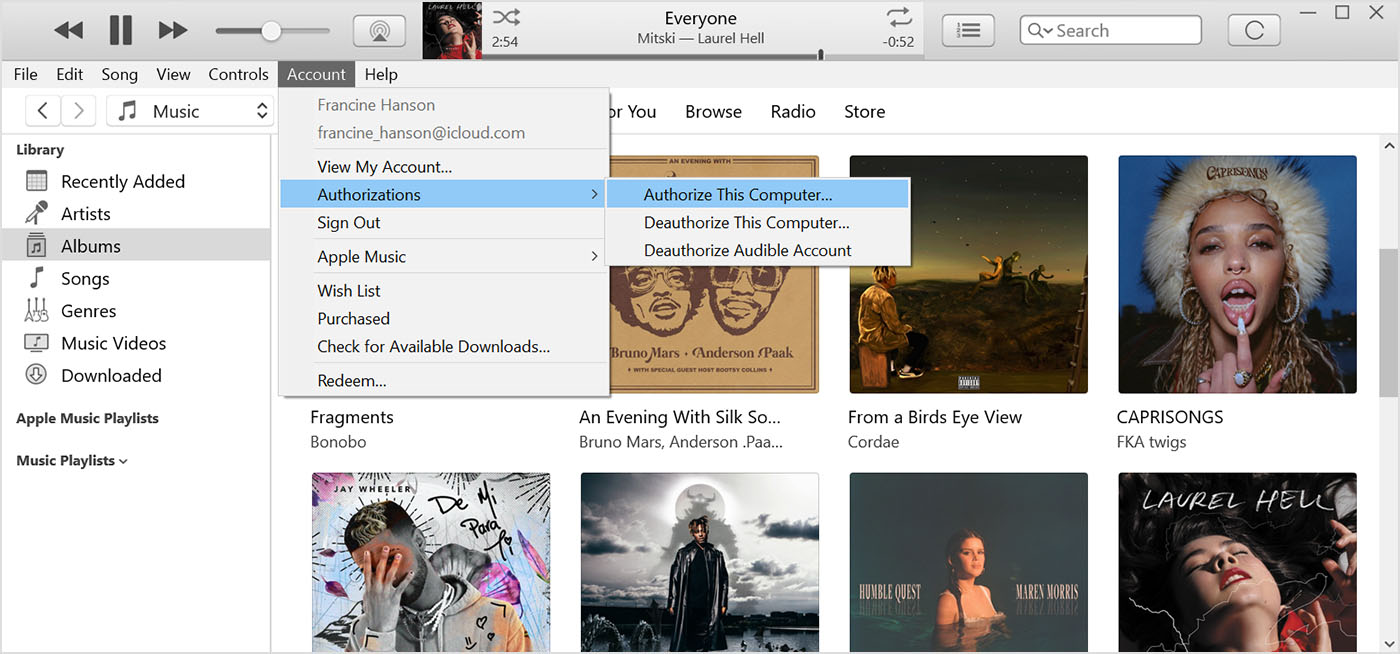

  1. "Open iTunes. At the top of the iTunes window, choose Account and make sure that you're signed in with your Apple ID.
  2. Choose Account > Authorizations, then choose Authorize This Computer or Deauthorize This Computer.
  3. iTunes showing the Account menu, Authorizations, and Authorize This Computer.
  4. Sign in with your Apple ID and password. Forgot your Apple ID?
  5. Click Authorize or Deauthorize.

Learn what to do if iTunes keeps asking you to authorize your PC when you try to play purchased content."


Cheers.

This thread has been closed by the system or the community team. You may vote for any posts you find helpful, or search the Community for additional answers.

License

Welcome to Apple Support Community
A forum where Apple customers help each other with their products. Get started with your Apple Account.