how to save an email to dropbox?(!)

i am trying to get digitally organized.

so i want to save an email to dropbox.

i can't see how mail is very effective five at organizing information i need to access. so in some cases i would like to save an email to dropbox.

can i do this yet?

if not what is the best workaround?

also can i print to PDF from mail?(!)

if not what is the best workaround for that?(!)

THANKS

iPhone SE

Posted on Sep 7, 2022 2:07 PM

Reply
1 reply

Sep 10, 2022 2:16 PM in response to hotwheels22

Hello hotwheels22,


You can use the steps below to take a screenshot of important emails, if needed:


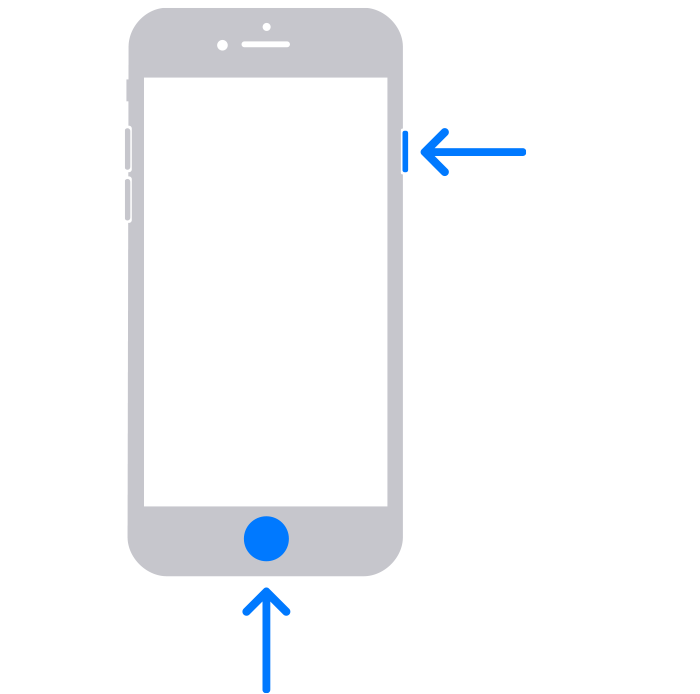
1. Press the side button and the Home button at the same time.
Image shows arrows pointing to side and Home buttons

2. Quickly release both buttons.
3. After you take a screenshot, a thumbnail temporarily appears in the lower-left corner of your screen. Tap the thumbnail to open it or swipe left to dismiss it.


You can also find those steps in this resource: Take a screenshot on your iPhone - Apple Support


For further assistance with Dropbox you'll want to reach out to the developer: Contact Dropbox Support They'd be in the best position to assist with their particular app and service.


Take care.

This thread has been closed by the system or the community team. You may vote for any posts you find helpful, or search the Community for additional answers.

how to save an email to dropbox?(!)

Welcome to Apple Support Community
A forum where Apple customers help each other with their products. Get started with your Apple Account.