Hello. I have tried every steps that are recommended regard of an app that is not responding. But it is not fixed, how can I solve this problem?

I have tried every steps that are recommended regard of an app that is not responding. But it is not fixed, how can I solve this problem?

MacBook Air 13″, macOS 10.15

Posted on Sep 15, 2022 7:52 PM

Reply
Question marked as Top-ranking reply

Posted on Sep 19, 2022 3:58 PM

Hi hanbi129,


Thanks for posting in Apple Support Communities! If you've tried all the steps in the linked article (If an app on your iPhone or iPad stops responding, closes unexpectedly, or won’t open) and the issue continues, we suggest reporting the behavior you're experiencing. For third party apps downloaded from the Mac App Store, follow these steps to contact the developer:


  1. "Open the App Store on your Mac.
  2. Click the sign-in button  or your photo. 
  3. A list of apps appear. Click the app that you want. If you can't find the app, use the search bar.
  4. The app's product page appears. Scroll to the Ratings & Reviews section, then click App Support. If you don't see App Support, make sure that you're signed in with the correct Apple ID.
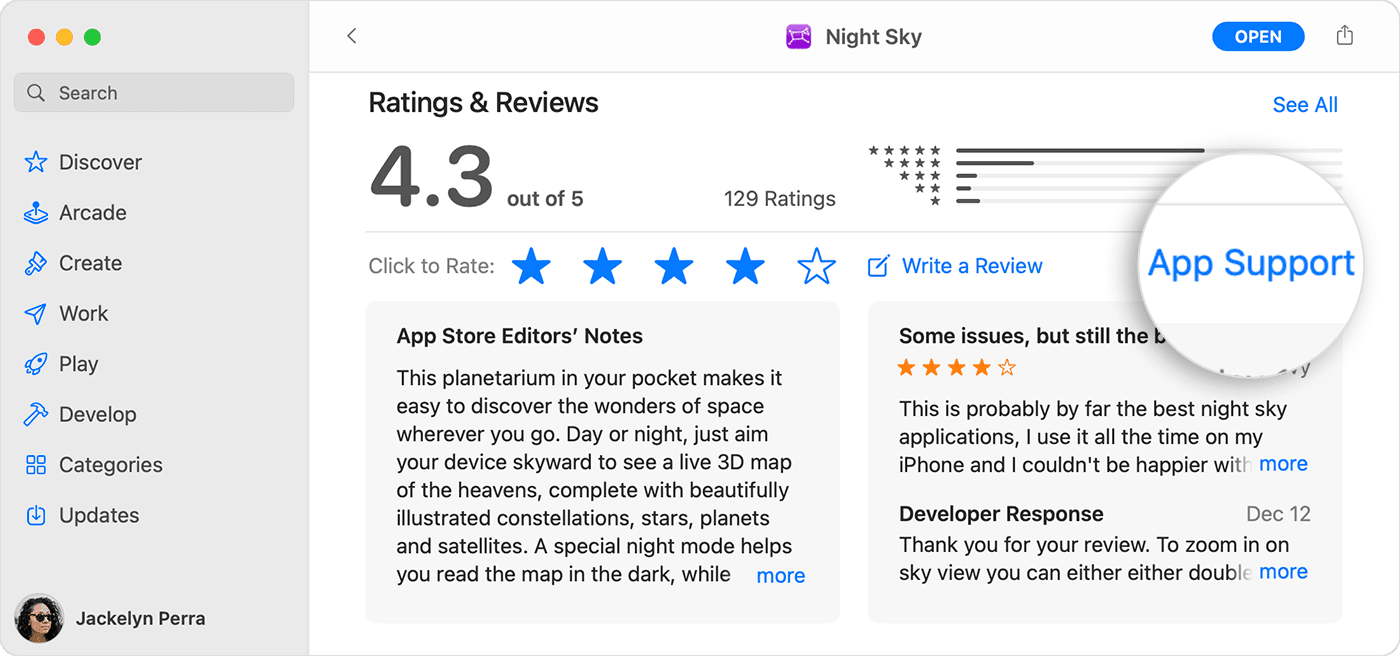
In the App Store on Mac, the App Support button is below the ratings and reviews section of the app's page."

These steps can be found in the article How to contact an app developer and will help you get your issue reported. If you didn't get the app from the App Store, follow this guidance instead: Contact a third-party vendor.


For issues with Apple apps, tell us more about what's happening with the app when you try to use it, and which app is affected so we can assist.


Cheers!

1 reply
Question marked as Top-ranking reply

Sep 19, 2022 3:58 PM in response to hanbi129

Hi hanbi129,


Thanks for posting in Apple Support Communities! If you've tried all the steps in the linked article (If an app on your iPhone or iPad stops responding, closes unexpectedly, or won’t open) and the issue continues, we suggest reporting the behavior you're experiencing. For third party apps downloaded from the Mac App Store, follow these steps to contact the developer:


  1. "Open the App Store on your Mac.
  2. Click the sign-in button  or your photo. 
  3. A list of apps appear. Click the app that you want. If you can't find the app, use the search bar.
  4. The app's product page appears. Scroll to the Ratings & Reviews section, then click App Support. If you don't see App Support, make sure that you're signed in with the correct Apple ID.

In the App Store on Mac, the App Support button is below the ratings and reviews section of the app's page."

These steps can be found in the article How to contact an app developer and will help you get your issue reported. If you didn't get the app from the App Store, follow this guidance instead: Contact a third-party vendor.


For issues with Apple apps, tell us more about what's happening with the app when you try to use it, and which app is affected so we can assist.


Cheers!

This thread has been closed by the system or the community team. You may vote for any posts you find helpful, or search the Community for additional answers.

Hello. I have tried every steps that are recommended regard of an app that is not responding. But it is not fixed, how can I solve this problem?

Welcome to Apple Support Community
A forum where Apple customers help each other with their products. Get started with your Apple Account.