iPhone charger not recognized
My charger cord was working no problem. Plugged phone up yesterday and it doesn’t recognize the charger cord now? How can I fix it? Please and thank you in advance.
My charger cord was working no problem. Plugged phone up yesterday and it doesn’t recognize the charger cord now? How can I fix it? Please and thank you in advance.
Hey there, wch25.
If you are unable to charge your iPhone, there are some steps you can take.
"Plug into power
To charge your device, follow these steps:
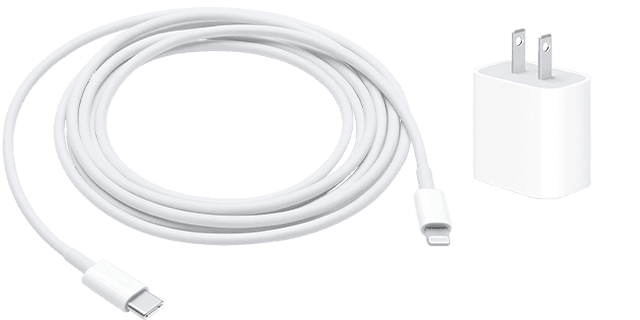
1. Connect your device to the USB cable that comes with it.
2. Plug into one of these three power sources:
Wall power outlet
Plug your USB charging cable into a USB power adapter, then plug the adapter into the wall.
Computer
Plug your charging cable into a USB 2.0 or 3.0 port on a computer that's on and not in sleep mode. Don’t use the USB ports on your keyboard.
Power accessory
Plug your cable into a powered USB hub, docking station, or other Apple-certified accessory.
If you're trying to charge wirelessly with an iPhone 8 or later, first make sure that you can charge with the USB cable that came with your device. If that works, then get help with wireless charging. For a third-party accessory, check that it's Apple certified.
When your device charges, a lightning bolt appears inside the battery icon in the status bar, or a large battery icon on your Lock Screen "
"If your device charges slowly or won’t charge
Follow these steps and try again after each:
1. Check your charging cable and USB adapter for signs of damage, like breakage or bent prongs. Don't use damaged accessories.
2. Use a wall power outlet and check for firm connections between your charging cable, USB wall adapter, and wall outlet or AC power cable, or try a different outlet.
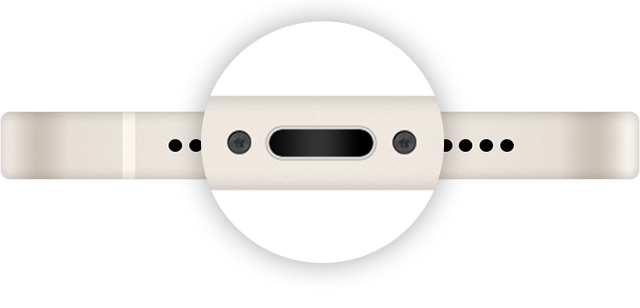
3. Remove any debris from the charging port on the bottom of your device, then firmly plug your charging cable into your device. If the charging port is damaged, your device probably needs service.
4. Let your device charge for a half hour.
5. If your device is still unresponsive, force restart your device:
iPhone 8 or later and iPhone SE (2nd generation): Press and quickly release the volume up button. Press and quickly release the volume down button. Press and hold the side button until the Apple logo appears.
iPhone 7, iPhone 7 Plus, and iPod touch (7th generation): Press and hold both the side (or top) button and the volume down button until the Apple logo appears.
iPhone 6s or earlier, iPhone SE (1st generation), and iPod touch (6th generation) or earlier: Press and hold both the side (or top) button and the Home button until the Apple logo appears.
6. Let your device charge for another half hour.
7. If your device still won't power on or charge, take your device, charging cable, and charging adapter to an Apple Store or Apple Authorized Service Provider for evaluation. You can also contact Apple Support." If your iPhone or iPod touch won't charge
We hope this helps!
Sincerely.
Hey there, wch25.
If you are unable to charge your iPhone, there are some steps you can take.
"Plug into power
To charge your device, follow these steps:
1. Connect your device to the USB cable that comes with it.
2. Plug into one of these three power sources:
Wall power outlet
Plug your USB charging cable into a USB power adapter, then plug the adapter into the wall.
Computer
Plug your charging cable into a USB 2.0 or 3.0 port on a computer that's on and not in sleep mode. Don’t use the USB ports on your keyboard.
Power accessory
Plug your cable into a powered USB hub, docking station, or other Apple-certified accessory.
If you're trying to charge wirelessly with an iPhone 8 or later, first make sure that you can charge with the USB cable that came with your device. If that works, then get help with wireless charging. For a third-party accessory, check that it's Apple certified.
When your device charges, a lightning bolt appears inside the battery icon in the status bar
"If your device charges slowly or won’t charge
Follow these steps and try again after each:
1. Check your charging cable and USB adapter for signs of damage, like breakage or bent prongs. Don't use damaged accessories.
2. Use a wall power outlet and check for firm connections between your charging cable, USB wall adapter, and wall outlet or AC power cable, or try a different outlet.
3. Remove any debris from the charging port on the bottom of your device, then firmly plug your charging cable into your device. If the charging port is damaged, your device probably needs service.
4. Let your device charge for a half hour.
5. If your device is still unresponsive, force restart your device:
iPhone 8 or later and iPhone SE (2nd generation): Press and quickly release the volume up button. Press and quickly release the volume down button. Press and hold the side button until the Apple logo appears.
iPhone 7, iPhone 7 Plus, and iPod touch (7th generation): Press and hold both the side (or top) button and the volume down button until the Apple logo appears.
iPhone 6s or earlier, iPhone SE (1st generation), and iPod touch (6th generation) or earlier: Press and hold both the side (or top) button and the Home button until the Apple logo appears.
6. Let your device charge for another half hour.
7. If your device still won't power on or charge, take your device, charging cable, and charging adapter to an Apple Store or Apple Authorized Service Provider for evaluation. You can also contact Apple Support." If your iPhone or iPod touch won't charge
We hope this helps!
Sincerely.
iPhone charger not recognized