
Why is my ipad showing function keys?
I can't access my ipad, as it is only showing function keys
iPad Pro 12.9-inch, 3rd Gen, Wi-Fi
The Apple Support Community will permanently close on November 20, 2026. Starting today, the site will no longer accept new posts and is available in a read-only state.
You can continue to find trusted guidance and support on the official Apple Support site.
We want to thank the community members who have contributed their time and expertise to help others with their Apple products.
The Apple Support Community will permanently close on November 20, 2026. Starting today, the site will no longer accept new posts and is available in a read-only state.
You can continue to find trusted guidance and support on the official Apple Support site.
We want to thank the community members who have contributed their time and expertise to help others with their Apple products.
I can't access my ipad, as it is only showing function keys
iPad Pro 12.9-inch, 3rd Gen, Wi-Fi
Force-restart your iPad:
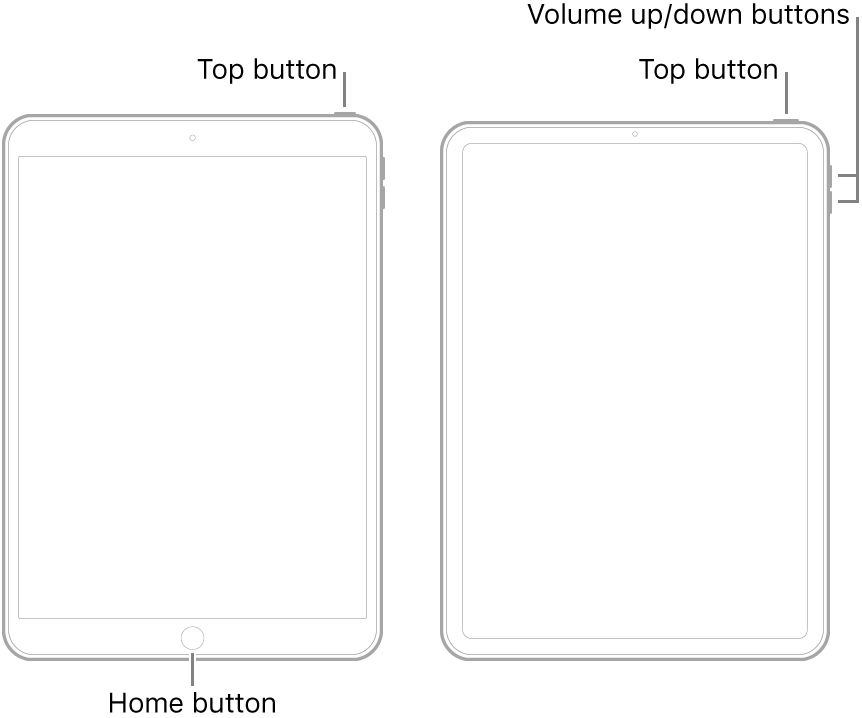
If the iPad doesn’t turn on, or if it gets stuck during start up, see the Apple Support article If your iPhone, iPad, or iPod touch won’t turn on or is frozen. Or if your iPad isn’t working correctly after you restart it, see the iPad Support website.
If you continue to experience difficulties, you will need to seek assistance directly from from Apple Support. You can contact the Support Team using the Get Support link at top-right of this page. Alternatively, if you have access to another device, you can initiate and manage your support cases using the excellent Apple Support App. If not already installed, the App can be downloaded from the App Store:
https://apps.apple.com/gb/app/apple-support/id1130498044
You might also visit the Genius Bar at your local Apple Store or Apple Authorised Service Provider (AASP) - where the technicians will be able to test and assess your iPad:
Force-restart your iPad:
If the iPad doesn’t turn on, or if it gets stuck during start up, see the Apple Support article If your iPhone, iPad, or iPod touch won’t turn on or is frozen. Or if your iPad isn’t working correctly after you restart it, see the iPad Support website.
If you continue to experience difficulties, you will need to seek assistance directly from from Apple Support. You can contact the Support Team using the Get Support link at top-right of this page. Alternatively, if you have access to another device, you can initiate and manage your support cases using the excellent Apple Support App. If not already installed, the App can be downloaded from the App Store:
https://apps.apple.com/gb/app/apple-support/id1130498044
You might also visit the Genius Bar at your local Apple Store or Apple Authorised Service Provider (AASP) - where the technicians will be able to test and assess your iPad:
Why is my ipad showing function keys?
