Add a third-party complication to watch face

I want to add a third-party complication to watch face.

It’s not on the list of complications that can be added.

How to I add it to this list?


BTW: As a work-around, I created a shortcut to open the complication. However, it brings up the ‘Run’ button every time, which I haven’t been able to bypass.


A solution to either issue would be very welcome!


Apple Watch Series 6, watchOS 9

Posted on Sep 17, 2022 1:41 PM

Reply
1 reply

Sep 20, 2022 6:17 PM in response to Lardlass

Hello Lardlass,


Welcome to Apple Support Communities. You can add certain third-party apps to Watch faces as complications.


Add complications to the watch face
You can add special features—called complications—to some watch faces, so you can instantly check things like stock prices, the weather report, or information from other apps you installed.
1-With the watch face showing, touch and hold the display, then tap Edit.
2-Swipe left all the way to the end.
If a face offers complications, they’re shown on the last screen.
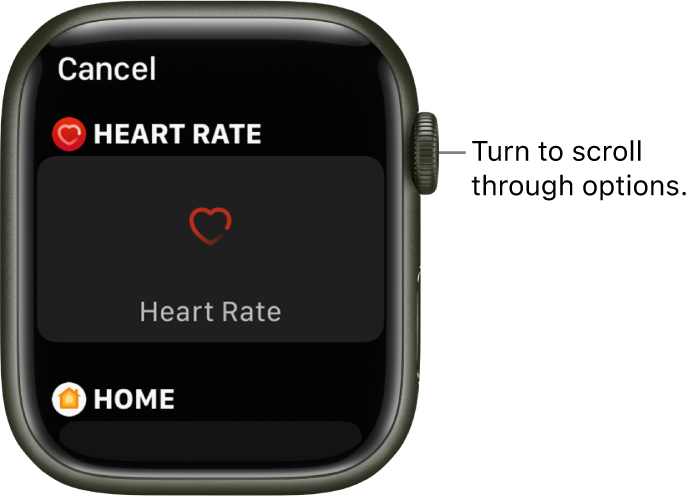
3-Tap a complication to select it, then turn the Digital Crown to choose a new one—Activity or Heart Rate, for example.
4-When you’re finished, press the Digital Crown to save your changes, then tap the face to switch to it.
The customize screen for a watch face with the Heart Rate complication highlighted. Turn the Digital Crown to browse complications.
Some apps you get from the App Store also include complications.


Customize the watch face - Apple Support


e hope this information is useful. Kind regards.


This thread has been closed by the system or the community team. You may vote for any posts you find helpful, or search the Community for additional answers.

Add a third-party complication to watch face

Welcome to Apple Support Community
A forum where Apple customers help each other with their products. Get started with your Apple Account.