How is your heart rate zone determined on the iwatch 7 OS9
I am trying to understand how the heart rate zone is determined, especially when considering the different age groups.
Apple Watch Series 7, watchOS 9
I am trying to understand how the heart rate zone is determined, especially when considering the different age groups.
Apple Watch Series 7, watchOS 9
Hello Ray Donato,
We understand you have questions about the heart rate zone on your Apple Watch. We'll do our best to assist with this.
We found the following helpful: View Heart Rate Zones on Apple Watch - Apple Support
View Heart Rate Zones on Apple Watch
In watchOS 9, you can learn about the intensity level of your workout by viewing Heart Rate Zone information on your Apple Watch. Heart Rate Zones are a percentage of your maximum heart rate and are automatically calculated and personalized using your health data. On Apple Watch, Heart Rate Zones are presented in five segments—effort levels from light to increasingly harder. By monitoring your Heart Rate Zone, you can make your workout more efficient and challenge yourself to improve your fitness.
Note: Heart Rate Zones are calculated only if you’ve entered your date of birth in the Health app on your iPhone.
View your Heart Rate Zone during a workout
1. Open the Workout appon your Apple Watch.
2. Begin a cardio-focused workout—an outdoor run, for example.
3. Turn the Digital Crown to the Heart Rate Zone workout view.
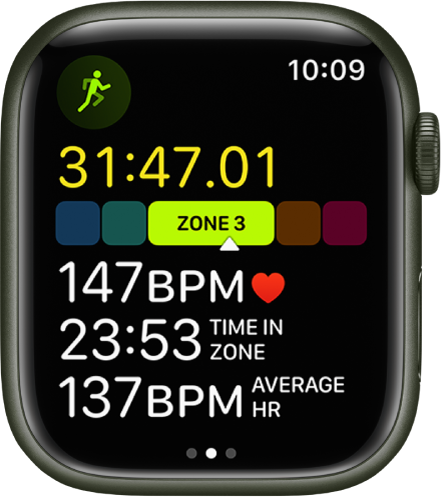
The screen shows your Heart Rate Zone, heart rate, time in the current zone, and your average heart rate.
Review Heart Rate Zone data
1. Open the Fitness app on your iPhone.
2. Tap a workout, then tap Show More next to Heart Rate.
A graph details the estimated time spent in each zone.
Edit Heart Rate Zones
By default, Heart Rate Zones are calculated for you based on your health data, but you can manually edit those zones.
1. Open the Settings appon your Apple Watch.
2. Go to Workout > Heart Rate Zones.
3. Tap Manual, tap zone 2, 3, or 4, then enter lower and upper limits.
You can also open the Apple Watch app on your iPhone, tap My Watch, go to Workout > Heart Rate Zones, tap Manual, tap zone 2, 3, or 4, then enter lower and upper limits.
If you are specifically looking for an answer to different age groups or this doesn't answer your question, then it may be best to contact Apple Support
They will be able to assist you further.
Take care.
Hello Ray Donato,
We understand you have questions about the heart rate zone on your Apple Watch. We'll do our best to assist with this.
We found the following helpful: View Heart Rate Zones on Apple Watch - Apple Support
View Heart Rate Zones on Apple Watch
In watchOS 9, you can learn about the intensity level of your workout by viewing Heart Rate Zone information on your Apple Watch. Heart Rate Zones are a percentage of your maximum heart rate and are automatically calculated and personalized using your health data. On Apple Watch, Heart Rate Zones are presented in five segments—effort levels from light to increasingly harder. By monitoring your Heart Rate Zone, you can make your workout more efficient and challenge yourself to improve your fitness.
Note: Heart Rate Zones are calculated only if you’ve entered your date of birth in the Health app on your iPhone.
View your Heart Rate Zone during a workout
1. Open the Workout app
2. Begin a cardio-focused workout—an outdoor run, for example.
3. Turn the Digital Crown to the Heart Rate Zone workout view.
The screen shows your Heart Rate Zone, heart rate, time in the current zone, and your average heart rate.
Review Heart Rate Zone data
1. Open the Fitness app on your iPhone.
2. Tap a workout, then tap Show More next to Heart Rate.
A graph details the estimated time spent in each zone.
Edit Heart Rate Zones
By default, Heart Rate Zones are calculated for you based on your health data, but you can manually edit those zones.
1. Open the Settings app
2. Go to Workout > Heart Rate Zones.
3. Tap Manual, tap zone 2, 3, or 4, then enter lower and upper limits.
You can also open the Apple Watch app on your iPhone, tap My Watch, go to Workout > Heart Rate Zones, tap Manual, tap zone 2, 3, or 4, then enter lower and upper limits.
If you are specifically looking for an answer to different age groups or this doesn't answer your question, then it may be best to contact Apple Support
They will be able to assist you further.
Take care.
How is your heart rate zone determined on the iwatch 7 OS9