
iPhone 14 pro calling starts a three-way calling
When you raise the phone to make a phone call, it doesn’t lock so either your face starts hitting apps or making three way call
iPhone 14 Pro Max
When you raise the phone to make a phone call, it doesn’t lock so either your face starts hitting apps or making three way call
iPhone 14 Pro Max
Greetings Bigearl198,
If you are having difficulty with the screen locking with the proximity sensor on your iPhone, begin by checking to see if Always-On display is enabled, using the steps found here:
Use Always-On display with your iPhone 14 Pro or iPhone 14 Pro Max - Apple Support
"Turn Always-On display off or on
Always-On display is on by default on iPhone 14 Pro and iPhone 14 Pro Max. To turn Always-On display off or on, follow these steps:
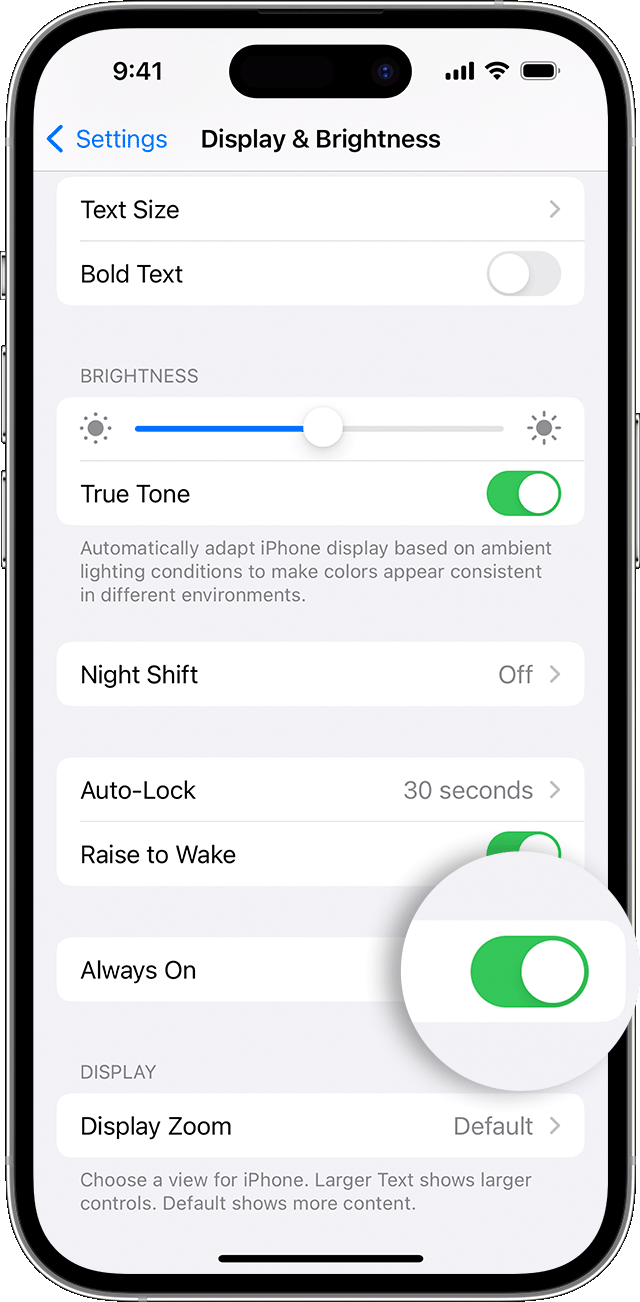 "
"Take care.
iPhone 14 pro calling starts a three-way calling
