
cant use my number for imessage
hello, i have an issue for imessage. i cant choose my number, there is only my email on the list. i have already sign out and sign in it but nothing change. please help thank you
iPhone 11, iOS 15
hello, i have an issue for imessage. i cant choose my number, there is only my email on the list. i have already sign out and sign in it but nothing change. please help thank you
iPhone 11, iOS 15
Hello zahratunnisa,
Welcome to Apple Support Communities!
We want to help get your phone number added in Messages like you want.
Use the steps here to add the number:
"Set up your phone number
On your iPhone:
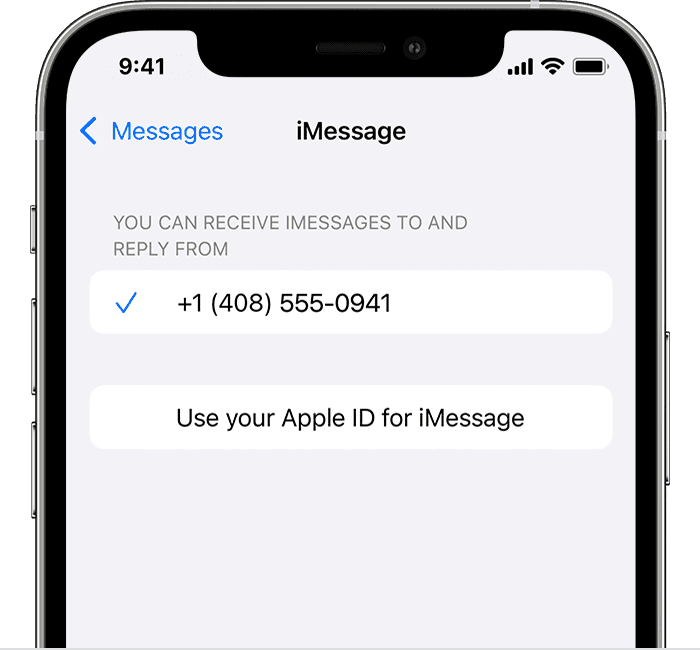
3. In the "You can receive iMessages to and Reply From" section, make sure that your phone number and Apple ID are selected.
4. Go to Settings > FaceTime and make sure that your phone number and Apple ID are selected in the "You can be reached by FaceTime at" section."
If you continue to have an issue, use the steps in the 'If you can't see or select your number in Messages or FaceTime' section.
This Apple Support page has the full details: Add or remove your phone number in Messages or FaceTime - Apple Support
This should help get the number added to iMessage so you can send messages again.
Cheers!
Hello zahratunnisa,
Welcome to Apple Support Communities!
We want to help get your phone number added in Messages like you want.
Use the steps here to add the number:
"Set up your phone number
On your iPhone:
3. In the "You can receive iMessages to and Reply From" section, make sure that your phone number and Apple ID are selected.
4. Go to Settings > FaceTime and make sure that your phone number and Apple ID are selected in the "You can be reached by FaceTime at" section."
If you continue to have an issue, use the steps in the 'If you can't see or select your number in Messages or FaceTime' section.
This Apple Support page has the full details: Add or remove your phone number in Messages or FaceTime - Apple Support
This should help get the number added to iMessage so you can send messages again.
Cheers!
cant use my number for imessage

