iPhone 11 Pro Max Home Screen does not rotate and does not rotate upside down google map, chrome !

  • 11promax : AssistiveTouch > Device > Rotate Screen > Upside Down but not available even though rotation lock button is disabled. What is the "Upside Down" option used for?
  • 6splus: Homescreen can rotate Left, Right. As for Google map, Chrome can rotate upsidedown.

iPhone 11 Pro Max, iOS 15

Posted on Sep 20, 2022 6:51 PM

Reply
5 replies

Sep 25, 2022 9:09 AM in response to Mr3K

Thanks for getting back to us, Mr3K. I’s appreciated.


If you turn off Assistive Touch, does the screen rotate as expected? If it does, leave Assistive Touch off and Restart your iPhone - Apple Support. One it’s back to the Home screen, turn Assistive Touch back on and see if your iPhone screen will rotate now.


If the screen didn’t rotate after turning Assistive Touch off, or still isn’t working as expected after restarting your iPhone, please contact Apple Support to look into this issue further with you: Get Support


All the best.

Sep 24, 2022 12:19 PM in response to Mr3K

Hi Mr3K,


We understand you're looking to use the rotation options for your iPhone's screen. Some apps do not support the feature of rotation. Be sure to follow the steps and article below for rotating the screen on apps that do support.


1."Swipe down from the top-right corner of your screen to open Control Center.

2.Tap the Portrait Orientation Lock button to make sure that it's off.

3.Turn your iPhone sideways.

If the screen still doesn't rotate, try a different app — like Safari or Messages — which are known to work in landscape mode."


Rotate the screen on your iPhone or iPod touch


Have a good day.

Sep 25, 2022 12:10 PM in response to Mr3K

Hello Mr3K,


If you are having an issue with the screen rotation of a single app, we would recommend that you reach out to the developers of that app as the other users here would not be able to help further.


Here are the steps from How to contact an app developer - Apple Support on how to reach a developer.


1. Open the App Store on your iPhone, iPad, or iPod touch.
2. Search for the app, then tap it. If you can't find it, tap the account button  or your photo at the top of the screen, tap Purchased, tap "Not on this [device]," then tap the app.
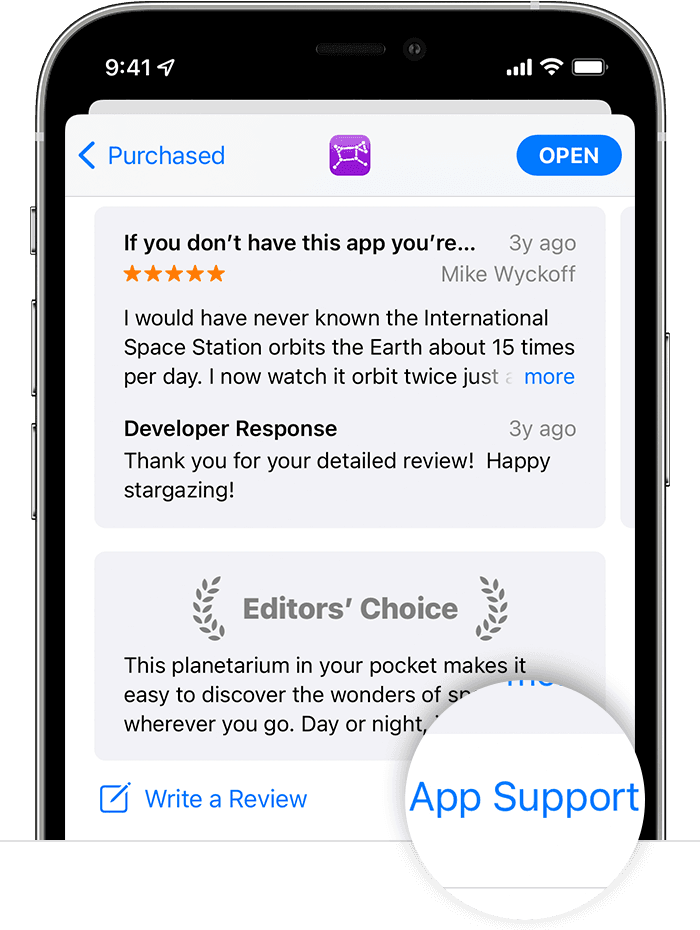
3. The app's product page appears. Scroll to the Ratings & Reviews section, then tap App Support. If you don't see App Support, make sure that you're signed in with the correct Apple ID.
In the App Store on iPhone, the App Support button is at the bottom of the app's page.


Have a good day.


This thread has been closed by the system or the community team. You may vote for any posts you find helpful, or search the Community for additional answers.

iPhone 11 Pro Max Home Screen does not rotate and does not rotate upside down google map, chrome !

Welcome to Apple Support Community
A forum where Apple customers help each other with their products. Get started with your Apple Account.
